

Introduction
React Router Dom is a 3rd Party plugin for creating single-page apps in React.
<Route>
This is the most important component in React Router. Its most basic responsibility is to render UI when its path matches the current URL.
Property sensitive refers to the URL parameter as being case-sensitive
<Link>
Provides navigation around your application.
<NavLink>
A special version of the <Link> that adds styling attributes to the rendered element when it matches the current URL.
<BrowserRouter>
It replaces the URL with the path after the domain name of our URL.
<HashRouter>
Adds # string in the URL and appends the path with the URL.
<Redirect>
Changes the URL value to another value, mainly used for Authentication
<switch>
If any of the redirect URLs mismatch the relevant component, a switch is used to maintain the error page(404)
After 16.8 we can use React Hooks. The available hooks for React Router Dom are as follows.
- use History
- use Location
- useParams
- useRouteMatch
Open a command prompt. Create a directory for the SPFx solution.
md spfx-SinglePageApp
Navigate to the above-created directory.
cd spfx-SinglePageApp
Run the Yeoman SharePoint Generator to create the solution.
yo @microsoft/sharepoint
Solution Name
- Hit Enter to have the default name (spfx-SinglePageApp in this case) or type in any other name for your solution.
- Selected Choice - Hit Enter
The target for the component
- Here, we can select the target environment where we are planning to deploy the client web part, i.e., SharePoint Online or SharePoint OnPremise (SharePoint 2016 onwards).
- Selected choice - SharePoint Online only (latest)
Place of files
- We may choose to use the same folder or create a subfolder for our solution.
- Selected Choice - Same folder
Deployment option
- Selecting Y will allow the app to be deployed instantly to all sites and be accessible everywhere.
- Selected Choice - N (install on each site explicitly)
Permissions to access web APIs
- Choose if the components in the solution require permission to access web APIs that are unique and not shared with other components in the tenant.
- Selected Choice - N (solution contains unique permissions)
Type of client-side component to create
- We can choose to create a client-side web part or an extension. Choose the web part option.
- Selected choice - WebPart
Web part name
- Hit Enter to select the default name or type in any other name.
- Selected choice - SpfxSinglePageApp
Web part description
- Hit Enter to select the default description or type in any other value.
Framework to use
- Select any JavaScript framework to develop the component. Available choices are - No JavaScript Framework, React, and Knockout.
- Selected choice - React.
- The Yeoman generator will perform a scaffolding process to generate the solution. The scaffolding process will take a significant amount of time.
- Once the scaffolding process is completed, lock down the version of project dependencies by running the below command.
`npm shrinkwrap`
In the command prompt, type the below command to open the solution in the code editor of your choice.
code
- NPM Packages Used,
- On the command prompt, run the below command.
npm i react-router-dom
in SpfxSinglePageApp.tsx
import * as React from 'react';
import styles from './SpfxSinglePageApp.module.scss';
import { Route, Link, Switch, BrowserRouter as Router, HashRouter } from 'react-router-dom';
import { ISpfxSinglePageAppProps } from './ISpfxSinglePageAppProps';
import PageNotFound from './PageNotFound';
import MyHome from './MyHomeComponent';
import MYDetails from './Details';
import MYDetailsWithParam from './DetailsWithParameter';
import MyRouteMatch from './MyRouteMatch';
import MyNestedRoute from './NestedRoute';

export default class SpfxSinglePageApp extends React.Component<ISpfxSinglePageAppProps, {}> {
  public render(): React.ReactElement<ISpfxSinglePageAppProps> {
    return (
      <div className={ styles.spfxSinglePageApp }>
        <div className={ styles.container }>
          <HashRouter>
            <div>
              <nav className="navbar navbar-expand-lg navbar-light bg-light">
                <ul className="navbar-nav mr-auto">
                  <li><Link to={'/'} className="nav-link"> MY Home </Link></li>
                  <li><Link to={'/MyDetails'} className="nav-link">My Details</Link></li>
                  <li><Link to={'/MyDetailsParam'} className="nav-link">My Details with Parameter</Link></li>
                  <li><Link to={'/MyRoutemtch'} className="nav-link">My Route Match</Link></li>
                  <li><Link to={'/MyRouteNewDetails'} className="nav-link">My Route New Details</Link></li>
                </ul>
              </nav>
              <hr />
              <Switch>
                <Route sensitive exact path="/" component={MyHome} />
                <Route path="/MyDetails" component={(props) => <MYDetails text="Hello, " {...props} />} />
                {/*
                  <Redirect from="/old-route" to="/new-route" />
                  <Route
                    exact
                    path="/props-through-render"
                    render={props => (
                      <PropsPage {...props} title={`Props through render`} />
                    )}
                  />
                */}
                <Route path="/MyDetailsParam/:name" component={MYDetailsWithParam} />
                <Route path="/MyRoutemtch/:name" component={MyRouteMatch} />
                <Route path="/MyRouteNewDetails" component={MyNestedRoute} />
                <Route component={PageNotFound} />
              </Switch>
            </div>
          </HashRouter>
        </div>
      </div>
    );
  }
}
in PageNotFound.tsx
import * as React from 'react';

const PageNotFound = () => <h1>Requested Page Not Found</h1>;

export default PageNotFound;

/*const SearchPage = ({ match, location }) => {
    return (
        <p>
            <strong>Query Params: </strong>
            {location.search}
        </p>
    );
};*/
in MyHomeComponent.tsx
import * as React from 'react';

const MyHome = () => <h1>This is My Home Component</h1>;

export default MyHome;
in Details.tsx
import * as React from 'react';

export default class MYDetails extends React.Component {
    constructor(props) {
        super(props);
    }

    public render(): React.ReactElement {
        // const {text, match: {params}} = this.props;
        console.log(this.props);

        return (
            <div>
                <h1>My Details Component</h1>
            </div>
        );
    }
}
in DetailsWithParameter.tsx
import * as React from 'react';
import { useParams } from "react-router-dom";

const MYDetailsWithParam = () => {
    let { name } = useParams();
    return <div>My Details With Parameter<br></br><b>{name}</b></div>;
};

export default MYDetailsWithParam;
in MyRouteMatch.tsx
import { useRouteMatch } from 'react-router-dom';
import * as React from 'react';

export default function MyRouteMatch(props) {
    let match = useRouteMatch("/MyRoutemtch/:name");

    return <div>My Details With Parameter {match.params.name}</div>;
}
NestedRoute.tsx
import * as React from 'react';
import { Route, NavLink } from 'react-router-dom';
import { useParams } from 'react-router-dom';

const MyDetails = () => {
    let { name } = useParams();
    return <div>My Details With Parameter<br /><b>{name}</b></div>;
};

export default class MyNestedRoute extends React.Component {
    public render(): React.ReactElement {
        return (
            <div>
                <p>Contact Us Component</p>
                <strong>Select contact name</strong>
                <ul>
                    <li><NavLink to="/MyRouteNewDetails/Madhan">Madhan</NavLink></li>
                    <li><NavLink to="/MyRouteNewDetails/Thurai">Thurai</NavLink></li>
                </ul>
                <Route path="/MyRouteNewDetails/:name" component={MyDetails}></Route>
            </div>
        );
    }
}
Here, I am using Default Route, Route for Error Component, Route With Parameters, and Nested Routes.
Passing Route props to Class Components via Component prop or using Render prop, for hook we need not to pass.
<Route exact path="/props-through-render" render={props => <PropsPage {...props} title={`Props through render`} />} />

{/* Alternatively */}

<Route path="/props-through-render" component={(props) => <PropsPage text="Hello, " {...props} />} />
Where exact refers to strictly matching the path.
Path -->The URL path where you want to render your component.
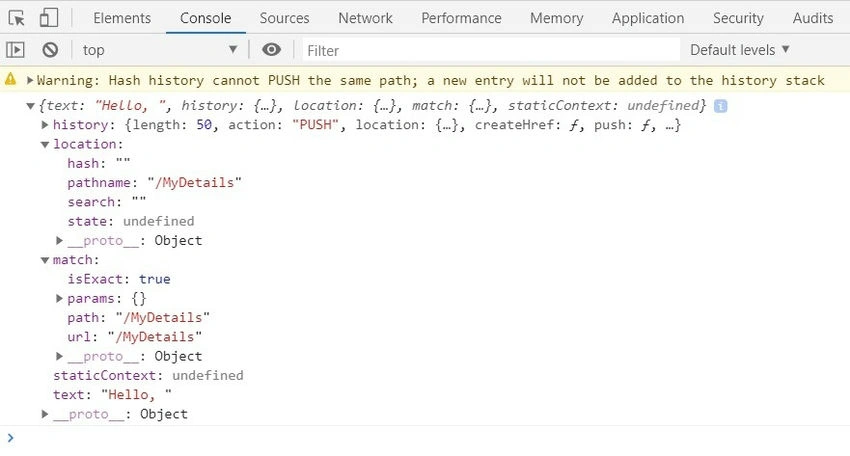
Sample Output for Router Props.
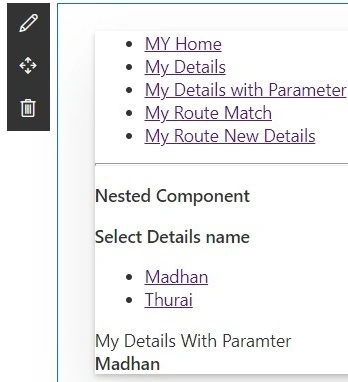
Sample Output for Nested Component.
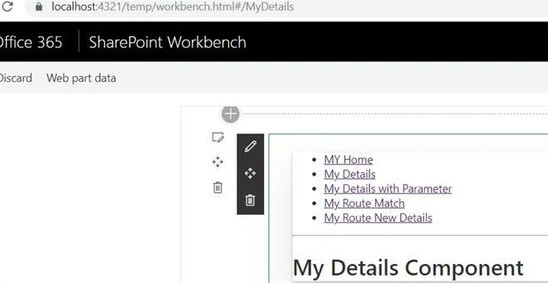
Sample Output without Parameter.
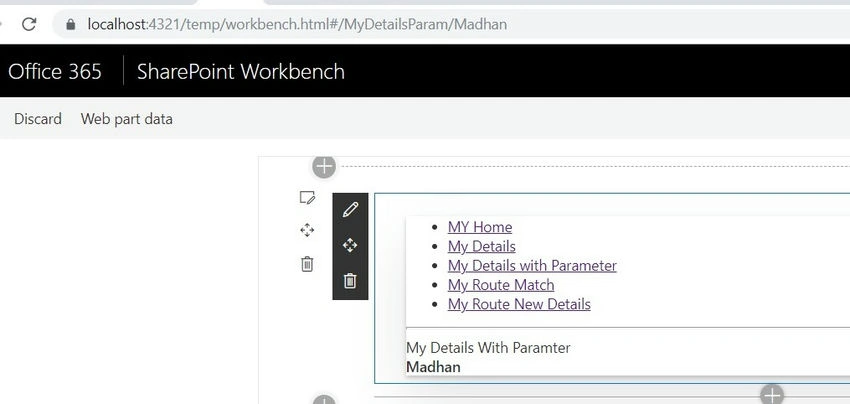
Sample Output with Parameter.
Hence, we have seen some samples for React Router in SPFx. In upcoming articles, I will explain more deeply. Happy Coding :)
Love ThakkerPosted Jul 5, 2022, 1:27 PM
Hi. Can you share your code in git repository or upload zip? i
Madhan ThuraiPosted Apr 9, 2020, 8:25 AM
Nav ul,li or just tags,u can do it same for buttons also
Shobha PPosted Apr 9, 2020, 8:21 AM
As a single page application, do you know how to navigate between components using button click event instead of Navbar?