

What is Single Table Inheritance?
Single table inheritance is also called filter mapping or Discriminated mapping or Table per hierarchy mapping.
With Single table inheritance, one database table is used to store the data for all the entity types in the entire inheritance hierarchy. Let’s understand with an example.
Let’s start
First, let’s create a table and insert some data in the table.
- Create Table SingleEmployees
- (
- ID int primary key identity,
- Name nvarchar(50),
- Gender nvarchar(50),
- AnuualSalary int,
- HourlyPay int,
- HoursWorked int,
- Discriminator nvarchar(50)
- )
- Insert into SingleEmployees values ('Akshay', 'Male', 60000, NULL, NULL, 'PermanentEmployee')
- Insert into SingleEmployees values ('Milind', 'Male', NULL, 50, 160, 'ContractEmployee')
- Insert into SingleEmployees values ('Raghavan', 'Male', NULL, 40, 120, 'ContractEmployee')
- Insert into SingleEmployees values ('Umesh', 'Male', 45000, NULL, NULL, 'PermanentEmployee')
- Insert into SingleEmployees values ('Kiran', 'Female', 30000, NULL, NULL, 'PermanentEmployee')
- Insert into SingleEmployees values ('Valarie', 'Female', NULL, 30, 140, 'ContractEmployee')
- GO
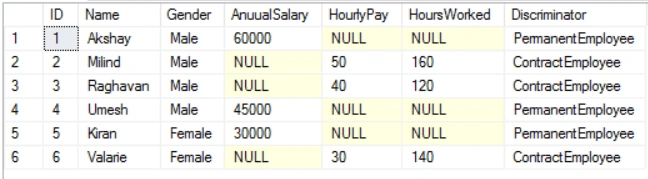
Now, this table stores the data for both types of employees; i.e., permanent employees and contract employees. Some of the columns in this table are specific to the permanent employee
For example
Annual Salary is specific to permanent employee, which means when we insert a row of a contract employee then the column is going to be NULL.
Similarly, Hourly Pay and HourlyWorked are specific to ContractEmployee, meaning, when we insert a row for the permanent employee then those columns are going to be NULL for permanent Employee. The other columns like ID, Name and Gender are common to both the types of employees. This Discriminator column is used to distinguish between permanent employee and contract employee.
Now, when we used LINQ to SQL class designer and if we would design a class, which is based on this table, by default, LINQ to SQL is going to create one employee class.
Create an empty Application. Add a LINQ to SQL file and name it as Sample.dbml .Now, drag and drop the table to the designer
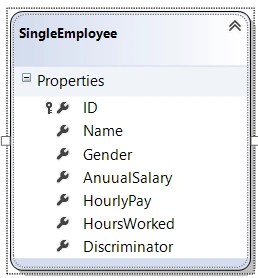
Thus, we have created one class. Now, within our organization, we had two types of employees.One is permanent employee and the other is contract employee.
Thus, we need to design class such that Employee will become the base class for us (will contain the common entities), which are shared by both of types; i.e., permanent and contract employees. Let’s see, how to design these classes.
Right click on the designer surface ->Add->Class->Change the name of the class as Permanent Employee. Add Annual Salary to permanent employee as they belong to the specific class. Similarly, add another class for ContractEmployee add HourlyWorked and Hourly Pay in Contract Employee.
Thus, our designer surface looks, as shown below.
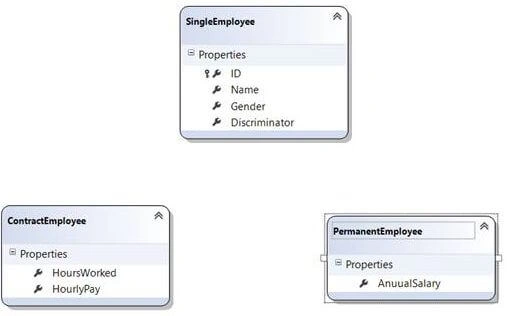
Next step is to establish the inheritance between these classes. Now, right click on the employee class ->click Add->Inheritance. Thus, our base class is Employee and derived class is Permanent Employee. Similarly, do it for ContractEmployee.
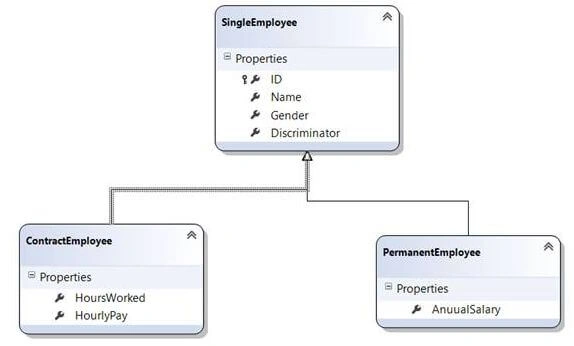
Now, to distinguish between permanent and contract employee, we are using discriminator property. Thus, we need to set the value. Thus, right click on the inheritance relationship.
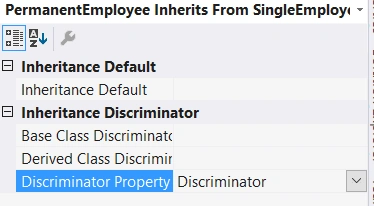
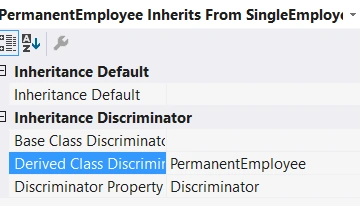
It is the discriminator, which we are using to discriminate between permanent and contract employee. Now, set the derived class discriminator as permanent employee.
Also, set inheritance, which is default as Permanent Employee.
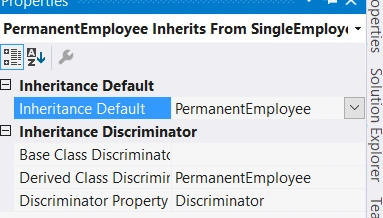
Do the same thing for Contract Employee. Thus, we are done with designing our classes. Now, at the back-end, it has created three classes for us, which is Employee, permanent employee and contract employee.

Now, lets add a Webform to this project.
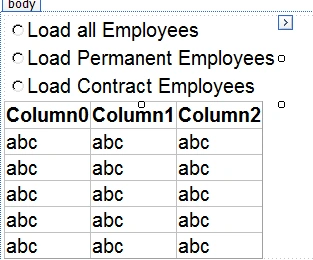
Thus, in our Webform, we got Radio button list to load all the employees, load permanent employees, and load contract employees, and we are displaying them in GridView control.
Webform1.aspx code
- <html xmlns="http://www.w3.org/1999/xhtml">
- <head runat="server">
- <title></title>
- </head>
- <body>
- <form id="form1" runat="server">
- <div style="font-family: Arial">
- <asp:RadioButtonList ID="RadioButtonList1" runat="server" AutoPostBack="True"
- onselectedindexchanged="RadioButtonList1_SelectedIndexChanged">
- <asp:ListItem Text="Load all Employees" Value="All"></asp:ListItem>
- <asp:ListItem Text="Load Permanent Employees" Value="Permanent">
- </asp:ListItem>
- <asp:ListItem Text="Load Contract Employees" Value="Contract">
- </asp:ListItem>
- </asp:RadioButtonList>
- <asp:GridView ID="GridView1" runat="server">
- </asp:GridView>
- </div>
- </form>
- </body>
- </html>
Cs file code
- protected void RadioButtonList1_SelectedIndexChanged(object sender, EventArgs e)
- {
- SampleDataContext dbContext = new SampleDataContext();
- dbContext.Log = Response.Output;
- switch (RadioButtonList1.SelectedValue)
- {
- case "Permanent":
- GridView1.DataSource =
- dbContext.SingleEmployees.OfType<PermanentEmployee>().ToList();
- GridView1.DataBind();
- break;
- case "Contract":
- GridView1.DataSource =
- dbContext.SingleEmployees.OfType<ContractEmployee>().ToList();
- GridView1.DataBind();
- break;
- default:
- GridView1.DataSource =
- ConvertEmployeesForDisplay(dbContext.SingleEmployees.ToList());
- GridView1.DataBind();
- break;
- }
Now, we had used a switch case here for a radio button list, when it is permanent. We want to load permanent employee for it, where we had created an instance of the sample class. Similarly, we did this for contract employees and the default value.
Now let’s run the app.

FinalOutput
As you can see from the above output, the properties that are displayed are ID, name, gender and discriminator, which are the properties present in the abstract employee class. We haven’t done employee class as abstract class to make. Click Employee class->Properties.
Select inheritance modifier as summary.
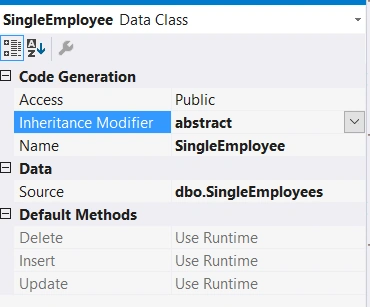
Now, let’s run the app again.
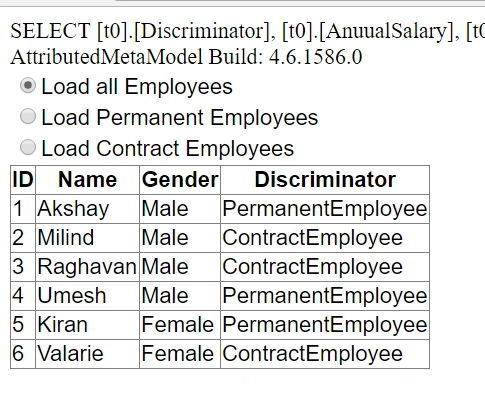
Notice, we are getting property of the requested type. Now, if we want all the columns like hourlyworked,houly pay and so on, we need to write a private method, as shown below.
- private DataTable ConvertEmployeesForDisplay(List<SingleEmployee> employees)
- {
- DataTable dt = new DataTable();
- dt.Columns.Add("ID");
- dt.Columns.Add("Name");
- dt.Columns.Add("Gender");
- dt.Columns.Add("AnuualSalary");
- dt.Columns.Add("HourlyPay");
- dt.Columns.Add("HoursWorked");
- dt.Columns.Add("Type");
- foreach (SingleEmployee employee in employees)
- {
- DataRow dr = dt.NewRow();
- dr["ID"] = employee.ID;
- dr["Name"] = employee.Name;
- dr["Gender"] = employee.Gender;
- if (employee is PermanentEmployee)
- {
- dr["AnuualSalary"] = ((PermanentEmployee)employee).AnuualSalary;
- dr["Type"] = "Permanent";
- }
- else
- {
- dr["HourlyPay"] = ((ContractEmployee)employee).HourlyPay;
- dr["HoursWorked"] = ((ContractEmployee)employee).HoursWorked;
- dr["Type"] = "Contract";
- }
- dt.Rows.Add(dr);
- }
- return dt;
- }
This private method is straight forward. Basically, it’s going to return a data table and we are passing the list of employees objects and its constructing a new data table. In addition to it, the data table is going to contain the respective columns and then we are using for each loop, which gets passed from the employee object, which is present.
We need to display annual salary, hourly pay, and other details of the employees only if we knownthe type of employees. Thus, we are typecasting an employee to a permanent employee. We are checking that typecasting to a permanent employee. Now, let’s run the solution.

FinalOutput1
Notice, we had all the columns here, which are specific to both permanent employees and contract employees.
Join the conversation! Your thoughts help the community grow.