

In this article, I am demonstrating how to develop a slide show application using C#.
1. Open Visual Studio 2012.
2. Select "File" -> "New" -> "Project...".
3. Select the language as “Visual C#” and the template as “Windows Forms Application”, provide an appropriate name, I named it "SlideShowApp". Select the location and click on "OK".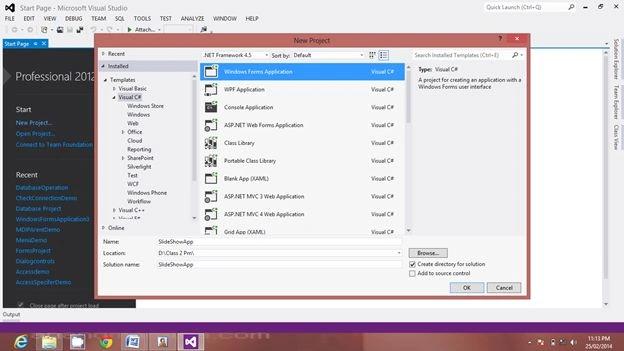
4. Place the Panel on the form and set the dock property to "Right".
5. Now place the PictureBox and set the dock property to "Fill".
6. Now design a form as in the following:
7. Drag and drop the FolderBrowserDiaglog and Timer control to the form. They will appear at the bottom. Go to the Timer control property and set Interval=3000.
8. Under the properties of next(>) ,previous(<) and Slide Show button, set the Enable property to False. So, by default, they should be disabled.
9. Prior to that you must import the namespace "System.IO".
10. Then write the following code:
using System;
using System.Collections.Generic;
using System.ComponentModel;
using System.Data;
using System.Drawing;
using System.Linq;
using System.Text;
using System.Threading.Tasks;
using System.Windows.Forms;
using System.IO;
namespace SlideShowApp
{
public partial class Form1 : Form
{
string Dirpath;
int imgindex;
public Form1()
{
InitializeComponent();
}
private void Form1_Load(object sender, EventArgs e)
{
for (int i = 1; i < 10; i++)
{
comboBox1.Items.Add(i);
comboBox1.SelectedIndex = 0;
}
}
private void button1_Click(object sender, EventArgs e)
{
DialogResult dr = folderBrowserDialog1.ShowDialog();
if (dr != DialogResult.Cancel)
{
listBox1.Items.Clear();
Dirpath = folderBrowserDialog1.SelectedPath;
string[] files = Directory.GetFiles(Dirpath, "*.Jpg");
foreach (string file in files)
{
int pos = file.LastIndexOf("||");
string FName = file.Substring(pos + 1);
listBox1.Items.Add(FName);
Pirajeeth SrisgandarasaPosted Sep 20, 2018, 5:02 AM
Thank you sir. This is so hepling me...
Abhay ShankerPosted Mar 26, 2016, 9:29 AM
Nice One
Vithal WadjePosted Dec 16, 2014, 9:53 PM
good one keep it up
jose RodriguezPosted Dec 15, 2014, 11:21 PM
great !! thanks