
Introduction
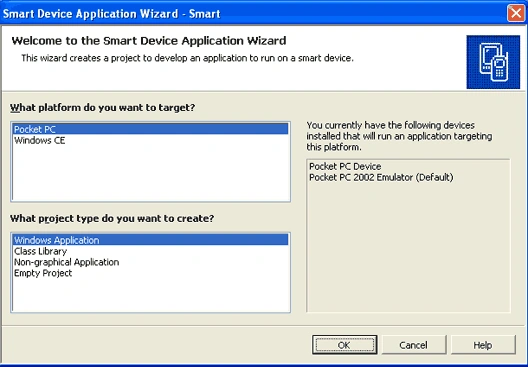
Smart device applications support many remote concept applications. It connect the databases in various ways normally it contain local databases stored in Temp folder. It maintain temp database. Smart device applications is of two types
- Pocket PC
- Windows CE
ADO.Net architecture support Sqlserver and SqlserverCE. It is used for operations such as insert, update and delete etc.
SqlserverCE is used for CE based applications that is disconnected from Sqlserver databases. Sqlclient is used for CE based applications that is direct connection to Sqlserver databases.
Pocket PC is just like
emulator. It reflect mobile operation. Normally smart device contain local
database with help of SQLServerCE.
Deploying this application will create own framework and SQLCE. For connecting
to remote or our local temp database we will use SqlserverCE or Sqlclient.
SqlserverCE is used to run the application in WindowsCE based platforms.
Interfaces needed to interact with SqlServerCE Replication and RDA are
SqlCEReplication and SqlCERemoteDataAccess. SqlCEEngine class used to enable
databases.
Why we prefer SqlserverCE
Normally Sqlclient on windows CE-based devices may leverage the Windows
authentication protocol, instead of using SQL Server authentication. Connection
string cannot support AttatchDBFile, Max Pool Size, Connection Lifetime,
Connection Reset and Pooling.
- It cannot read ANSI column.
- Distributed transactions are not supported.
We can connect to remote Sql database using two methods.
- Replication
- RDA (Remote Data Access)
Replication
It enable to access Sqlserver. Replication is message based data access. SqlserverCE synchronize with Sqlserver by using HTTP connection with help of IIS.
RDA Method
RDA tracked PULL and PUSH methods use optimistic concurrency control.
PULL Method
An application calls the PULL method to extract data from Sqlserver database and store the data in SqlserverCE.
PUSH Method
An application calls
the PUSH method to transmit changes from a PULLED tracked table in SqlserverCE
back to Sqlserver table.
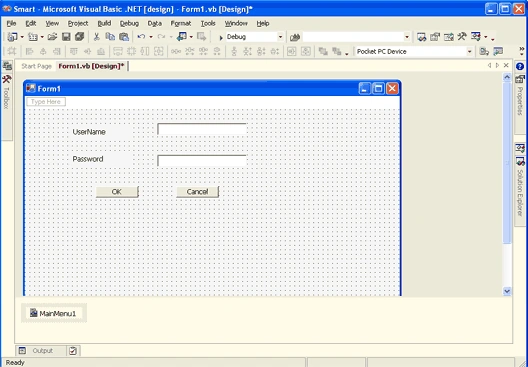
Open the Smart device application we will set some data provider references.
Now we will see the normal database connection with in the local sqlserverCE. The below example describe how to insert the values in local .sdf database and how to delete the records in that table.
Click Project menu and click Add Reference.
Microsoft.WindowsCE.Forms
System.Data.Common
System.Data.SqlServerCE
System.Windows.Forms

Join the conversation! Your thoughts help the community grow.