

Introduction
The react-share is a plugin written in React.js to initialize the sharing social media icon component in React forms.
Open a command prompt. Create a directory for the SPFx solution.
md spfx-ReactSocialShare
Navigate to the above-created directory.
cd spfx-ReactSocialShare
Run the Yeoman SharePoint Generator to create the solution.
yo @microsoft/sharepoint
Solution Name
Hit Enter to have the default name (spfx-ReactSocialShare this case) or type in any other name for your solution.
Selected choice - Hit Enter
Target for the component
Here, we can select the target environment where we are planning to deploy the client web part; i.e., SharePoint Online or SharePoint OnPremise (SharePoint 2016 onwards).
Selected choice - SharePoint Online only (latest).
Place of files
We may choose to use the same folder or create a subfolder for our solution.
Selected choice - same folder.
Deployment option
Selecting Y will allow the app to be deployed instantly to all sites and be accessible everywhere.
Selected choice - N (install on each site explicitly).
Permissions to access web APIs
Choose if the components in the solution require permission to access web APIs that are unique and not shared with other components in the tenant.
Selected choice - N (solution contains unique permissions)
Type of client-side component to create
We can choose to create a client-side web part or an extension. Choose the web part option.
Selected choice - WebPart
Web part name
Hit Enter to select the default name or type in any other name.
Selected choice - SpfxReactShare
Web part description
Hit Enter to select the default description or type in any other value.
Framework to use
Select any JavaScript framework to develop the component. Available choices are - No JavaScript Framework, React, and Knockout.
Selected choice - React
The Yeoman generator will perform a scaffolding process to generate the solution. The scaffolding process will take a significant amount of time.
Once the scaffolding process is completed, lock down the version of project dependencies by running the below command,
npm shrinkwrap
In the command prompt, type the below command to open the solution in the code editor of your choice.
NPM Packages used,
- npm i react-share
- npm i @types/react-share
- import {
- FacebookShareCount,
- PinterestShareCount,
- VKShareCount,
- OKShareCount,
- RedditShareCount,
- TumblrShareCount,
- FacebookShareButton,
- FacebookMessengerShareButton,
- FacebookMessengerIcon,
- LinkedinShareButton,
- TwitterShareButton,
- PinterestShareButton,
- VKShareButton,
- OKShareButton,
- TelegramShareButton,
- WhatsappShareButton,
- RedditShareButton,
- EmailShareButton,
- TumblrShareButton,
- LivejournalShareButton,
- MailruShareButton,
- ViberShareButton,
- WorkplaceShareButton,
- LineShareButton,
- WeiboShareButton,
- PocketShareButton,
- InstapaperShareButton,
- FacebookIcon,
- TwitterIcon,
- LinkedinIcon,
- PinterestIcon,
- VKIcon,
- OKIcon,
- TelegramIcon,
- WhatsappIcon,
- RedditIcon,
- TumblrIcon,
- MailruIcon,
- EmailIcon,
- LivejournalIcon,
- ViberIcon,
- WorkplaceIcon,
- LineIcon,
- PocketIcon,
- InstapaperIcon,
- WeiboIcon,
- } from "react-share";
- VK
- OK
- Tumblr
- FacebookMessenger
- Telegram
- Livejournal
- Mailru
- Viber
- Workplace
- Line
- Instapaper
In the import statement
- suffix sharebutton refers the api for share
- suffixicon refers the icon of the social site
- suffixcount refers the count of the share
Challenges
In v4 of typescript it gets a type error as follows:
- Type '{ children: Element; url: string; }' is missing the following properties from type 'Pick<Props<{ quote?: string; hashtag?: string; }>, "form" | "style" | "title" | "type" | "name" | "defaultChecked" | "defaultValue" | "suppressContentEditableWarning" | "suppressHydrationWarning" | ... 264 more ... | "resetButtonStyle">': form, title, type, name, and 256 more.
In the node modules path (i.e. node_modules\react-share\es) open all the d.ts files and comment the export default method and replace with
- declare module 'react-share' {
- declare const ComonentName: any;
- export {
- ComonentName
- }
- }
Intially it will look like:
- /// <reference types="react" />
- declare const FacebookShareButton: import("react").ForwardRefExoticComponent<Pick<import("./ShareButton").Props<{
- quote?: string | undefined;
- hashtag?: string | undefined;
- }>, "disabled" | "hidden" | "dir" | "form" | "slot" | "style" | "title" | "color" | "children" | "url" | "className" | "id" | "lang" | "name" | "type" | "role" | "tabIndex" | "aria-activedescendant" | "aria-atomic" | "aria-autocomplete" | "aria-busy" | "aria-checked" | "aria-colcount" | "aria-colindex" | "aria-colspan" | "aria-controls" | "aria-current" | "aria-describedby" | "aria-details" | "aria-disabled" | "aria-dropeffect" | "aria-errormessage" | "aria-expanded" | "aria-flowto" | "aria-grabbed" | "aria-haspopup" | "aria-hidden" | "aria-invalid" | "aria-keyshortcuts" | "aria-label" | "aria-labelledby" | "aria-level" | "aria-live" | "aria-modal" | "aria-multiline" | "aria-multiselectable" | "aria-orientation" | "aria-owns" | "aria-placeholder" | "aria-posinset" | "aria-pressed" | "aria-readonly" | "aria-relevant" | "aria-required" | "aria-roledescription" | "aria-rowcount" | "aria-rowindex" | "aria-rowspan" | "aria-selected" | "aria-setsize" | "aria-sort" | "aria-valuemax" | "aria-valuemin" | "aria-valuenow" | "aria-valuetext" | "dangerouslySetInnerHTML" | "onCopy" | "onCopyCapture" | "onCut" | "onCutCapture" | "onPaste" | "onPasteCapture" | "onCompositionEnd" | "onCompositionEndCapture" | "onCompositionStart" | "onCompositionStartCapture" | "onCompositionUpdate" | "onCompositionUpdateCapture" | "onFocus" | "onFocusCapture" | "onBlur" | "onBlurCapture" | "onChange" | "onChangeCapture" | "onBeforeInput" | "onBeforeInputCapture" | "onInput" | "onInputCapture" | "onReset" | "onResetCapture" | "onSubmit" | "onSubmitCapture" | "onInvalid" | "onInvalidCapture" | "onLoad" | "onLoadCapture" | "onError" | "onErrorCapture" | "onKeyDown" | "onKeyDownCapture" | "onKeyPress" | "onKeyPressCapture" | "onKeyUp" | "onKeyUpCapture" | "onAbort" | "onAbortCapture" | "onCanPlay" | "onCanPlayCapture" | "onCanPlayThrough" | "onCanPlayThroughCapture" | "onDurationChange" | "onDurationChangeCapture" | "onEmptied" | "onEmptiedCapture" | "onEncrypted" | "onEncryptedCapture" | "onEnded" | "onEndedCapture" | "onLoadedData" | "onLoadedDataCapture" | "onLoadedMetadata" | "onLoadedMetadataCapture" | "onLoadStart" | "onLoadStartCapture" | "onPause" | "onPauseCapture" | "onPlay" | "onPlayCapture" | "onPlaying" | "onPlayingCapture" | "onProgress" | "onProgressCapture" | "onRateChange" | "onRateChangeCapture" | "onSeeked" | "onSeekedCapture" | "onSeeking" | "onSeekingCapture" | "onStalled" | "onStalledCapture" | "onSuspend" | "onSuspendCapture" | "onTimeUpdate" | "onTimeUpdateCapture" | "onVolumeChange" | "onVolumeChangeCapture" | "onWaiting" | "onWaitingCapture" | "onAuxClick" | "onAuxClickCapture" | "onClick" | "onClickCapture" | "onContextMenu" | "onContextMenuCapture" | "onDoubleClick" | "onDoubleClickCapture" | "onDrag" | "onDragCapture" | "onDragEnd" | "onDragEndCapture" | "onDragEnter" | "onDragEnterCapture" | "onDragExit" | "onDragExitCapture" | "onDragLeave" | "onDragLeaveCapture" | "onDragOver" | "onDragOverCapture" | "onDragStart" | "onDragStartCapture" | "onDrop" | "onDropCapture" | "onMouseDown" | "onMouseDownCapture" | "onMouseEnter" | "onMouseLeave" | "onMouseMove" | "onMouseMoveCapture" | "onMouseOut" | "onMouseOutCapture" | "onMouseOver" | "onMouseOverCapture" | "onMouseUp" | "onMouseUpCapture" | "onSelect" | "onSelectCapture" | "onTouchCancel" | "onTouchCancelCapture" | "onTouchEnd" | "onTouchEndCapture" | "onTouchMove" | "onTouchMoveCapture" | "onTouchStart" | "onTouchStartCapture" | "onPointerDown" | "onPointerDownCapture" | "onPointerMove" | "onPointerMoveCapture" | "onPointerUp" | "onPointerUpCapture" | "onPointerCancel" | "onPointerCancelCapture" | "onPointerEnter" | "onPointerEnterCapture" | "onPointerLeave" | "onPointerLeaveCapture" | "onPointerOver" | "onPointerOverCapture" | "onPointerOut" | "onPointerOutCapture" | "onGotPointerCapture" | "onGotPointerCaptureCapture" | "onLostPointerCapture" | "onLostPointerCaptureCapture" | "onScroll" | "onScrollCapture" | "onWheel" | "onWheelCapture" | "onAnimationStart" | "onAnimationStartCapture" | "onAnimationEnd" | "onAnimationEndCapture" | "onAnimationIteration" | "onAnimationIterationCapture" | "onTransitionEnd" | "onTransitionEndCapture" | "value" | "disabledStyle" | "openShareDialogOnClick" | "windowWidth" | "windowHeight" | "windowPosition" | "beforeOnClick" | "onShareWindowClose" | "resetButtonStyle" | "autoFocus" | "formAction" | "formEncType" | "formMethod" | "formNoValidate" | "formTarget" | "defaultChecked" | "defaultValue" | "suppressContentEditableWarning" | "suppressHydrationWarning" | "accessKey" | "contentEditable" | "contextMenu" | "draggable" | "placeholder" | "spellCheck" | "translate" | "radioGroup" | "about" | "datatype" | "inlist" | "prefix" | "property" | "resource" | "typeof" | "vocab" | "autoCapitalize" | "autoCorrect" | "autoSave" | "itemProp" | "itemScope" | "itemType" | "itemID" | "itemRef" | "results" | "security" | "unselectable" | "inputMode" | "is"> & {
- quote?: string | undefined;
- hashtag?: string | undefined;
- } & import("react").RefAttributes<HTMLButtonElement>>;
- export default FacebookShareButton;
- /// <reference types="react" />
- declare const FacebookShareButton: import("react").ForwardRefExoticComponent<Pick<import("./ShareButton").Props<{
- quote?: string | undefined;
- hashtag?: string | undefined;
- }>, "disabled" | "hidden" | "dir" | "form" | "slot" | "style" | "title" | "color" | "children" | "url" | "className" | "id" | "lang" | "name" | "type" | "role" | "tabIndex" | "aria-activedescendant" | "aria-atomic" | "aria-autocomplete" | "aria-busy" | "aria-checked" | "aria-colcount" | "aria-colindex" | "aria-colspan" | "aria-controls" | "aria-current" | "aria-describedby" | "aria-details" | "aria-disabled" | "aria-dropeffect" | "aria-errormessage" | "aria-expanded" | "aria-flowto" | "aria-grabbed" | "aria-haspopup" | "aria-hidden" | "aria-invalid" | "aria-keyshortcuts" | "aria-label" | "aria-labelledby" | "aria-level" | "aria-live" | "aria-modal" | "aria-multiline" | "aria-multiselectable" | "aria-orientation" | "aria-owns" | "aria-placeholder" | "aria-posinset" | "aria-pressed" | "aria-readonly" | "aria-relevant" | "aria-required" | "aria-roledescription" | "aria-rowcount" | "aria-rowindex" | "aria-rowspan" | "aria-selected" | "aria-setsize" | "aria-sort" | "aria-valuemax" | "aria-valuemin" | "aria-valuenow" | "aria-valuetext" | "dangerouslySetInnerHTML" | "onCopy" | "onCopyCapture" | "onCut" | "onCutCapture" | "onPaste" | "onPasteCapture" | "onCompositionEnd" | "onCompositionEndCapture" | "onCompositionStart" | "onCompositionStartCapture" | "onCompositionUpdate" | "onCompositionUpdateCapture" | "onFocus" | "onFocusCapture" | "onBlur" | "onBlurCapture" | "onChange" | "onChangeCapture" | "onBeforeInput" | "onBeforeInputCapture" | "onInput" | "onInputCapture" | "onReset" | "onResetCapture" | "onSubmit" | "onSubmitCapture" | "onInvalid" | "onInvalidCapture" | "onLoad" | "onLoadCapture" | "onError" | "onErrorCapture" | "onKeyDown" | "onKeyDownCapture" | "onKeyPress" | "onKeyPressCapture" | "onKeyUp" | "onKeyUpCapture" | "onAbort" | "onAbortCapture" | "onCanPlay" | "onCanPlayCapture" | "onCanPlayThrough" | "onCanPlayThroughCapture" | "onDurationChange" | "onDurationChangeCapture" | "onEmptied" | "onEmptiedCapture" | "onEncrypted" | "onEncryptedCapture" | "onEnded" | "onEndedCapture" | "onLoadedData" | "onLoadedDataCapture" | "onLoadedMetadata" | "onLoadedMetadataCapture" | "onLoadStart" | "onLoadStartCapture" | "onPause" | "onPauseCapture" | "onPlay" | "onPlayCapture" | "onPlaying" | "onPlayingCapture" | "onProgress" | "onProgressCapture" | "onRateChange" | "onRateChangeCapture" | "onSeeked" | "onSeekedCapture" | "onSeeking" | "onSeekingCapture" | "onStalled" | "onStalledCapture" | "onSuspend" | "onSuspendCapture" | "onTimeUpdate" | "onTimeUpdateCapture" | "onVolumeChange" | "onVolumeChangeCapture" | "onWaiting" | "onWaitingCapture" | "onAuxClick" | "onAuxClickCapture" | "onClick" | "onClickCapture" | "onContextMenu" | "onContextMenuCapture" | "onDoubleClick" | "onDoubleClickCapture" | "onDrag" | "onDragCapture" | "onDragEnd" | "onDragEndCapture" | "onDragEnter" | "onDragEnterCapture" | "onDragExit" | "onDragExitCapture" | "onDragLeave" | "onDragLeaveCapture" | "onDragOver" | "onDragOverCapture" | "onDragStart" | "onDragStartCapture" | "onDrop" | "onDropCapture" | "onMouseDown" | "onMouseDownCapture" | "onMouseEnter" | "onMouseLeave" | "onMouseMove" | "onMouseMoveCapture" | "onMouseOut" | "onMouseOutCapture" | "onMouseOver" | "onMouseOverCapture" | "onMouseUp" | "onMouseUpCapture" | "onSelect" | "onSelectCapture" | "onTouchCancel" | "onTouchCancelCapture" | "onTouchEnd" | "onTouchEndCapture" | "onTouchMove" | "onTouchMoveCapture" | "onTouchStart" | "onTouchStartCapture" | "onPointerDown" | "onPointerDownCapture" | "onPointerMove" | "onPointerMoveCapture" | "onPointerUp" | "onPointerUpCapture" | "onPointerCancel" | "onPointerCancelCapture" | "onPointerEnter" | "onPointerEnterCapture" | "onPointerLeave" | "onPointerLeaveCapture" | "onPointerOver" | "onPointerOverCapture" | "onPointerOut" | "onPointerOutCapture" | "onGotPointerCapture" | "onGotPointerCaptureCapture" | "onLostPointerCapture" | "onLostPointerCaptureCapture" | "onScroll" | "onScrollCapture" | "onWheel" | "onWheelCapture" | "onAnimationStart" | "onAnimationStartCapture" | "onAnimationEnd" | "onAnimationEndCapture" | "onAnimationIteration" | "onAnimationIterationCapture" | "onTransitionEnd" | "onTransitionEndCapture" | "value" | "disabledStyle" | "openShareDialogOnClick" | "windowWidth" | "windowHeight" | "windowPosition" | "beforeOnClick" | "onShareWindowClose" | "resetButtonStyle" | "autoFocus" | "formAction" | "formEncType" | "formMethod" | "formNoValidate" | "formTarget" | "defaultChecked" | "defaultValue" | "suppressContentEditableWarning" | "suppressHydrationWarning" | "accessKey" | "contentEditable" | "contextMenu" | "draggable" | "placeholder" | "spellCheck" | "translate" | "radioGroup" | "about" | "datatype" | "inlist" | "prefix" | "property" | "resource" | "typeof" | "vocab" | "autoCapitalize" | "autoCorrect" | "autoSave" | "itemProp" | "itemScope" | "itemType" | "itemID" | "itemRef" | "results" | "security" | "unselectable" | "inputMode" | "is"> & {
- quote?: string | undefined;
- hashtag?: string | undefined;
- } & import("react").RefAttributes<HTMLButtonElement>>;
- //export default FacebookShareButton;
- declare module 'react-share' {
- declare const FacebookShareButton: any;
- export {
- FacebookShareButton
- }
- }
Do it for all the d.ts files present in the "node_modules\react-share\es" location as per its component name.
Full code
In SpfxReactShare.tsx
- import * as React from 'react';
- import { ISpfxReactShareProps } from './ISpfxReactShareProps';
- import {
- FacebookShareButton,FacebookIcon,FacebookMessengerShareButton,FacebookMessengerIcon,TwitterShareButton,TwitterIcon,
- TelegramShareButton,TelegramIcon,WhatsappShareButton,WhatsappIcon,LinkedinShareButton,LinkedinIcon
- ,RedditShareButton,RedditIcon,TumblrShareButton,TumblrIcon,EmailShareButton,EmailIcon,ViberShareButton,ViberIcon,
- LineShareButton,LineIcon
- } from "react-share";
- import './mystyle.css';
- export default class SpfxReactShare extends React.Component<ISpfxReactShareProps, {}> {
- public render(): React.ReactElement<ISpfxReactShareProps> {
- const shareUrl = 'https://www.c-sharpcorner.com/members/madhan-thurai';
- const title = 'c-sharpcorner';
- const myhasttag=["Madhan","MadhanAPI"];
- return (
- <div >
- <div className="Demo__container">
- <div className="Demo__some-network">
- <FacebookShareButton
- className={"Demo__some-network__share-button"}
- hashtag ={"#Madhan"}
- url={shareUrl}
- quote={title}>
- <FacebookIcon size={32} round />
- </FacebookShareButton>
- </div>
- <div className="Demo__some-network">
- <FacebookMessengerShareButton
- url={shareUrl}
- appId="521270401588372"
- className="Demo__some-network__share-button"
- >
- <FacebookMessengerIcon size={32} round />
- </FacebookMessengerShareButton>
- </div>
- <div className="Demo__some-network">
- <TwitterShareButton
- url={shareUrl}
- title={title}
- className="Demo__some-network__share-button"
- hashtags={myhasttag}
- via ={"MadhanAPI"}
- >
- <TwitterIcon size={32} round />
- </TwitterShareButton>
- <div className="Demo__some-network__share-count"> </div>
- </div>
- <div className="Demo__some-network">
- <TelegramShareButton
- url={shareUrl}
- title={title}
- className="Demo__some-network__share-button"
- >
- <TelegramIcon size={32} round />
- </TelegramShareButton>
- <div className="Demo__some-network__share-count"> </div>
- </div>
- <div className="Demo__some-network">
- <WhatsappShareButton
- url={shareUrl}
- title={title}
- separator=":: "
- className="Demo__some-network__share-button"
- >
- <WhatsappIcon size={32} round />
- </WhatsappShareButton>
- <div className="Demo__some-network__share-count"> </div>
- </div>
- <div className="Demo__some-network">
- <LinkedinShareButton url={shareUrl} className="Demo__some-network__share-button">
- <LinkedinIcon size={32} round />
- </LinkedinShareButton>
- </div>
- <div className="Demo__some-network">
- <RedditShareButton
- url={shareUrl}
- title={title}
- windowWidth={660}
- windowHeight={460}
- className="Demo__some-network__share-button"
- >
- <RedditIcon size={32} round />
- </RedditShareButton>
- </div>
- <div className="Demo__some-network">
- <TumblrShareButton
- url={shareUrl}
- title={title}
- className="Demo__some-network__share-button"
- >
- <TumblrIcon size={32} round />
- </TumblrShareButton>
- </div>
- <div className="Demo__some-network">
- <EmailShareButton
- url={shareUrl}
- subject={title}
- body={shareUrl}
- className="Demo__some-network__share-button"
- >
- <EmailIcon size={32} round />
- </EmailShareButton>
- </div>
- <div className="Demo__some-network">
- <ViberShareButton
- url={shareUrl}
- title={title}
- className="Demo__some-network__share-button"
- >
- <ViberIcon size={32} round />
- </ViberShareButton>
- </div>
- <div className="Demo__some-network">
- <LineShareButton
- url={shareUrl}
- title={title}
- className="Demo__some-network__share-button"
- >
- <LineIcon size={32} round />
- </LineShareButton>
- </div>
- </div>
- </div>
- );
- }
- }
For detailed options visit here
In mystyle.css:
- body {
- font-family: 'Arial', sans-serif;
- background-color: white;
- padding: 20px;
- }
- .Demo__some-network {
- vertical-align: top;
- display: inline-block;
- margin-right: 10px;
- text-align: center;
- }
- .Demo__some-network__share-count {
- display: inline-flex;
- justify-content: center;
- white-space: nowrap;
- overflow: visible;
- width: 0;
- margin-top: 3px;
- font-size: 12px;
- }
- .Demo__some-network__share-button {
- cursor: pointer;
- }
- .Demo__some-network__share-button:hover:not(:active) {
- opacity: 0.75;
- }
- .Demo__some-network__custom-icon {
- width:32px;
- height:32px;
- }
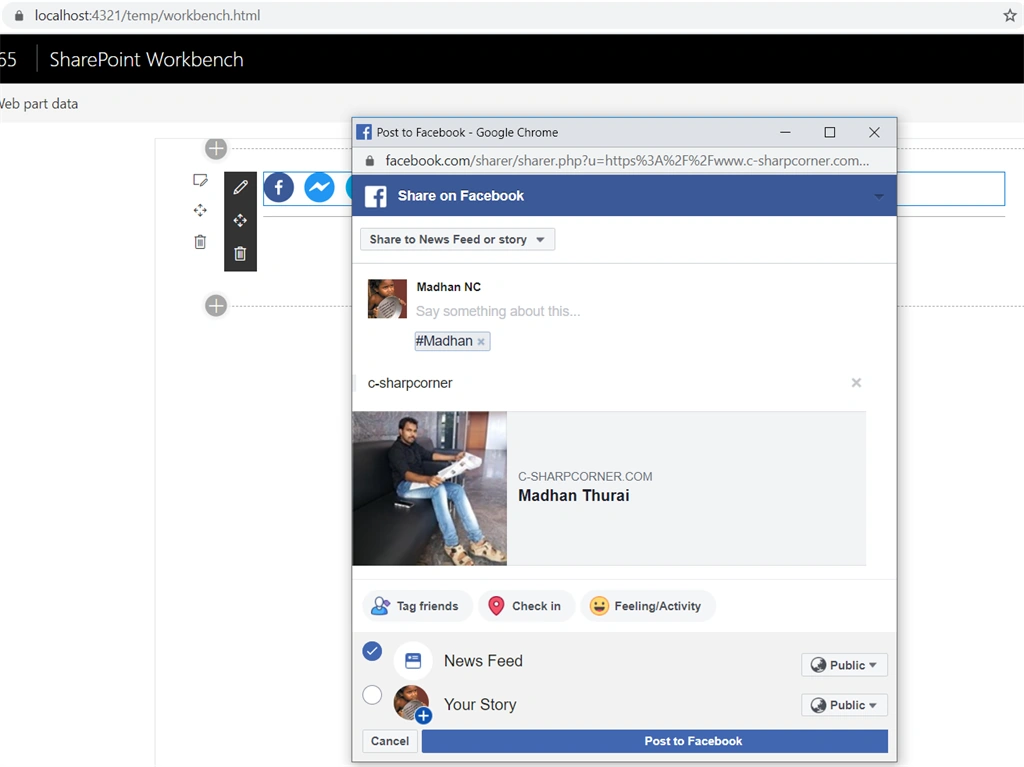
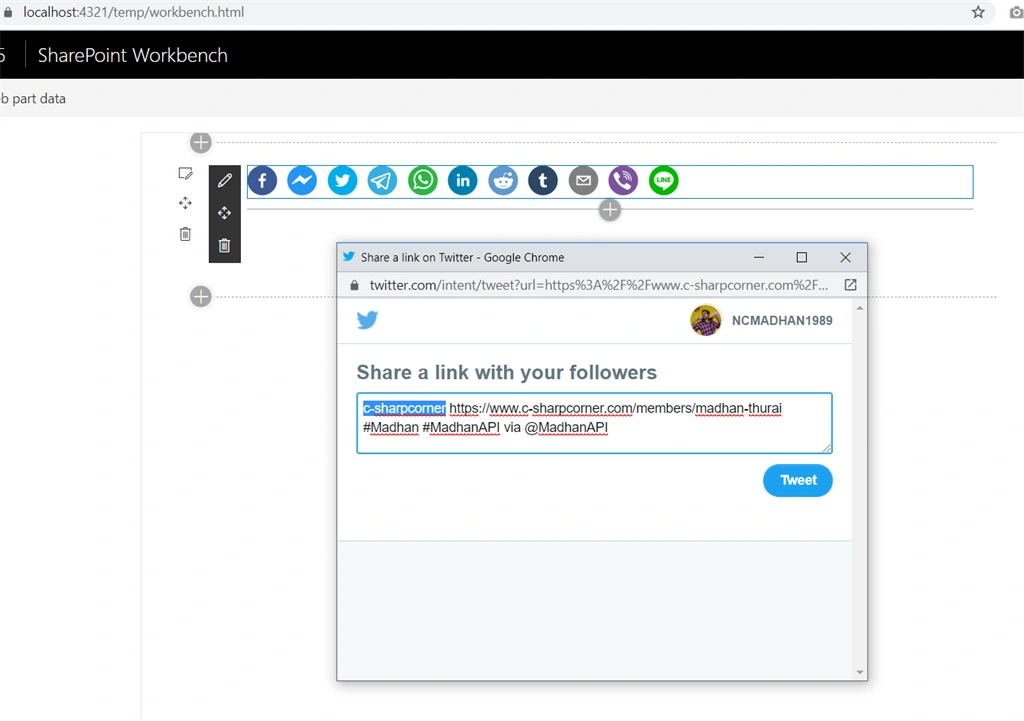
Share Icons

Facebook Timeline Share
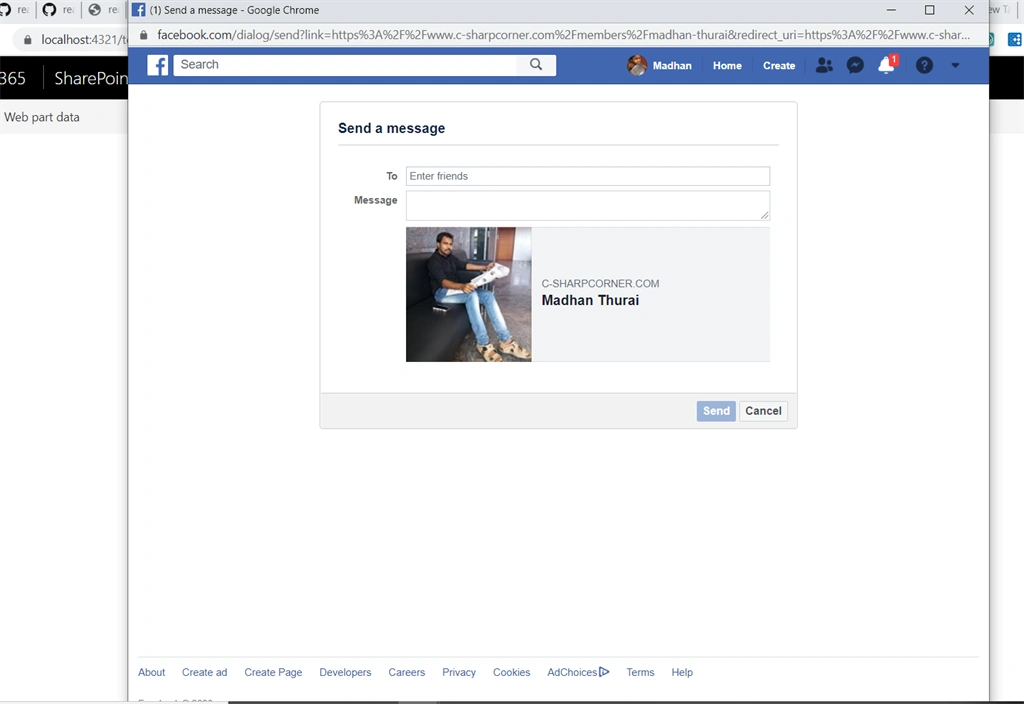
Facebook Messenger Share
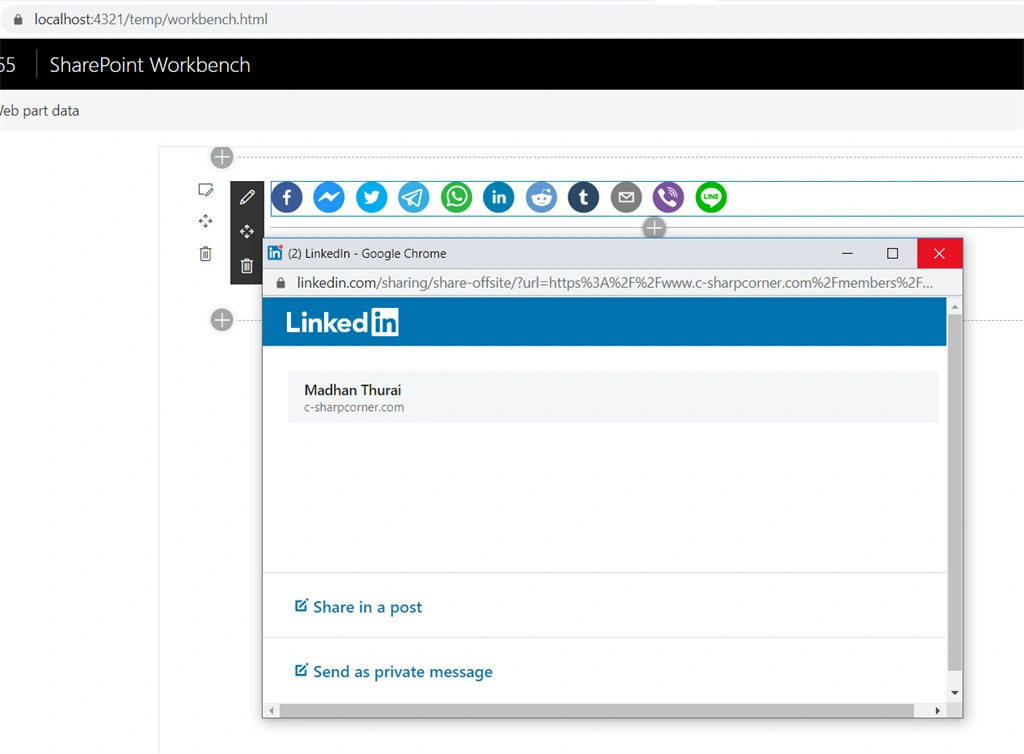
Linkedin share
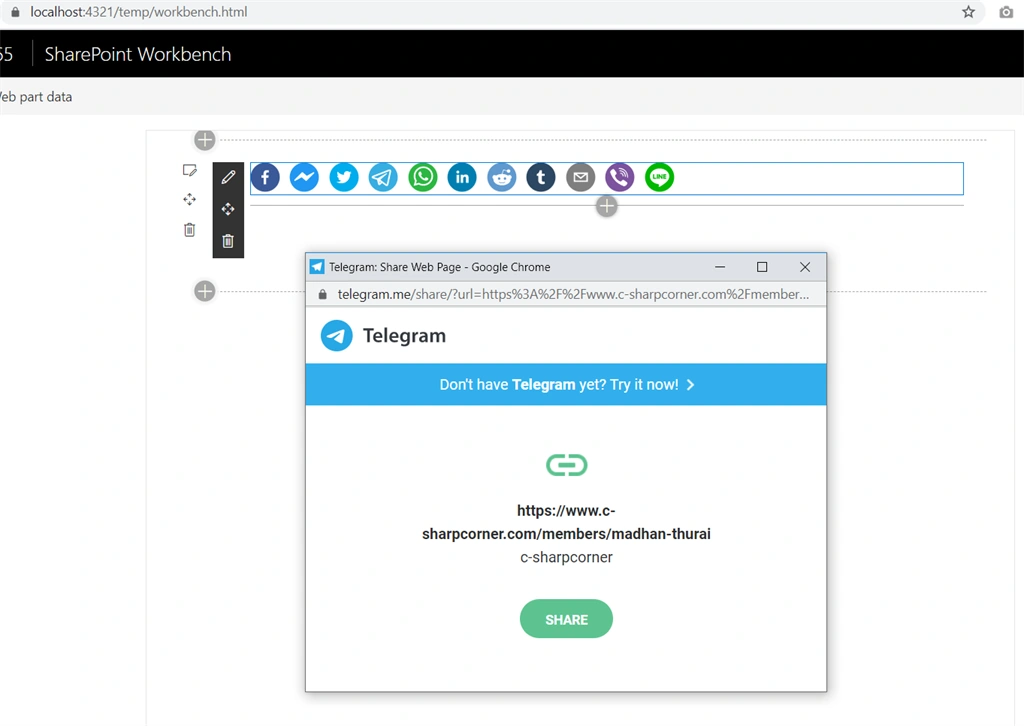
Telegram share
Twitter Share
Conclusion
Hence we learned about initializing React social share component in Spfx forms using react-share plugin. I hope this helps someone. Happy coding :)
Kevin WolfPosted Jul 30, 2020, 12:08 AM
I've gotten as far as running npm shrinkwrap, but then am lost. VERY new to coding and trying to begin learning coding, so please forgive me if this is basic stuff. Any guidance you can provide is appreciated. This would be the first webpart I've ever created, even following this great tutorial. Before today I didn't have any of the tools installed or configured, was mostly an OOB SharePoint Admin.
Bhargava ChPosted Mar 19, 2020, 10:48 AM
Nice article
Sagar PardeshiPosted Mar 3, 2020, 12:09 AM
Well explore the social connector