
Introduction
In this article, learn C# socket programming. First, we will see how to create a C# socket and set up a listener server node that starts listening to any messages coming its way via the predefined IP and protocol. We will also see how to create a client application that will send messages to a listener server and read them using Sockets. The sample code is written in C# and .NET Core.
Sockets in computer networks are used to establish a connection between two or more computers and to send data from one computer to another. Each computer in the network is called a node. Sockets use nodes’ IP addresses and a network protocol to create a secure channel of communication and use this channel to transfer data.
Figure 1
Socket client and server communication.
In socket communication, one node acts as a listener, and the other node acts as a client. The listener node opens itself upon a pre-established IP address and on a predefined protocol and starts listening. Clients who want to send messages to the server start broadcasting messages on the same IP address and same protocol. A typical socket connection uses the Transmission Control Protocol (TCP) to communicate.
In this article, we will see how to create a socket and set up a listener server node that starts listening to any messages coming to it via the predefined IP and protocol. We will also see how to create a client application that will send a message to the listener server and read it. The sample code is written in C# and .NET Core.
Step 1. Create a Listener
Create a .NET Core Console app and write the following code.
using System;
using System.Net;
using System.Net.Sockets;
using System.Text;

// Socket Listener acts as a server and listens to the incoming
// messages on the specified port and protocol.
public class SocketListener
{
    public static int Main(String[] args)
    {
        StartServer();
        return 0;
    }

    public static void StartServer()
    {
        // Get Host IP Address that is used to establish a connection
        // In this case, we get one IP address of localhost that is IP : 127.0.0.1
        // If a host has multiple addresses, you will get a list of addresses
        IPHostEntry host = Dns.GetHostEntry("localhost");
        IPAddress ipAddress = host.AddressList[0];
        IPEndPoint localEndPoint = new IPEndPoint(ipAddress, 11000);

        try {

            // Create a Socket that will use Tcp protocol
            Socket listener = new Socket(ipAddress.AddressFamily, SocketType.Stream, ProtocolType.Tcp);
            // A Socket must be associated with an endpoint using the Bind method
            listener.Bind(localEndPoint);
            // Specify how many requests a Socket can listen before it gives Server busy response.
            // We will listen 10 requests at a time
            listener.Listen(10);

            Console.WriteLine("Waiting for a connection...");
            Socket handler = listener.Accept();

             // Incoming data from the client.
             string data = null;
             byte[] bytes = null;

            while (true)
            {
                bytes = new byte[1024];
                int bytesRec = handler.Receive(bytes);
                data += Encoding.ASCII.GetString(bytes, 0, bytesRec);
                if (data.IndexOf("<EOF>") > -1)
                {
                    break;
                }
            }

            Console.WriteLine("Text received : {0}", data);

            byte[] msg = Encoding.ASCII.GetBytes(data);
            handler.Send(msg);
            handler.Shutdown(SocketShutdown.Both);
            handler.Close();
        }
        catch (Exception e)
        {
            Console.WriteLine(e.ToString());
        }

        Console.WriteLine("\n Press any key to continue...");
        Console.ReadKey();
    }
}
The code above creates a Socket listener on the local host using TCP protocol, and any messages captured from the client, it displayed it on the console. The listener can request 10 clients at a time, and the 11th request will give a server busy message.
Output
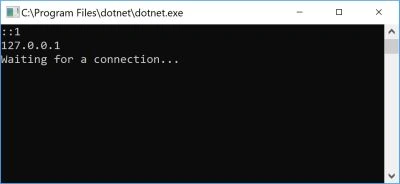
Figure 2
Step 2. Create a Client
A client application is one that establishes a connection with a server/listener and sends a message. Create another .NET Core console application and write the following code
The sample code below creates a client application that creates a socket connection with the listener on the given IP and the port and sends a message.
using System;
using System.Net;
using System.Net.Sockets;
using System.Text;

// Client app is the one sending messages to a Server/listener.
// Both listener and client can send messages back and forth once a
// communication is established.
public class SocketClient
{
    public static int Main(String[] args)
    {
        StartClient();
        return 0;
    }

    public static void StartClient()
    {
        byte[] bytes = new byte[1024];

        try
        {
            // Connect to a Remote server
            // Get Host IP Address that is used to establish a connection
            // In this case, we get one IP address of localhost that is IP : 127.0.0.1
            // If a host has multiple addresses, you will get a list of addresses
            IPHostEntry host = Dns.GetHostEntry("localhost");
            IPAddress ipAddress = host.AddressList[0];
            IPEndPoint remoteEP = new IPEndPoint(ipAddress, 11000);

            // Create a TCP/IP  socket.
            Socket sender = new Socket(ipAddress.AddressFamily,
                SocketType.Stream, ProtocolType.Tcp);

            // Connect the socket to the remote endpoint. Catch any errors.
            try
            {
                // Connect to Remote EndPoint
                sender.Connect(remoteEP);

                Console.WriteLine("Socket connected to {0}",
                    sender.RemoteEndPoint.ToString());

                // Encode the data string into a byte array.
                byte[] msg = Encoding.ASCII.GetBytes("This is a test<EOF>");

                // Send the data through the socket.
                int bytesSent = sender.Send(msg);

                // Receive the response from the remote device.
                int bytesRec = sender.Receive(bytes);
                Console.WriteLine("Echoed test = {0}",
                    Encoding.ASCII.GetString(bytes, 0, bytesRec));

                // Release the socket.
                sender.Shutdown(SocketShutdown.Both);
                sender.Close();

            }
            catch (ArgumentNullException ane)
            {
                Console.WriteLine("ArgumentNullException : {0}", ane.ToString());
            }
            catch (SocketException se)
            {
                Console.WriteLine("SocketException : {0}", se.ToString());
            }
            catch (Exception e)
            {
                Console.WriteLine("Unexpected exception : {0}", e.ToString());
            }

        }
        catch (Exception e)
        {
            Console.WriteLine(e.ToString());
        }
    }
}
Step 3. Test and Run
Now build both projects and run both applications from the command line. You will see the message sent by the client is read and displayed by the listener.
Once the client runs, you will see the message is sent to the server. See Figure 2
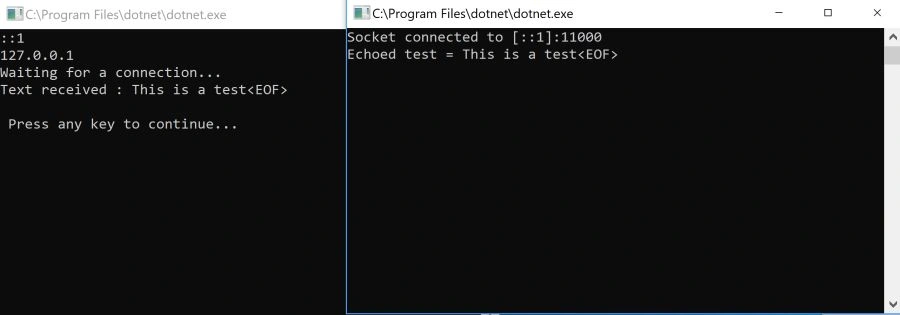
Figure 3
Summary
In this article, you learned how to use Sockets in C# and .NET Core to create a client and a server to communicate via the TCP/IP protocol. This sample works on a local machine, but you can use the same code on a network. All you need to do is change the IP address of the host.
Ken PearsonPosted Feb 13, 2024, 10:02 AM
In the SocketListener code, where it states handler, it shout read listener
Ammar AlTuhafiPosted Jun 7, 2022, 9:17 AM
Thanks a lot ; knu.edu.iq
Luciano DbPosted Mar 7, 2022, 7:34 AM
Added a loop cicle to keep running the server and created a .Net Standard 2.0 library for sharing it and all is perfectly working. Great self-explaining example. Thanks a lot.
Triton HalleyPosted Jul 16, 2021, 4:41 PM
Can take client ip address from server for example i want to know which client in my network send this massage i know i can send ip address in massage from client but i want to know I wanted to know if there was another way ?
JayadevPosted Jul 7, 2021, 1:00 PM
Very Good article
Tejas DhimmarPosted Jun 26, 2021, 12:10 PM
Should I call server from javascript? and send json to the server?
Esteban AyalaPosted Jun 22, 2021, 9:41 AM
This is like ipc but cool
Matt RedmondPosted Mar 23, 2021, 2:45 PM
Where does this code ever print the server side IP address before printing "Waiting for connection..." ?? Oh that's right, it doesn't. Because this was just lifted (and badly) from the Microsoft example on the same subject.
Don RappPosted Mar 11, 2021, 2:24 AM
Ok, so I think I'm missing something. If the server side is listening to localhost:11000 and client side is sending localhost:11000, are they not just sending and listening to their own respective machines? OR, does the TCP/IP socket BROADCAST the command across the network, so anything on the same said network that is listening or sending respectively gets the data?
ishita shahPosted Aug 6, 2020, 10:03 AM
Hi I have applied same code but client screen is not persist and when i change ip address at client side then server does not accept to client how to do it? Please help me
John LucasPosted Jul 7, 2020, 8:59 AM
This has just all been copied from the Microsoft website: https://docs.microsoft.com/en-us/dotnet/framework/network-programming/socket-code-examples
Jashan MoonakPosted Mar 7, 2020, 6:01 AM
Thank You ,Good Article
Adil AbdulPosted Nov 19, 2019, 3:57 AM
Very nice article
Ramesh PalaniappanPosted Aug 29, 2016, 11:25 AM
Nice
Muhammad Abdul MananPosted Jul 29, 2015, 7:39 AM
good Article
farshad beiranvandPosted Nov 15, 2012, 1:09 AM
Hi I wanted some books on socket programming This is my student project I appreciate your help
Mazen AhmedPosted Apr 23, 2012, 4:31 AM
TcpListener tcpListener = new TcpListener(10); tcpListener.Start(); Socket socketForClient = tcpListener.AcceptSocket(); you must put those lines instead of the first 3 lines in the code of the server > (^_^)
abass najriPosted Oct 11, 2010, 7:49 AM
it seems difficult to me but i will try to do my best and of cours u will help me
asd qwePosted Aug 28, 2010, 12:27 AM
Implementing a readline() on a network stream can cause problems, because there is no knowing when to stop reading. Its best to implement this as a read buffer, and use stingbuilder to create s string, then just split it by newlines.
raghav sharmaPosted Jul 2, 2010, 2:40 PM
nice code.... clarified everything... thanks...
Nick BranPosted May 8, 2010, 5:28 PM
well, nice start but it takes ages to build your complete TCP protocol, I found recently good tool to build TCP protocols in www.protocol-builder.com it generates the protocol code for the server connection which can accept many connections from the client, but I like to understand the generated code, thank you.
lil iza lilaPosted Oct 29, 2009, 11:30 PM
How to make the server can serve 2 or more client simultaneously? do I need to include array for it? which part to include an array? at server part or at client part? Rgds, lil iza
jitednra jadavPosted Aug 17, 2009, 5:35 AM
thankx very much b'coz i would try to connect client server so i m very happy ....
pankaj mishraPosted Dec 22, 2007, 2:31 AM
hi how we can imoplement peer to peer application in .Net.pleasse help me. Thanks in Advance
h sPosted Dec 16, 2007, 3:29 AM
hi,i want open source code for chat beetwen 2 person in network with c#([email protected])
h sPosted Dec 16, 2007, 3:28 AM
hi,i want source code for chat beetwen 2 person in network with c#([email protected])
h sPosted Dec 16, 2007, 3:24 AM
help me
shailesh kavathiyaPosted Jun 5, 2007, 8:22 AM
Hi, I have use same method for the contact list grabber in msn.but it's take too much time to read Stream Data from the streamReader. how to make fast it's take 3 min to data fatch from the hotmail email address.. Have any solution? regards, Shailesh