There is a limitation on size of a control in Windows Phone of 2048 pixels only but in some case we need to display a long list of items. For example, TextBlock control is used to show large text but it’s truncated automatically if it more than 2048 pixels.
You can notice that if you place more text in textblock then it will disappear automatically due to 2048 pixel issue.
So my idea is to measure the string length if it goes more than the maximum length then add that into new textblock and bind to content presenter. Let us see the sets to perform this task.
Create new windows phone application and first we are going to see the XAML UI part.
The default control ContentPresenter is available in windows phone. Using this we can bind or add the other controls inside the content presenter.
So I am going to use this control, add content presenter inside the Grid as in the following,
<ContentPresenter x:Name="cpresenter"></ContentPresenter>
Add this content presenter in the listview items template for scrolling the text block.
The full xaml source code looks like the following,
- <Grid>
- <ListBox x:Name="test" Margin="0,0,0,10" Background="#FF001918">
- <ListBox.ItemTemplate>
- <DataTemplate>
- <StackPanel HorizontalAlignment="Left" VerticalAlignment="Center">
- <ContentPresenter x:Name="cpresenter" Content="{Binding LargeText,Converter={StaticResource LargeTextConverter}}" Foreground="#FFEE1717"></ContentPresenter>
- </StackPanel>
- </DataTemplate>
- </ListBox.ItemTemplate>
- </ListBox>
- </Grid>
Add new class and add one property to set the large text:
- publicclassvalues
- {
- publicstring LargeText
- {
- get;
- set;
- }
- }
Next in code behind add new class file and make it as Converter like the following code.
- publicclassLargeTextConverter: IValueConverter
- {
- publicobject Convert(object value, Type targetType, object parameter, System.Globalization.CultureInfo culture)
- {
- UIElement result = null;
-
- if (value != null)
- {
- string data = value.ToString();
-
- if (data.Length <= 500)
- {
-
- result = newTextBlock
- {
- Text = data,
- TextWrapping = TextWrapping.Wrap,
- Foreground = newSolidColorBrush(Colors.White),
- FontSize = 15,
-
- HorizontalAlignment = HorizontalAlignment.Left
- };
- } else
- {
- StackPanel resultPanel = newStackPanel();
- int min = 0;
- int max = 500;
- while (true)
- {
- string temp = data.Substring(min, max - min);
- if (max != data.Length)
- {
- int index = temp.LastIndexOf('\n');
- index = index == -1 ? temp.LastIndexOf('.') + 1 : -1;
- max = (index == -1) ? max : index;
- temp = data.Substring(min, max) + '\n';
- resultPanel.Children.Add(newTextBlock
- {
- Margin = newThickness(12, 0, 12, -30),
- Text = temp,
- TextWrapping = TextWrapping.Wrap,
- FontSize = 15,
- Foreground = newSolidColorBrush(Colors.White),
-
- HorizontalAlignment = HorizontalAlignment.Left
- });
- } else
- {
- resultPanel.Children.Add(newTextBlock
- {
- Margin = newThickness(12, 0, 12, 0),
- Text = temp,
- TextWrapping = TextWrapping.Wrap,
- FontSize = 15,
- Foreground = newSolidColorBrush(Colors.White),
-
- HorizontalAlignment = HorizontalAlignment.Left
- });
- break;
- }
-
- min += max;
- max = min + 500;
- if (max > data.Length)
- {
- max = data.Length;
- }
- }
-
- result = resultPanel;
- }
- }
-
- return result;
- }
-
-
- publicobject Convert(object value, Type targetType, object parameter, string language)
- {
-
- return Convert(value, targetType, parameter, newCultureInfo(language));
- }
-
- publicobject ConvertBack(object value, Type targetType, object parameter, string language)
- {
- return Convert(value, targetType, parameter, newCultureInfo(language));
- }
- }
Here I checked the string length more than 500 characters then I add it to new textblock control and finally push this textblock control to Stack Panel. You can set the properties of the font also.
This solution is not perfect but anyway it will work for 2048 pixel problems and works fine for showing large text.
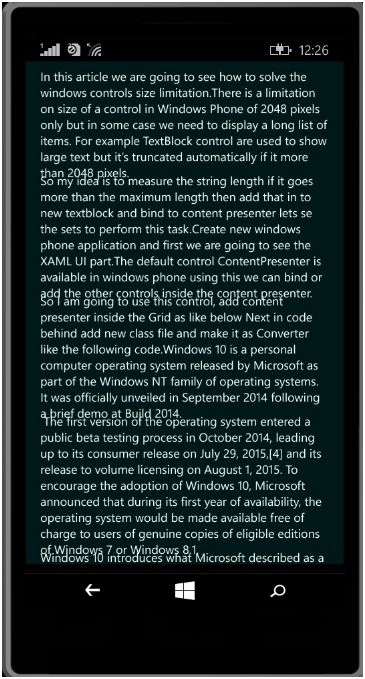
Now run the app and show the output like the following screen.


Mukesh KumarPosted Dec 1, 2015, 8:44 AM
Good Share
Suresh MPosted Dec 1, 2015, 1:37 AM
Thank you
Santhakumar MunuswamyPosted Dec 1, 2015, 1:33 AM
Nice share
Raja TPosted Nov 30, 2015, 11:38 PM
Nice,Thanks for sharing
Banketeshvar NarayanPosted Nov 30, 2015, 1:53 PM
Nice Sharing