Introduction
In this article, we will be studying some of the HTML5 tags.
1. Span element
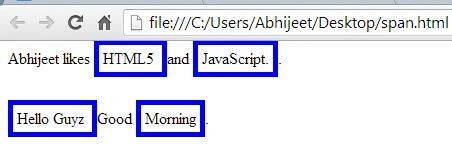
The span element has no meaning in its own right. We would use it to apply one of the global attributes to a region of content. It is not a new element in HTML5.
The span element can be used with the class attribute so that we can target content with a CSS style.
Example
- <html>
- <head>
- <title>Span Example</title>
- <style>
- .HTML5
- {
- border: thick solid blue;
- padding: 4px;
- }
- </style>
- </head>
- <body>
- Abhijeet likes <span class="HTML5">HTML5 </span>and <span class="HTML5">JavaScript.</span>.
- <br>
- <br>
- <br>
- <span class="HTML5">Hello Guyz </span>Good <span class="HTML5">Morning</span>.
- </body>
- </html>
2. Mark element
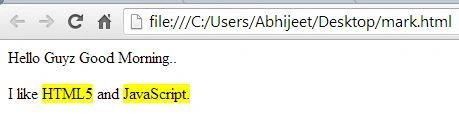
It is basically used for highlighting the text.
In other words, I can say that the mark element is new to HTML5 and represents a span of text that is highlighted due to its relevance in another context.
Example
- <html>
- <head>
- <title>Mark Example</title>
- </head>
- <body>
- Hello Guyz Good Morning..
- <p>
- I like
- <mark>HTML5</mark>
- and
- <mark>JavaScript.</mark>
- </p>
- </body>
- </html>
3. Ins element
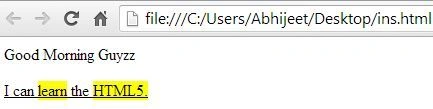
The ins element denotes inserted content. It is also a new element in HTML5.
Example
- <html>
- <head>
- <title>Ins Example</title>
- </head>
- <body>
- Good Morning Guyzz
- <p>
- <ins>I can
- <mark>learn</mark>
- the
- <mark>HTML5.</mark>
- </ins>
- </p>
- </body>
- </html>
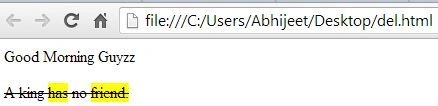
We denote text that has been removed from the document using the del element. It is also a new element in HTML5.
Example
- <html>
- <head>
- <title>Del Example</title>
- </head>
- <body>
- Good Morning Guyzz
- <p>
- <del>A king
- <mark>has</mark>
- no
- <mark>friend.</mark>
- </del>
- </p>
- </body>
- </html>
Conclusion
In this article, we studied some of the HTML5 tags.


Abhishek BhatPosted Feb 26, 2014, 3:41 AM
I am not able to copy html content and paste properly. Just, declare <style> span {style attributes}</style>, then it will use this style for all spans defined in the html body.
Abhijeet SinghPosted Feb 26, 2014, 2:14 AM
how? please explain with an example...
Abhishek BhatPosted Feb 25, 2014, 10:54 PM
A suggestion..first example instead of declaring style at each span level, you can declare it only once..