

Overview
In this article, we will see how we sort the data by table header. In my earlier article, we saw how to sort data by ascending and descending order. This is an extension of that article. So, please refer to my previous article here.
http://www.c-sharpcorner.com/article/sorting-data-in-angularjs/
Introduction
We will see how to sort data in a bidirectional manner, in AngularJS. What we want here is that when we click on a column header, we can sort the data in ascending and descending order. Initially, we have a drop-down for sorting the data. Here, we will click on the column header to sort that data in ascending or descending order.
Let's see the example. We go back to the model that we used in our previous part, Sorting Data in AngularJS.
var mypartone = angular
  .module("mymodule", [])
  .controller("myController", function ($scope) {
    var employees = [
      { name: "Akshay", dateOfBirth: new Date("July 21,1960"), Address: "Mumbai", Salary: "1234.34" },
      { name: "Milind", dateOfBirth: new Date("July 20,1960"), Address: "Nashik", Salary: "12.34" },
      { name: "Raghvan", dateOfBirth: new Date("July 19,1960"), Address: "Pune", Salary: "1235.34" },
      { name: "Hari", dateOfBirth: new Date("July 18,1960"), Address: "Mumbai", Salary: "5589.34" }
    ];
    $scope.employees = employees;
    $scope.SortColumn = "name";
  });
As you can see from the model, we have an employee array and we are attaching that to our $scope. In that $scope object, we are passing sortColumns. It will pop a drop-down list to sort the data but we want a clickable column name for the same.
Now, in that model, we are attaching reverse sort which will be a Boolean property.
$scope.reverseSort = false;
Now, we will add a function that sorts a value of our column name.
$scope.SortData = function (column) {
    $scope.reverseSort = ($scope.SortColumn == column) ? !$scope.reverseSort : false;
}
Now, look at the function carefully. Here, we have attached sort data to our scope object, and in that, we applied the if else condition.
($scope.SortColumn==column) ? If this is true, then it will sort the column, or else
? !$scope. reverse sort: false it will set to false to set as false we had used! (NOT) operator.
$scope.SortData = function (column) {
    $scope.reverseSort = ($scope.SortColumn == column) ? !$scope.reverseSort : false;
    $scope.SortDate = column;
}
Now, I am going to attach another function here, getSortClass. In this function, we will loop another if condition. So, if that value is true, it will sort the data in ascending or descending order.
$scope.getSortClass = function (column) {
    if ($scope.SortColumn == column) {
        return $scope.reverseSort ? 'arrow-down' : 'arrow-up';
    }
}
Here, I am passing the if statement. If $scope.SortColumn is true, then it will return that reverse sort; else, it will return a CSS class which is up arrow and down arrow.
To add a CSS class, just write these lines in CSS.
.arrow-up {
    width: 0;
    height: 0;
    border-left: 5px solid transparent;
    border-right: 5px solid transparent;
    border-bottom: 10px solid black;
}
.arrow-down {
    width: 0;
    height: 0;
    border-left: 5px solid transparent;
    border-right: 5px solid transparent;
    border-top: 10px solid black;
}
Now, if you need to return an empty string, sorting is available for only one column, and the rest of the columns, should return an empty string.
Return
So, our final Model code is.
/// <reference path="angular.min.js" />
// Create a module
var mypartone = angular
                    .module("mymodule", [])
                    .controller("myController", function ($scope) {
                        var employees = [
                            { name: "Akshay", dateOfBirth: new Date("July 21,1960"), Address: "Mumbai", Salary: "1234.34" },
                            { name: "Milind", dateOfBirth: new Date("July 20,1960"), Address: "Nashik", Salary: "12.34" },
                            { name: "Raghvan", dateOfBirth: new Date("July 19,1960"), Address: "Pune", Salary: "1235.34" },
                            { name: "Hari", dateOfBirth: new Date("July 18,1960"), Address: "Mumbai", Salary: "5589.34" }
                        ];
                        $scope.employees = employees;
                        $scope.SortColumn = "name";
                        $scope.reverseSort = false;

                        $scope.SortData = function (column) {
                            $scope.reverseSort = ($scope.SortColumn == column) ? !$scope.reverseSort : false;
                            $scope.SortDate = column;
                        }

                        $scope.getSortClass = function (column) {
                            if ($scope.SortColumn == column) {
                                return $scope.reverseSort ? 'arrow-down' : 'arrow-up'
                            }
                            return '';
                        }
                    });
Now, we will get back to our View.
Currently, our output is
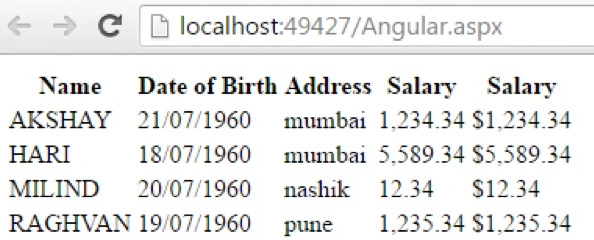
We need an up arrow and a down arrow to sort our data. We need to sort our data by name. So, in our th section, we need to pass ng-click directive and SortClass and bind them by name, as.
<th ng-click="sortData('name')">
Now, we need the up arrow and the down arrow. To display these, we will include a div section and pass ng-class which we will call getSortClass.
Name<div ng-class="getSortClass('name')"></div>
Similarly, do it for the other columns too.
<th ng-click="sortData('name')">
    Name<div ng-class="getSortClass('name')"></div>
</th>
<th ng-click="sortData('dateOfBirth')">Date of Birth <div ng-class="getSortClass('dateOfBirth')"></div>
</th>
<th ng-click="sortData('Address')">Address <div ng-class="getSortClass('Address')"></div>
</th>
<th ng-click="sortData('Salary')">Salary <div ng-class="getSortClass('Salary')"></div>
</th>
<th ng-click="sortData('Salary')">Salary <div ng-class="getSortClass('Salary')"></div>
</th>
Also, we need to pass in reverse sort in ng-repeat, to sort the data.
<tr ng-repeat="employee in employees | orderBy:SortColumn:reverseSort">
So, our View code is.
<table>
  <thead>
    <tr>
      <th ng-click="SortData('name')">
        Name<div ng-class="getSortClass('name')"></div>
      </th>
      <th ng-click="SortData('dateOfBirth')">Date of Birth
        <div ng-class="getSortClass('dateOfBirth')"></div>
      </th>
      <th ng-click="SortData('Address')">Address
        <div ng-class="getSortClass('Address')"></div>
      </th>
      <th ng-click="SortData('Salary')">Salary
        <div ng-class="getSortClass('Salary')"></div>
      </th>
    </tr>
  </thead>
  <tbody>
    <tr ng-repeat="employee in employees | orderBy:SortColumn:reverseSort">
      <td>{{employee.name | uppercase}}</td>
      <td>{{employee.dateOfBirth | date : "dd/MM/yyyy"}}</td>
      <td>{{employee.Address | lowercase}}</td>
      <td>{{employee.Salary | number : 2}}</td>
      <%-- <td>{{employee.Salary | currency}}</td> --%>
    </tr>
  </tbody>
</table>
Now, just reload the page.
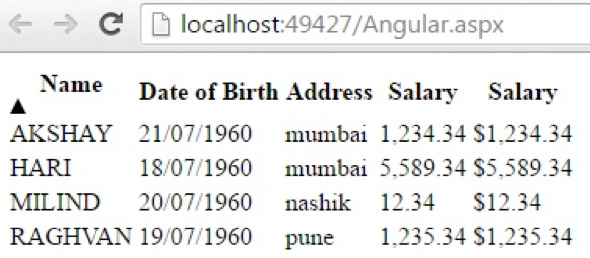
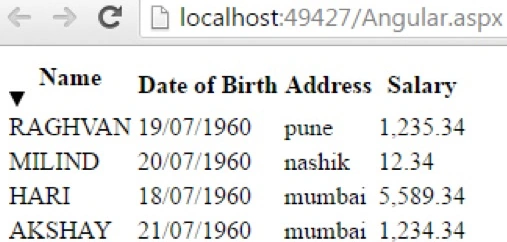
When we click on the Name section, the data is sorted.
Conclusion
So, this was about sorting the data by Table Header, in AngularJS. Hope this article was helpful !!
Also, refer to my previous articles on AngularJS.
- http://www.c-sharpcorner.com/article/overview-of-angularjs/
- http://www.c-sharpcorner.com/article/modules-and-controller-in-angularjs/
- http://www.c-sharpcorner.com/article/controllers-in-angularjs/
- http://www.c-sharpcorner.com/article/angularjs-ng-src-directive/
- http://www.c-sharpcorner.com/article/angularjs-ng-repeat-directive/
- http://www.c-sharpcorner.com/article/handling-events-in-angularjs/
- http://www.c-sharpcorner.com/article/how-to-use-two-way-data-binding-in-angularjs/
- http://www.c-sharpcorner.com/article/filters-in-angularjs2/
Animesh SinghPosted Jul 18, 2017, 9:34 AM
I saw this code on AngularJS tutorial by Venkat. It would be great if you at least mention his name somewhere. Here is the link: https://www.youtube.com/watch?v=hnKSv28dp_w&t=2s
Sandilyan MuniswamyPosted Jun 21, 2017, 3:26 AM
You can use this type of sorting method with the help of bootstrap and jquery also , Check out this link : http://www.sanwebcorner.com/2017/06/sort-table-data-based-on-table-header.html
ankur agarawalPosted Dec 22, 2016, 4:45 AM
I tried same code and worked perfectly in chrome but in IE it is sorting and then binding again so result is duplicate entries. say if i have 4 rows then on click of any column it is showing 8 rows.
SubashPosted Aug 1, 2016, 4:06 AM
Useful share