

Introduction
In my previous article I explained how to create a Simple Media Player. In this article I add Sound Effects in this Media Player such as Volume Up, Volume Down and Mute operations. So that the sound will be affected when doing these operations in this. To work with this first I want to explain how these operations will work.
Volume Up : If the IsMuted property of the Media Element control is set to true then that means it will unmute the audio or vedio. The volume level ranges from 0.0 to 1.0. When it unmutes the audio or video then the handler will increase the Volume property by 0.1. In this way we can increase the volume in Media Player.
private void btnVolumeUp_Click(object sender, RoutedEventArgs e)
{
if (Media.IsMuted)
{
Media.IsMuted = false;
}
if (Media.Volume > 0)
{
Media.Volume -= .1;
}
}
Volume Down : Its just the opposite of Volume Up, in other words if the IsMuted property of the Media element control is set to False then the Volume goes down.
private void btnVolumeDown_Click(object sender, RoutedEventArgs e)
{
if (Media.IsMuted)
{
Media.IsMuted = false;
}
if (Media.Volume < 1)
{
Media.Volume += .1;
}
}
Mute : It will toggle the IsMuted property between true and false.
private void btnMute_Click(object sender, RoutedEventArgs e)
{
Media.IsMuted = !Media.IsMuted;
}
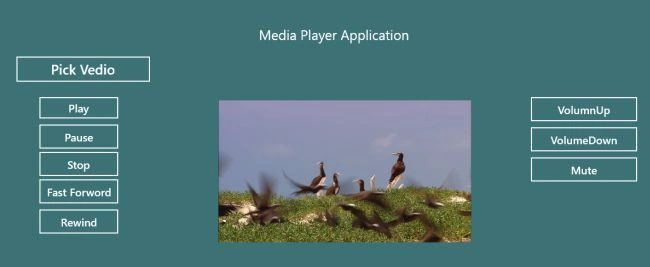
Now first create the MainPage.xaml by performing the following designing in it:
<Page
x:Class="App1.MainPage"
xmlns="http://schemas.microsoft.com/winfx/2006/xaml/presentation"
xmlns:x="http://schemas.microsoft.com/winfx/2006/xaml"
xmlns:local="using:App1"
xmlns:d="http://schemas.microsoft.com/expression/blend/2008"
xmlns:mc="http://schemas.openxmlformats.org/markup-compatibility/2006"
mc:Ignorable="d">
<Grid Background="{StaticResource ApplicationPageBackgroundThemeBrush}">
<Grid Background="#FF3C7176">
<Grid.RowDefinitions>
<RowDefinition Height="100"/>
<RowDefinition Height="650"/>
<RowDefinition Height="auto"/>
</Grid.RowDefinitions>
<Grid.ColumnDefinitions>
<ColumnDefinition Width="350"/>
<ColumnDefinition Width="550"/>
<ColumnDefinition Width="*"/>
</Grid.ColumnDefinitions>
<TextBlock Text="Media Player Application" FontSize="25" Grid.Row="0" Grid.Column="1" HorizontalAlignment="Center" Margin="50,50,0,0" Width="350"/>
<Button Content="Pick Vedio" Width="250" FontSize="25" Margin="29,0,0,598" Click="Pick_Click" Grid.Row="1" Grid.Column="0"/>
<Button Content="Play" FontSize="20" Width="150" Margin="71,74,0,531" Click="Play_click" Grid.Row="1" Grid.Column="0"/>
<Button Content="Pause" FontSize="20" Height="50" Width="150" Margin="71,124,0,476" Click="Pause_click" Grid.Row="1" Grid.Column="0"/>
<Button Content="Stop" FontSize="20" Height="50" Width="150" Margin="71,174,0,426" Click="Stop_Click" Grid.Row="1" Grid.Column="0"/>
<Button Content="Fast Forword" FontSize="20" Height="50" Width="150" Margin="71,224,0,376" Click="Forword_Click" Grid.Row="1" Grid.Column="0"/>
Join the conversation! Your thoughts help the community grow.