

Entity Framework 5 brings many improvements and Spatial Data Type Support in Code First is one of them.
Step 2: Install EF5 from NuGet or Package Manager
At very first, we need to install the Entity Framework 5 for this console project from NuGet Package Manager. For this, in "Solution Explorer" right-click on the project and click on "Manage NuGet Packages" and install Entity Framework 5.
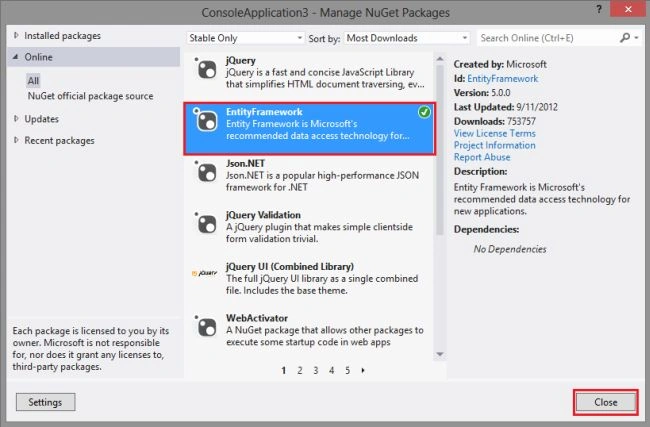
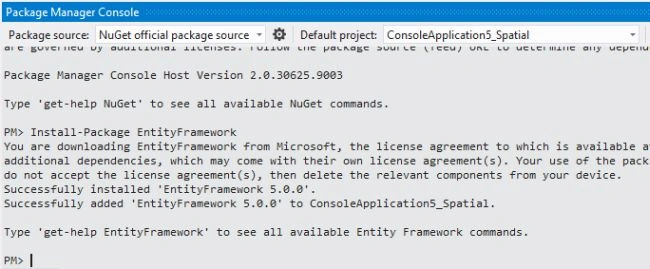
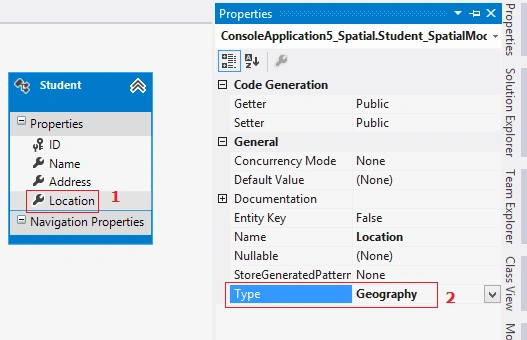
In Entity Framework 5, there are two main spatial data types: geography and geometry. The geography data type stores ellipsoidal data (for example, GPS latitude and longitude coordinates). The geometry data type represents a Euclidean (flat) coordinate system. More here.
In Code First development we usually begin by writing .NET Framework classes that define our conceptual (domain) model and the code below defines the "Student" class.
The "Student" model has the "Location" property of the DbGeography type. To use the DbGeography type, we must add a reference to the "System.Data.Entity" assembly and also add the "System.Data.Spatial" using statement.
In addition to defining entities, we need to define a class that derives from DbContext and exposes DbSet<T> properties. The DbSet<T> properties let the context know which types you want to include in the model.Step 5: Adding and selecting data
- public partial class Student
- {
- public int ID { get; set; }
- public string Name { get; set; }
- public string Address { get; set; }
- public DbGeography Location { get; set; }
- }
- public partial class Student_Spatial : DbContext
- {
- public DbSet Students { get; set; }
- }
Use the following code to find the closest student:
- using (var context = new Student_Spatial())
- {
- Student student1 = new Student()
- {
- Name = "Abhimanyu K Vatsa",
- Address = "Bokaro",
- Location = DbGeography.FromText("POINT(23.684774 86.914565)")
- };
- Student student2 = new Student()
- {
- Name = "Deepak Kumar",
- Address = "Bokaro",
- Location = DbGeography.FromText("POINT(23.563453 86.876875)")
- };
- context.Students.Add(student1);
- context.Students.Add(student2);
- context.SaveChanges();
- var myCurrLocation = DbGeography.FromText("POINT(23.445342 86.108453)");
- var stdQuery = (from i in context.Students
- orderby i.Location.Distance(myCurrLocation)
- select i).FirstOrDefault();
- Console.WriteLine("The closest student to me is " + stdQuery.Name);
- Console.ReadKey();
- }
Kuppurasu NagarajPosted Apr 24, 2016, 12:53 PM
Nice Sharing..
sampath lokugePosted Apr 30, 2013, 12:14 PM
Good one.Keep up the good work.