

Introduction
This article will help you understand what partial class is and what class is used in C# language. Also, I will explain the various uses of the partial class, benefits of using the partial class, and the appropriate place to use the same, with an example.
What is a partial class in C#?
In C#, everything is considered as a separate physical file which has the extension of .cs [CSharp]. This language of C# also provides you with the ability which can have a single class implemented in multiple or different physical (.cs) files.
How is that possible to have a single class in multiple files? Yes, that is achievable using the "partial" modifier keyword in the language of the code. This partial keyword modifier can also be applied to any of the class, method, interface, and structure.
Benefits of Clas
- The modularity of the code can be extensively increased.
- Quality of code maintainability is increased.
- Isolation of the larger part of the code is achieved.
- A single big class, method, or interface can be broken down into multiple partial files based on the module of its functionality or the grouping on some work.
- Easy to debug and edit the code in future.
- It helps to cover the code during unit test execution.
There are many other benefits once you start using the partial class
Where to use the partial class?
This is up to the developer who makes code. Even if you don’t use the partial class, nothing will stop you from the execution of the code.
When you implement the partial class in your application, the above said benefits will be achieved and also, the other developers can easily understand your code.
Now, I answer your question, i.e., when you use the partial keyword in the application.
- When you find the code in a file keeps growing
- When you want to have a set of logic grouped into a file and separate logics in another file.
- When you need to segregate the module of task activities in separate files which belongs to the same class.
How this partial class looks?
A single class which can be subdivided into multiple classes.

Yes, you are right! We are just making a complex object into multiple smaller parts.
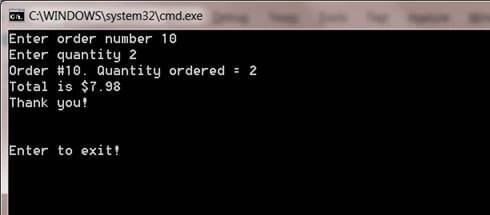
Example

satyendra chPosted Dec 27, 2017, 2:07 AM
Very Usefull............ Can we use these classes in other classes.?? And how to instantiate these partial classes in other class...?
Satish Kumar VadlavalliPosted Dec 15, 2017, 5:33 AM
Nice article and thanks for sharing .
Upendra Pratap ShahiPosted Dec 13, 2017, 12:24 PM
Nice one share keep it up.......