

I've come across several questions over the past few months with developers asking questions regarding the port values that are used when running applications through Visual Studio, primarily where are the values coming from and how to set them. Although this may be a fairly trivial topic, it appears that many users are unaware that the ports that are being used aren't always as random as they may initially appear.
This post will provide a short walk-through for handling and updating these areas of your application to gain more control over debugging, testing and running your applications through Visual Studio.
The Problem
You have multiple Projects that are within your Solution that are going to be running alongside one another and you want to assign explicit ports to each of them (because you don’t want to have to type a different port within your browser each time).
The Solution
You can set these properties depending on if you are using the local Visual Studio Development Server or through IIS within the Properties of your current Project through the following steps:
- Right-click on your Project within the Solution Explorer in Visual Studio.
- Choose Properties from the available Context Menu.
- Select the Web tab on the left-hand side.
- You should find a section called Servers within the right-hand pane.
- You should then see the following area that will allow you to either explicitly use a Specific Port or Auto-Assign Port.
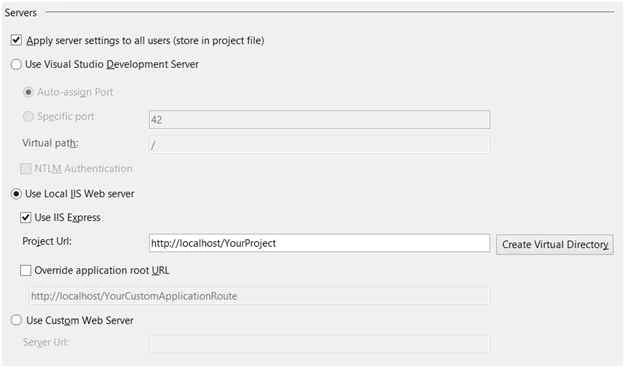
Each of the sections listed within the Servers area will permit you to make changes to the environment that your applications are run in during the debugging process and should provide a bit more control for you (especially if you need to test specific features and functionality through IIS).
Anish AnsariPosted Nov 16, 2015, 12:58 AM
nice one
Santhakumar MunuswamyPosted Nov 11, 2015, 9:41 AM
Good one
Sibeesh VenuPosted Nov 4, 2015, 11:22 PM
Nice Share
Humayun Kabir MamunPosted Nov 4, 2015, 11:20 PM
Nice...
Harshad PansuriyaPosted Nov 4, 2015, 11:08 PM
Nice one