

Introduction
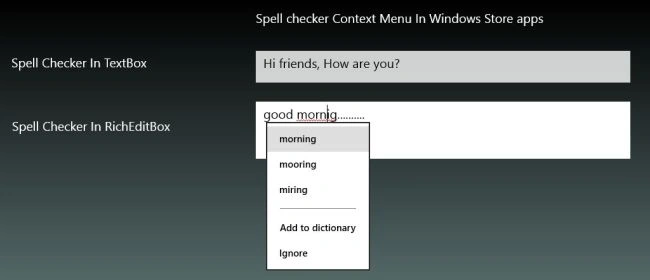
Spell Checker is used to check the spelling of any word. We can apply the Spell Checker context menu in the TextBox and the RichEditBox. If we mis-spell anything that is not in the dictionary then when we right-click on the spelling mistake the Spell Checker context menu will appear showing all the possible correct spellings of that word and also an option for adding that word to the dictionary. The following image shows the simple Spell Checker context menu: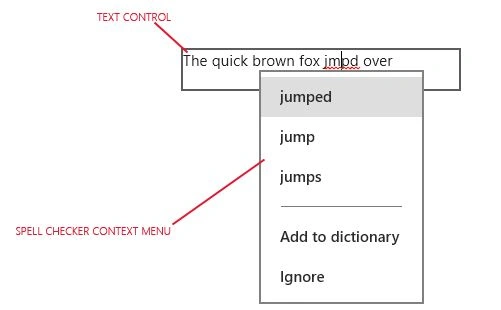
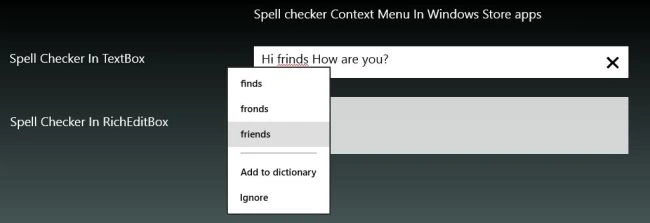
This can be done by using the IsSpellCheckEnabled property of TextBox and the RichaEditBox. If this property is set to true then the Spell Checker context menu will appear when we right-click on the incorrect spelling in the TextBox or the RichEditBox. To see how it works let's use the following.
Step 1
Open Visual Studio 2012 and click on "File" -> "New" -> "Project...".
Step 2
A window is shown. In it select Window Store inside the Visual C# template from the left pane and BlankPage from the center pane as: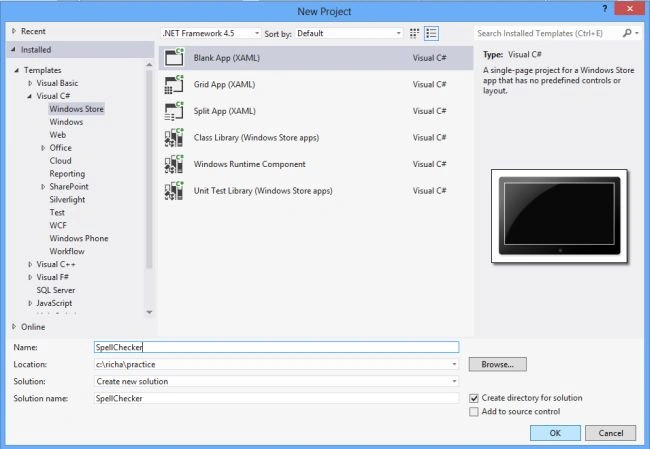
Give the name of your application as "SpellChecker" and then click ok.
Step 3
Open the MainPage.xaml file.
Step 4
Write the following code in this MainPage.xaml file as:
<Page
x:Class="SpellChecker.MainPage"
xmlns="http://schemas.microsoft.com/winfx/2006/xaml/presentation"
xmlns:x="http://schemas.microsoft.com/winfx/2006/xaml"
xmlns:local="using:SpellChecker"
xmlns:d="http://schemas.microsoft.com/expression/blend/2008"
xmlns:mc="http://schemas.openxmlformats.org/markup-compatibility/2006"
mc:Ignorable="d">
<Grid>
<Grid.Background>
<LinearGradientBrush EndPoint="0.5,1" StartPoint="0.5,0">
<GradientStop Color="Black"/>
<GradientStop Color="#FFCFFDFD" Offset="1"/>
</LinearGradientBrush>
</Grid.Background>
<Grid.RowDefinitions>
<RowDefinition Height="50"/>
<RowDefinition Height="100"/>
Join the conversation! Your thoughts help the community grow.