
Introduction
In this article I provide a sample Spell Checker app. So let us first all understand what a spell checker is and it's use.
A spell checker is used to check the spelling of your document. For example we all have worked on a Word document. While writing the document, you have noticed that if you write a misspelled word then a red line automatically appears at the misspelled word. Then you need to right-click on the misspelled word to get all the possible corrections in a context menu, then choose one of them as the correction of your misspelled word.
I want to implement the same thing in a Windows Store app. When I will write a misspelled word in a TextBox then a red line should appear automatically and when I right-click on a misspelled word all possible corrections should be shown in the context menu.
Use the following procedure to create it.
Step 1
First of all you must create a new Windows Store Application.
Open Visual Studio 2012
"File" -> "New" -> "Project..."
Choose "Template" -> "Visual C#" -> "Window Store app"
Choose "Blank App (XAML)" then rename the application
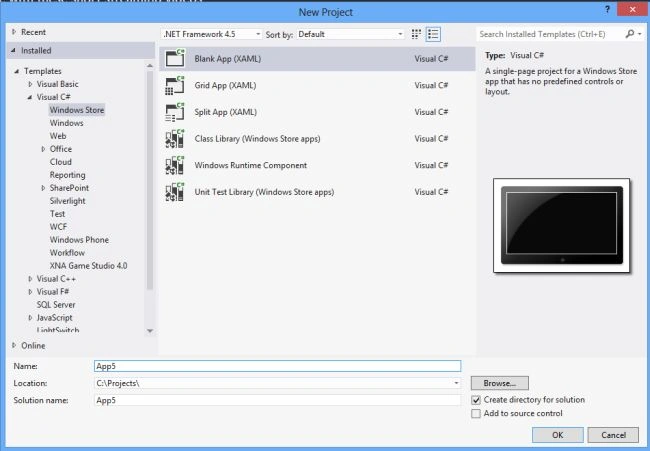
Step 2
Write the following XAML code in "Mainpage.Xaml" (that is available in Solution Explorer):
<Page
x:Class="spell_cheeking_app.MainPage"
xmlns="http://schemas.microsoft.com/winfx/2006/xaml/presentation"
xmlns:x="http://schemas.microsoft.com/winfx/2006/xaml"
xmlns:local="using:spell_cheeking_app"
xmlns:d="http://schemas.microsoft.com/expression/blend/2008"
xmlns:mc="http://schemas.openxmlformats.org/markup-compatibility/2006"
mc:Ignorable="d">
<Grid Background="Red">
<Grid.RowDefinitions>
<RowDefinition Height="82*"/>
<RowDefinition Height="31*"/>
<RowDefinition Height="86*"/>
<RowDefinition Height="569*"/>
</Grid.RowDefinitions>
<Grid.ColumnDefinitions>
<ColumnDefinition Width="258*"/>
<ColumnDefinition Width="551*"/>
<ColumnDefinition Width="557*"/>
</Grid.ColumnDefinitions>
<TextBlock Text="Spell checker app" FontSize="20" FontWeight="ExtraBold" FontFamily="Arial" TextAlignment="Left" Foreground="White" Grid.Column="1" Grid.Row="1" ></TextBlock>
<TextBox x:Name="textbox1" Grid.Column="1" Grid.Row="2" Width="341" Height="82" HorizontalAlignment="Left" VerticalAlignment="Top" IsSpellCheckEnabled="True" AcceptsReturn="True" TextWrapping="Wrap" ></TextBox>
</Grid>
</Page>
Step 3
Now run your application and see the output.

Join the conversation! Your thoughts help the community grow.