Spfx Crud Operations with Dynamic Controls (PNPJS)
Open a command prompt. Create a directory for the SPFx solution.
md spfx-pnp-Crud
Navigate to the above-created directory.
cd spfx-pnp-Crud
Run the Yeoman SharePoint Generator to create the solution.
yo @microsoft/sharepoint
Solution Name
Hit Enter to have default name (spfx-pnp-DropDown in this case) or type in any other name for your solution.
Selected choice - Hit Enter
Target for the component
Here, we can select the target environment where we are planning to deploy the client web part, i.e., SharePoint Online or SharePoint OnPremise (SharePoint 2016 onwards).
Selected Choice: SharePoint Online only (latest)
Place of files
We may choose to use the same folder or create a subfolder for our solution.
Selected Choice: Same folder
Deployment option
Selecting Y will allow the app to deployed instantly to all sites and will be accessible everywhere.
Selected Choice: N (install on each site explicitly)
Permissions to access web APIs
Choose if the components in the solution require permission to access web APIs that are unique and not shared with other components in the tenant.
Selected Choice: N (solution contains unique permissions)
Type of client-side component to create
We can choose to create a client-side web part or an extension. Choose the web part option.
Selected Choice: WebPart
Web part name
Hit Enter to select the default name or type in any other name.
Selected Choice: SpfxDynamicCOntrols
Web part description
Hit Enter to select the default description or type in any other value.
Framework to use
Select any JavaScript framework to develop the component. Available choices are - No JavaScript Framework, React, and Knockout.
Selected Choice: React
Yeoman generator will perform a scaffolding process to generate the solution. The scaffolding process will take a significant amount of time.
Once the scaffolding process is completed, lock down the version of the project dependencies by running the below command.
npm shrinkwrap
In the command prompt, type the below command to open the solution in the code editor of your choice.
NPM Packages Used,
On the command prompt, run the below command.
npm i @pnp/logging @pnp/common @pnp/odata @pnp/sp --save
for Pollyfills
npm install --save @pnp/polyfill-ie11
in SpfxDynamicCOntrolsWebPart.ts
- import "@pnp/polyfill-ie11";
- import { sp, Web } from '@pnp/sp';
- export interface ISpfxDynamicCOntrolsWebPartProps {
- description: string;
- }
- export default class SpfxDynamicCOntrolsWebPart extends BaseClientSideWebPart<ISpfxDynamicCOntrolsWebPartProps> {
- protected onInit(): Promise<void> {
- return new Promise<void>((resolve: () => void, reject: (error?: any) => void): void => {
- sp.setup({
- sp: {
- headers: {
- "Accept": "application/json; odata=nometadata"
- }
- }
- });
- resolve();
- });
- }
- public render(): void {
- const element: React.ReactElement<ISpfxDynamicCOntrolsProps > = React.createElement(
- SpfxDynamicCOntrols,
- {
- description: this.properties.description,
- context: this.context
- }
- );
- ReactDom.render(element, this.domElement);
- }
- protected onDispose(): void {
- ReactDom.unmountComponentAtNode(this.domElement);
- }
- protected get dataVersion(): Version {
- return Version.parse('1.0');
- }
- protected getPropertyPaneConfiguration(): IPropertyPaneConfiguration {
- return {
- pages: [
- {
- header: {
- description: strings.PropertyPaneDescription
- },
- groups: [
- {
- groupName: strings.BasicGroupName,
- groupFields: [
- PropertyPaneTextField('description', {
- label: strings.DescriptionFieldLabel
- })
- ]
- }
- ]
- }
- ]
- };
- }
- }
in SpfxDynamicCOntrols.ts
- import { ISpfxDynamicCOntrolsState } from './ISpfxDynamicCOntrolsState';
- import * as $ from 'jquery';
- require('./Styles/capstatus.css');
- let ProjectMapId:any;
- var search = window.location.search;
- var params = new URLSearchParams(search);
- var MYProjectname = params.get('ProjectName');
- var managerlistid: number;
- import { sp, Web } from '@pnp/sp';
- export default class SpfxDynamicCOntrols extends React.Component<ISpfxDynamicCOntrolsProps, ISpfxDynamicCOntrolsState> {
- constructor(props: ISpfxDynamicCOntrolsProps, state: ISpfxDynamicCOntrolsState) {
- super(props);
- this.state = {
- Projectstatus: [{ mymilestone: "", myscore: "", id: "",Forcastedate:"",Actualdate:"",TgtResDate:"" }]
- };
- this.fetchdatas = this.fetchdatas.bind(this);
- this.AddProject = this.AddProject.bind(this);
- this.updateproject = this.updateproject.bind(this);
- this.AddProgram = this.AddProgram.bind(this);
- this.UpdateProgram = this.UpdateProgram.bind(this);
- if (MYProjectname)
- this.fetchdatas();
- }
- private mybutton() {
- if (!MYProjectname) {
- return <button
- onClick={this.AddProgram}>
- Add Project
- </button>;
- } else {
- return <button
- onClick={() => this.UpdateProgram()}>
- Update Project
- </button>;
- }
- }
- private createUI() {
- let widthstyle = {
- width:"100%"
- };
- let heightstyle = {
- width:"100%"
- };
- return this.state.Projectstatus.map((el, i) => (
- <tr key={i}>
- <td><input type="text" style={widthstyle} mycustomattribute={el.id || ''} placeholder="MileStone" name="mymilestone" value={el.mymilestone || ''} onChange={this.handleChange.bind(this, i)}/></td>
- <td><input type="text" style={widthstyle} mycustomattribute={el.id || ''} placeholder="Percentage" name="myscore" value={el.myscore || ''} onChange={this.handleChange.bind(this, i)}/></td>
- <td><input type="text" style={widthstyle} mycustomattribute={el.id || ''} placeholder="Forcastedate" name="Forcastedate" value={el.Forcastedate || ''} onChange={this.handleChange.bind(this, i)}/></td>
- <td><input type="text" style={widthstyle} mycustomattribute={el.id || ''} placeholder="Actualdate" name="Actualdate" value={el.Actualdate || ''} onChange={this.handleChange.bind(this, i)}/></td>
- <td><input type="text" style={widthstyle} mycustomattribute={el.id || ''} placeholder="TgtResDate" name="TgtResDate" value={el.TgtResDate || ''} onChange={this.handleChange.bind(this, i)}/></td>
- <td><span><a href="" mycustomattribute={el.id || ''} onClick={(e) => {this.removeClick(e,this, i, el.id)}}>-</a></span></td>
- </tr>
- ));
- }
- private handleChange(i, e) {
- const { name, value } = e.target;
- let Projectstatus = [...this.state.Projectstatus];
- Projectstatus[i] = { ...Projectstatus[i], [name]: value };
- this.setState({ Projectstatus });
- }
- private addClick() {
- this.setState(prevState => ({
- Projectstatus: [...prevState.Projectstatus, { mymilestone: "", myscore: "", id: "",Forcastedate:"",Actualdate:"",TgtResDate:"" }]
- }));
- }
- private removeClick(event,mythis,i, delid) {
- event.preventDefault();
-
- if (MYProjectname) {
- let list = sp.web.lists.getByTitle("ProjectStatus");
- list.items.getById(delid).delete().then(_ => {
- console.log("Deleted");
- });
- }
- let Projectstatus = [...this.state.Projectstatus];
- Projectstatus.splice(i, 1);
- this.setState({ Projectstatus });
- }
- private async AddProject(myid:number) {
- const web = new Web(this.props.context.pageContext.web.absoluteUrl);
- const batch = web.createBatch();
- const list = web.lists.getByTitle("ProjectStatus");
- const entityTypeFullName = await list.getListItemEntityTypeFullName();
- for (let k = 0; k < this.state.Projectstatus.length; k++) {
- list.items.inBatch(batch).add({
- ProjectNameId: myid,
- MileStone:this.state.Projectstatus[k].mymilestone,
- PercentageComplete: this.state.Projectstatus[k].myscore,
- ForcastDate: this.state.Projectstatus[k].Forcastedate,
- ActualDate: this.state.Projectstatus[k].Actualdate,
- TargetResolutionDate: this.state.Projectstatus[k].TgtResDate
- }, entityTypeFullName).then(b => {
- });
- }
- batch.execute().then(() => {
- });
- }
- private async updateproject() {
- const web = new Web(this.props.context.pageContext.web.absoluteUrl);
- const batch = web.createBatch();
- const list = web.lists.getByTitle("ProjectStatus");
- const entityTypeFullName = await list.getListItemEntityTypeFullName();
- for (let k = 0; k < this.state.Projectstatus.length; k++) {
- if (!this.state.Projectstatus[k].id) {
- list.items.inBatch(batch).add({
- ProjectNameId: managerlistid,
- MileStone: this.state.Projectstatus[k].mymilestone,
- PercentageComplete:this.state.Projectstatus[k].myscore,
- ForcastDate: this.state.Projectstatus[k].Forcastedate,
- ActualDate: this.state.Projectstatus[k].Actualdate,
- TargetResolutionDate: this.state.Projectstatus[k].TgtResDate
- }, entityTypeFullName).then(b => {
-
- });
- }
- else {
- list.items.inBatch(batch).getById(this.state.Projectstatus[k].id).update({
- ProjectNameId:managerlistid,
- MileStone: this.state.Projectstatus[k].mymilestone,
- PercentageComplete: this.state.Projectstatus[k].myscore,
- ForcastDate: this.state.Projectstatus[k].Forcastedate,
- ActualDate: this.state.Projectstatus[k].Actualdate,
- TargetResolutionDate: this.state.Projectstatus[k].TgtResDate
- }).then(b => {
-
- });
- }
- }
- batch.execute().then(() => console.log("All done!"));
-
- }
- private fetchdatas() {
- var reg1 = new RegExp('<div class=\"ExternalClass[0-9A-F]+\">', "");
- var reg2 = new RegExp('</div>$', "");
- const web = new Web(this.props.context.pageContext.web.absoluteUrl);
-
- const list1 = web.lists.getByTitle("Program");
- list1.items.select('Id,ProgramName').filter("ProgramName eq '" + MYProjectname + "'").get().then(r => {
- managerlistid = r[0].Id;
- $("#ProjectName").val(r[0].ProgramName);
- });
- const list2 = web.lists.getByTitle("ProjectStatus");
- let FetchProjectDetails = [];
- list2.items.select('Id,MileStone,PercentageComplete,ForcastDate,ActualDate,TargetResolutionDate').filter("ProjectName/ProgramName eq '" + MYProjectname + "'").top(5000).get().then(r => {
- for (let i = 0; i < r.length; i++) {
- FetchProjectDetails.push({
- mymilestone: r[i].MileStone,
- myscore: r[i].PercentageComplete,
- id: r[i].Id,
- Forcastedate:r[i].ForcastDate,
- Actualdate:r[i].ActualDate,
- TgtResDate:r[i].TargetResolutionDate
- });
- }
- this.setState({ Projectstatus: FetchProjectDetails });
- });
- }
- public render(): React.ReactElement<ISpfxDynamicCOntrolsProps> {
- return (
- <div className="wrapper">
- <div className="container">
- <div className="program_list">
- <div>
- <div><label>Program Name:</label></div>
- <div><input className="input" type="text" id="ProjectName" /></div>
- </div>
- </div>
- <div className="milestone">
- <table>
- <tbody>
- <tr>
- <th>Milestone Title</th>
- <th>%Complete</th>
- <th>Forecast Date</th>
- <th>Actual Date</th>
- <th>Target Resolution Date</th>
- </tr>
- <a href="#" id="Addbutton" onClick={this.addClick.bind(this)}>+</a><br></br>
- {this.createUI()}
- </tbody>
- </table>
- </div>
- {this.mybutton()}
- </div> </div>
- );
- }
- private AddProgram(): void{
-
- let projectname = $("#ProjectName").val();
-
- var AddData ={
- "ProgramName": projectname,
- };
- sp.web.lists.getByTitle("Program").items.add(AddData).then(i => {
- this.AddProject(i.data.Id);
- });
- }
- private UpdateProgram(): void {
- let projectname = $("#ProjectName").val();
- var UpdateData ={
- "ProgramName": projectname
- }; sp.web.lists.getByTitle("Program").items.getById(managerlistid).update(UpdateData).then(i => {
- this.updateproject();
- });
- }
- }
in ISpfxDynamicCOntrolsProps.ts
- import { WebPartContext } from '@microsoft/sp-webpart-base';
- export interface ISpfxDynamicCOntrolsProps {
- description: string;
- context: WebPartContext;
- }
in ISpfxDynamicCOntrolsState.ts
- export interface ISpfxDynamicCOntrolsState {
- Projectstatus?:any[];
- }
Here I am using 2 lists, namely Program and ProjectStatus.
Program list contains ProgramName field.
ProjectStatus list contains MileStone,PercentageComplete,ForcastDate,ActualDate,TargetResolutionDate fields.
Dynamic Fields are used in the second list.
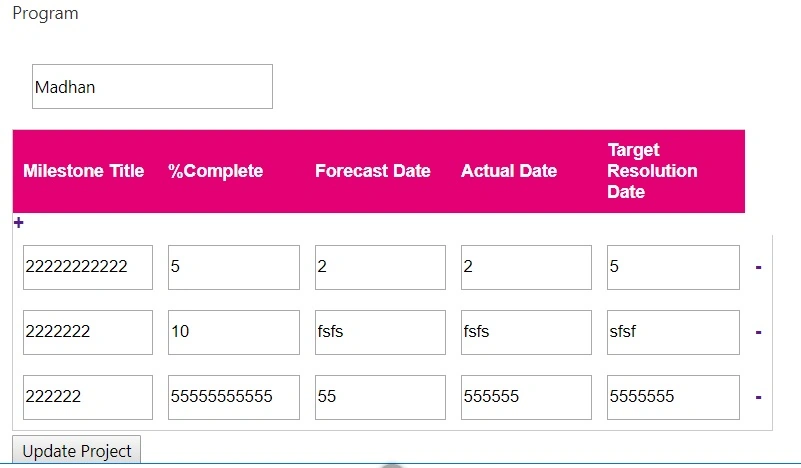
Sample output
I hope this helps someone.


Madhan ThuraiPosted Mar 31, 2020, 8:27 AM
Then use es6 or jquery for those operations ,append,hide,remove etc...
Kartheek TlnPosted Mar 31, 2020, 8:02 AM
I am not using react ,i am using typescript for getting data (https://www.c-sharpcorner.com/article/retrieve-sharepoint-list-items-using-sharepoint-framework-development-model/) i have followed this link to get data ,can you tell me how to do it using typescript
Madhan ThuraiPosted Mar 31, 2020, 7:54 AM
Use react component cycle and state architecture,by setting state the component will rerender
Kartheek TlnPosted Mar 31, 2020, 7:42 AM
Can you give example with code to renrender , ( thanks in advance )
Kartheek TlnPosted Mar 30, 2020, 8:06 AM
Hi i am getting data using from sharepoint list using spfx and making them as anchor tags ,after clicking that links i need to get details related to that link and push data to another div using same SPFX project how to do it?