

In this article we will discuss about the Splash Screen in Silverlight 3.
If a Silverlight application is small, it will be downloaded quickly and appear in the browser. If a Silverlight application is large, it may take a few seconds to download. As long as your application takes longer than 500 milliseconds to download, Silverlight will show an animated splash screen.
Splash Screens can be used for the following purposes:
- To show the Progress of downloading the xap file. (By Default)
- Copyright Information
- Custom Animation.
Fire up Visual Studio 2008 and create a Silverlight Application. Name it as SplashScreenInSL3.

The built in Splash Screen is not that exciting. It simply displays a ring of blinking circles and the percentage of the application that's been downloaded so far.
If you don't like the stock splash screen, you can easily create your own. Essentially, a custom splash screen is a XAML file with the graphical content you want to display, and a dash of JavaScript code that updates the splash screen as the application is downloaded.
Add a new XAML file to your ASP.NET website (not the Silverlight project).
Choose the Silverlight JScript page template, enter a name, and click Add. This XAML file will hold the markup for your splash screen.
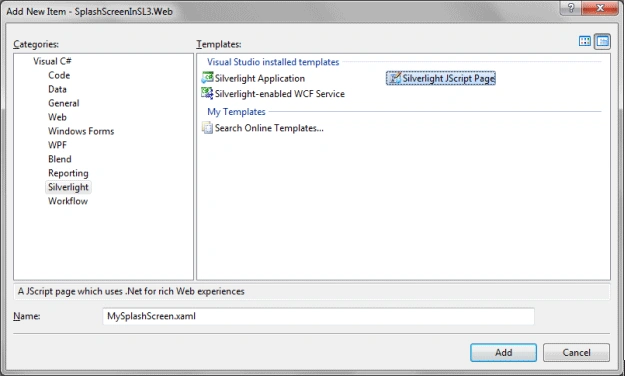
Add the following xaml code into it.

<Grid xmlns="http://schemas.microsoft.com/client/2007"
xmlns:x="http://schemas.microsoft.com/winfx/2006/xaml">
<StackPanel VerticalAlignment="Center">
<Grid>
<Rectangle x:Name="progressBarBackground" Fill="White" Stroke="Black" StrokeThickness="1" Height="30" Width="200"></Rectangle>
<Rectangle x:Name="progressBar" Fill="Yellow" Height="28" Width="0"></Rectangle>
</Grid>
<TextBlock x:Name="progressText" HorizontalAlignment="Center" Text="0% downloaded ..."></TextBlock>
</StackPanel>
</Grid>
Next, you need to add a JavaScript function to your ASPX entry page or ASP.NET test page. (If you plan on using both, place the JavaScript function in a separate file and then link to it in both files using the source attribute of the script block.) The JavaScript code can look up named elements on the page using the sender.findName() method, and manipulate their properties. It can also determine the current progress using the eventArgs.progress property. In this example, the event handling code simply updates the text and widens the progress bar based on the current progress percentage:
<script type="text/javascript">
function onSourceDownloadProgressChanged(sender, eventArgs) {
sender.findName("progressText").Text = Math.round((eventArgs.progress * 100)) + "% downloaded ...";
sender.findName("progressBar").Width = eventArgs.progress * sender.findName("progressBarBackground").Width;
}
</script>
To use this splash screen, you need to add the splashscreensource parameter to identify your XAML splash screen and the onsourcedownloadprogresschanged parameter to hook up your JavaScript event handler. If you want to react when the download is finished, you can hook up a different JavaScript event handler using the onsourcedownloadcomplete parameter.
<object data="data:application/x-silverlight-2," type="application/x-silverlight-2" width="100%" height="100%">
<param name="source" value="ClientBin/SplashScreenInSL3.xap"/>
<param name="onError" value="onSilverlightError" />
<param name="background" value="white" />
<param name="minRuntimeVersion" value="3.0.40624.0" />
<param name="autoUpgrade" value="true" />
<param name="splashscreensource" value="MySplashScreen.xaml" />
<param name="onsourcedownloadprogresschanged" value="onSourceDownloadProgressChanged" />
<a href="http://go.microsoft.com/fwlink/?LinkID=149156&v=3.0.40624.0" style="text-decoration:none">
<img src="http://go.microsoft.com/fwlink/?LinkId=108181" alt="Get Microsoft Silverlight" style="border-style:none"/>
</a>
</object>
That's it run your application to test your Splash Screen. If you still don't see your Splash Screen that is because your page is loading in 500 milli seconds. To see the splash screen build your sample application and this time you will be able to see it.
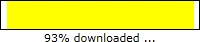
Remember this is a sample Splash Screen. You can make your own Splash Screen.
Enjoy Coding.
SwastikPosted Mar 30, 2011, 6:02 AM
Good Article ! Can u plz provide some more input in ways to use this splash screen in sharepoint page. M using SP 2010 and i need to use a splash screen on my home page so that the user doesn't get bore while the page loads.
jing liPosted Sep 26, 2010, 11:21 PM
Very appreciated for your help there! So is it possible to disable the splash screen in silverlight4? I hope nothing should be shown before the silverlight is loaded but just blank.
GreenwayPosted Aug 13, 2009, 12:44 PM
This works great! Thank you. Diptimaya, I have no JavaScript knowledge, so please forgive my uninformed question. Here is my Idea. We start with an ASP.net page, that also holds small SL-3 control (200x300) The ASP.Net page display introductory text, for the user to read while the 3 meg SL-3 app downloads When the SL app is loaded, it enables a button on the ASP.net page... When the users done reading the intro text, he clicks the button and SL control animates to take up the whole page, totally covering the text. Is this possible? Any pointers? Thanks Mike Greenway
Sejac asaPosted Jul 30, 2009, 6:16 PM
This is very nice and easily understand but i want in .xaml pages forexample : I have taken Two .xaml pages in that in first page i applied Datagrid then it's taken large time for datafill in datagrid then i want splash screen. please help me..