

This example shows how to split files and merge files in C# .Net.
FileStream Open File [C#]
By using the FileStream class, files can be opened for reading or writing; this article is about how to load and save files using FileStream in C#. The FileStream class has "FileMode" and "FileAccess" enumerations as parameters.
[C#] Open existing file for reading
FileStream fileStream = new FileStream(@"c:\file.txt", FileMode.Open, FileAccess.Read);
Prepare Windows form:
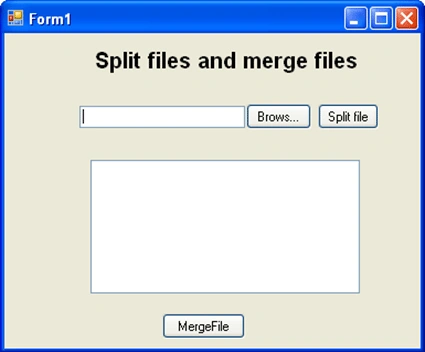
using System;
using System.Collections.Generic;
using System.ComponentModel;
using System.Data;
using System.Drawing;
using System.Linq;
using System.Text;
using System.Windows.Forms;
using System.IO;

namespace Splitfiles
{
    public partial class Form1 : Form
    {
        public FileStream fs;
        string mergeFolder;
        public Form1()
        {
            InitializeComponent();
        }
        List<string> Packets = new List<string>();
        //Merge file is stored in drive
        string SaveFileFolder = @"c:\";

        //Code Under Brows button:

        private void brows_Click(object sender, EventArgs e)
        {
            try
            {
                openFileDialog1.ShowDialog();
                txtBrowsFile.Text = openFileDialog1.FileName;
                fs = new FileStream(txtBrowsFile.Text, FileMode.Open, FileAccess.Read);
                int FileLength = (int)fs.Length / 1024;
                string name = Path.GetFileName(txtBrowsFile.Text);
            }
            catch (Exception ex)
            {
                lblSendingResult.Text = "EXCEPTION:" + ex;
            }
        }
        //Code Under Split button:

        private void btnSplit_Click(object sender, EventArgs e)
        {
            SplitFile(txtBrowsFile.Text, Convert.ToInt32(5));
            listBox1.Items.Add(Packets[0].ToString());
            listBox1.Items.Add(Packets[1].ToString());
            listBox1.Items.Add(Packets[2].ToString());
            listBox1.Items.Add(Packets[3].ToString());
            listBox1.Items.Add(Packets[4].ToString());
        }

        public bool SplitFile(string SourceFile, int nNoofFiles)
        {
            bool Split = false;
            try
            {
                FileStream fs = new FileStream(SourceFile, FileMode.Open, FileAccess.Read);
                int SizeofEachFile = (int)Math.Ceiling((double)fs.Length / nNoofFiles);
                for (int i = 0; i < nNoofFiles; i++)
                {
                    string baseFileName = Path.GetFileNameWithoutExtension(SourceFile);
                    string Extension = Path.GetExtension(SourceFile);
                    FileStream outputFile = new FileStream(Path.GetDirectoryName(SourceFile) + "\\" + baseFileName + "." +
                        i.ToString().PadLeft(5, Convert.ToChar("0")) + Extension + ".tmp", FileMode.Create, FileAccess.Write);
                    mergeFolder = Path.GetDirectoryName(SourceFile);
                    int bytesRead = 0;
                    byte[] buffer = new byte[SizeofEachFile];
                    if ((bytesRead = fs.Read(buffer, 0, SizeofEachFile)) > 0)
                    {
                        outputFile.Write(buffer, 0, bytesRead);
                        //outp.Write(buffer, 0, BytesRead);
                        string packet = baseFileName + "." + i.ToString().PadLeft(3, Convert.ToChar("0")) + Extension.ToString();
                        Packets.Add(packet);
                    }
                    outputFile.Close();
                }
                fs.Close();
            }
            catch (Exception Ex)
            {
                throw new ArgumentException(Ex.Message);
            }
            return Split;
        }

        //Code Under Merge button:
        //Files have been merged and saved at location C:\\"
        private void btnMergeFile_Click(object sender, EventArgs e)
        {
            MergeFile(mergeFolder);
        }

        public bool MergeFile(string inputfoldername1)
        {
            bool Output = false;
            try
            {
                string[] tmpfiles = Directory.GetFiles(inputfoldername1, "*.tmp");
                FileStream outPutFile = null;
                string PrevFileName = "";
                foreach (string tempFile in tmpfiles)
                {
                    string fileName = Path.GetFileNameWithoutExtension(tempFile);
                    string baseFileName = fileName.Substring(0, fileName.IndexOf(Convert.ToChar(".")));
                    string extension = Path.GetExtension(fileName);
                    if (!PrevFileName.Equals(baseFileName))
                    {
                        if (outPutFile != null)
                        {
                            outPutFile.Flush();
                            outPutFile.Close();
                        }
                        outPutFile = new FileStream(SaveFileFolder + "\\" + baseFileName + extension, FileMode.OpenOrCreate, FileAccess.Write);
                    }
                    int bytesRead = 0;
                    byte[] buffer = new byte[1024];
                    FileStream inputTempFile = new FileStream(tempFile, FileMode.OpenOrCreate, FileAccess.Read);
                    while ((bytesRead = inputTempFile.Read(buffer, 0, 1024)) > 0)
                        outPutFile.Write(buffer, 0, bytesRead);
                    inputTempFile.Close();
                    File.Delete(tempFile);
                    PrevFileName = baseFileName;
                }
                outPutFile.Close();
                lblSendingResult.Text = "Files have been merged and saved at location C:\\";
            }
            catch
            {
            }
            return Output;

        }
    }
}
Nam HoàngPosted Apr 18, 2018, 4:16 AM
If File is audio ? help me please
Aparajita RajoriaPosted Feb 13, 2018, 12:49 AM
Sir when i am uploading and split any PDF document it does not split properly and not merging. Sir could you please tell how to merge multiple PDF files?
snowal rajPosted Nov 14, 2017, 3:12 PM
Can u please tell me how to split in time wise
Patrick MuofheePosted Jul 10, 2017, 3:41 AM
Good Day Sir can this code also work to split Pdf File too?
Hai DangPosted Jul 6, 2017, 9:22 PM
Thanks Krishna so much!
mohan rajPosted Sep 6, 2016, 7:08 AM
Sir cld u pls tell how to merge files
Devraj KapdiPosted Aug 30, 2013, 2:06 AM
hello sir .. can u please tell me how to merge the splitted files on FTP. i sent the splited files on my FTP location now wnt to merge that.
Alok KumarPosted Aug 5, 2013, 2:42 PM
Really a good article and code.
Thanh Bang TranPosted May 9, 2013, 12:37 PM
Hey, Can you help me? I have a project send and recieve file through LAN use C#, but I have a matter. After I had sent packets from client to server I joined it. But when I analyse it, it haven't readed. Please help me. that's my project http://www.mediafire.com/?jt7hnxbxs7o2ori. I need your help immediately. Please, Thank you very much.
khizarPosted Oct 18, 2012, 3:38 AM
great work
Ejas ShaikPosted Feb 21, 2012, 11:17 AM
nice one but here problem is that split option works fine, but when i click merge option it is not taking the .000 file when i previous spitted..
faizal ahamdPosted Dec 30, 2011, 4:31 AM
I rate you 5
Felice MassaroPosted Nov 11, 2011, 8:13 AM
Hi, Very interesting article. Lets suppose you wont to split the file in 500 parts, how would you modify the code? Thanks for helping.
Boris DobPosted Apr 28, 2011, 6:02 PM
BIG THANKS, I will use this many times !