

When you eagerly load related data in Entity Framework Core (EF Core) using Include and ThenInclude, the framework can either generate a single large SQL query with multiple JOIN operations or execute several smaller queries (known as split queries). Selecting the appropriate strategy is essential, as an incorrect choice may lead to excessive row counts, high memory consumption, or additional network round trips. This article describes the concept of split queries, their purpose, safe usage practices, and scenarios where they outperform single-query approaches—along with practical patterns for production environments.
The problem: JOINs, duplication, and the "Cartesian explosion"
When using relational databases, Entity Framework gets related data by combining tables with JOINs in single query. The JOIN operations are a standard feature in SQL; however, improper or inefficient implementation can result in considerable performance overhead.This approach works until the query involves multiple collection navigations at the same level, at which point the result set can grow dramatically.
Consider the following example: the Customer table has relationships with Order and Address at the same level. Loading both Order and Address for each Blog results in a Cartesian product of orders and addresses per customer. For instance, if a customer contains 10 orders and 10 addresses, the query will return 100 rows for that single customer. This is the classic Cartesian explosion.
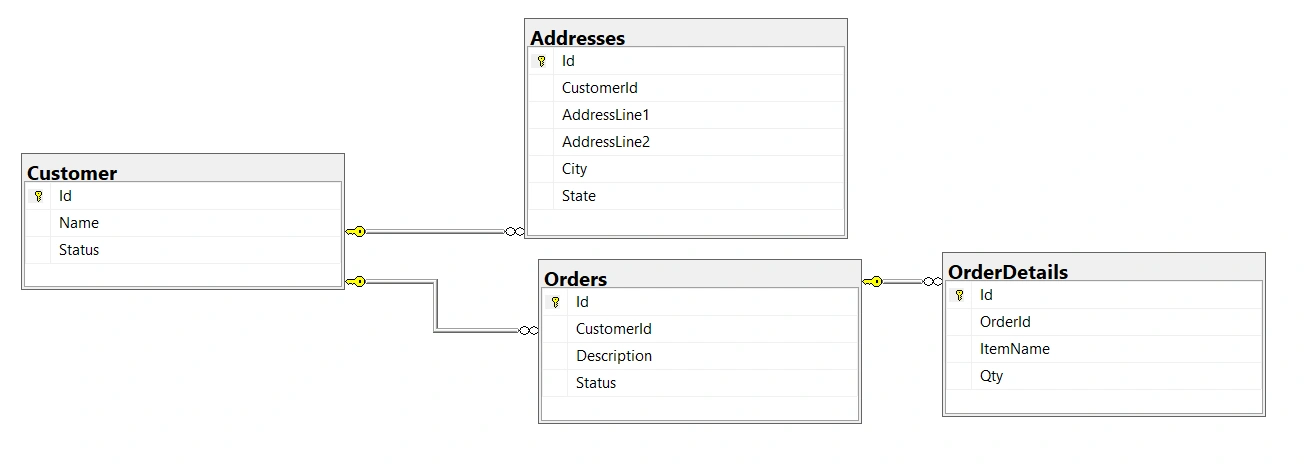
Even with a single collection include, JOIN operations replicate the principal entity’s columns for each child row. This can become costly when the principal contains large columns, such as images or lengthy text. Entity Framework Core recommends using projections to avoid retrieving unnecessary large columns.
var query = context.Customer
            .Include(o=>o.Orders)
            .Include(a=>a.Addresses)
            .Where(r=>r.Id==1);
Generated SQL

What are split queries?
Split queries instruct EF Core to divide a single LINQ query with Include statements into multiple SQL commands, typically one for each included collection. EF Core then assembles the results into the entity graph in memory, preventing the large, duplicated row sets that broad JOIN operations often produce.
Consider above mention example:
var query = context.Customer
            .Include(o=>o.Orders)
            .Include(a=>a.Addresses)
            .AsSplitQuery()
            .Where(r=>r.Id==1);
Generated SQL

When to Use Split Queries
Multiple sibling collection includes
Large principal rows - If the principal entity contains large columns (such as images or BLOBs), JOIN duplication can significantly increase the payload size. In such cases, consider using split queries.
Complex graphs with deep relationships - EF Core’s caution regarding single-query eager loading of collections still applies; for queries with heavy includes, split queries are generally the safer default.
Enabling split queries globally (at the Context level)
You can also set split queries as the default behavior for your application's DbContext
protected override void OnConfiguring(DbContextOptionsBuilder optionsBuilder)
{
    optionsBuilder
        .UseSqlServer(
            connectionString,
            o => o.UseQuerySplittingBehavior(QuerySplittingBehavior.SplitQuery));
}
When split queries are set as the default, you can still configure individual queries to execute as single queries.
Use caution when applying split queries in the following scenarios
Avoid Skip/Take with split queries unless ordering is unique - If you’re using split queries with Skip and Take in EF Core versions prior to 10, make sure your query has a unique ordering. If it doesn’t, the results might be wrong.
Prefer projections over Include for paged lists - Select only the data you need (e.g., project into DTOs) instead of including entire object graphs. This approach reduces payload size and prevents JOIN duplication
Conclusion
Split queries are a powerful, pragmatic tool in EF Core. They help reduce data duplication and mitigate JOIN-related performance issues when eagerly loading complex object graphs—though they introduce additional round trips and potential consistency concerns. The best approach depends on context: benchmark both strategies with production-like data, prefer projections for paging, and ensure stable ordering whenever you combine split queries with pagination.
Use Split Queries When:
You include two or more collections at the same level.
Principal entities contain large columns (e.g., binary or text) that cannot be avoided.
You need predictable memory usage and reduced duplication.
Use Single Queries When:
Includes are primarily references rather than collections.
Network latency is high and additional round trips are expensive.
Strong consistency is required and you prefer a single SQL statement.
Join the conversation! Your thoughts help the community grow.