

Hi everybody. I hope you re enjoying and loving coding. Developers often need to split data at a special character, like !,@,#,$ and so on. Many characters are available on the keyboard.
In the morning I want to upload Microsoft Excel data to SQL Server. I know this is not a difficult task but the problem is if any column value is too large or multiple data sets are in a single column like the following:
In the morning I want to upload Microsoft Excel data to SQL Server. I know this is not a difficult task but the problem is if any column value is too large or multiple data sets are in a single column like the following:
CDSO (India) approved, WHO prequalified, USFDA / USAID approved, Medicines and Healthcare products Regulatory Agency (UK) approved, Product sold to UN
What is the best way to check itself, just look a bit at the following picture to help yu understand.
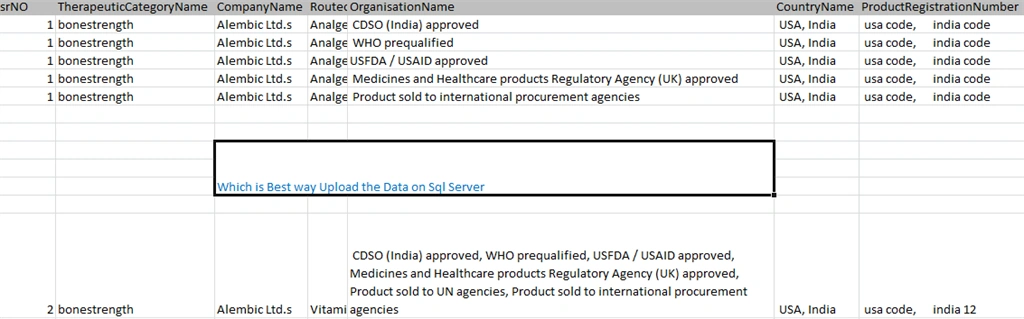
The user wants to enter data into a single column. I know this is difficult, but don't worry, SQL Server hs the ability to split the string value using special characters. Okay, to get to the main point, I created a function in SQL Server. This function splits the string and returns a value in table format.
How to Create a function in SQL Server
- create function [dbo].[fun_splitcolumnvalue_for_importProductName]
- (@Firstdata varchar(max),@seconddata varchar(max),@delimeter varchar(50))
- returns @tamptable table(First varchar(max), Second varchar(max))
- as
- begin
- -- Do stuff here
- return
- end
The preceding function in @FirstData and @secondData is a function parameter. It's a data parameter and @delimeter holds a special character like ,!@#$% and so on. You can split upon any special character.
First varchar(max) and Second varchar(max) is a column name of the @tempTable.
How to work this function
- create function [dbo].[fun_splitcolumnvalue_for_importProductName]
- (@dataone varchar(max),@seconddata varchar(max),@delimeter varchar(50))
- returns @tamptable table(first varchar(max),second varchar(max))
- as
- begin
- DECLARE @CINDEX INT=1
- declare @Csindex varchar(max)
- DECLARE @CSLICE varchar(max)
- declare @Csslice varchar(max)
- WHILE @CINDEX !=0 -- This loop continue until @cindex is value 0.
- BEGIN
- set @CINDEX = CHARINDEX(@delimeter,@dataone) --CHARINDEX is a predefined function. This function return a int type of value like 5. Let's -- --example select charindex(',','joginder,singh')
- --select CHARINDEX('@','I love @ my india')
- -- output is charindex 9 and 8 number
- set @Csindex=CHARINDEX(@delimeter,@seconddata)
- if(@CINDEX!=0)
- begin
- SELECT @CSLICE =LEFT(@dataone,@CINDEX - 1) --left is a sql function it's a predefined. this function returns a string type values like 'joginder'. Let's --example-- select left('joginder,singh',(charindex(',','joginder,singh')-1))
- --output is left function 'joginder' without single comma.
- select @Csslice=LEFT(@seconddata,cast(@Csindex as int)-1)
- end
- else
- begin
- select @CSLICE=@dataone
- select @Csslice=@seconddata
- end
- insert into @tamptable(first,second) values(ltrim(rtrim(@CSLICE)), ltrim(rtrim(@Csslice)))
- set @dataone = RIGHT(@dataone,LEN(@dataone) - @CINDEX) --Right is a also sql predifined function. This function returns a string type values like 'singh'
- set @seconddata=right(@seconddata,LEN(@seconddata)-@Csindex)
- IF LEN(@CINDEX) = 0
- begin
- BREAK
- end
- end
- return
- end
- --select * from fun_splitcolumnvalue_for_importProduct('USA,india','usa code,inida code',',')
- output :
- first |second
- USA | usa code
- India| India Code
A common error
I know that without errors there is no fun in a developer's life. I encountered an error when making this function so I will share it with you. The problem occurs when you make this type of function.
- An infinite loop.
I hope every thing is clear. Comments are most welcome.
Join the conversation! Your thoughts help the community grow.