

Insert a blank space
No, a blank space too consumes a memory.
Then?
Use NULL Values.
What are NULL Values
A Null Value represents a value which is not available (missing values). Null Values are not equal to zero. They are not equal to empty space too. Null Values simply means the missing values.
Consider the Student table which contains StudentID, StudentName, City and marks. Suppose that we don't know the City of particular student. Then, if we write the following query, a blank space will be inserted in the place where City was supposed to be inserted.
Insert into Students values(1,'Raj','',45);
A Null Value represents a value which is not available (missing values). Null Values are not equal to zero. They are not equal to empty space too. Null Values simply means the missing values.
Consider the Student table which contains StudentID, StudentName, City and marks. Suppose that we don't know the City of particular student. Then, if we write the following query, a blank space will be inserted in the place where City was supposed to be inserted.
Insert into Students values(1,'Raj','',45);
The above query inserts a space and not a null value. Then, how can one insert null values in a table.
Insert into Students values(2,'Sham','Mumbai',null);
Insert into Students values(2,'Sham','Mumbai',null);
In the above query, you can see the keyword null in the place where marks are to be inserted. This means that for Sham, the marks field will contain null value.
Now, lets see a table with Null Values.
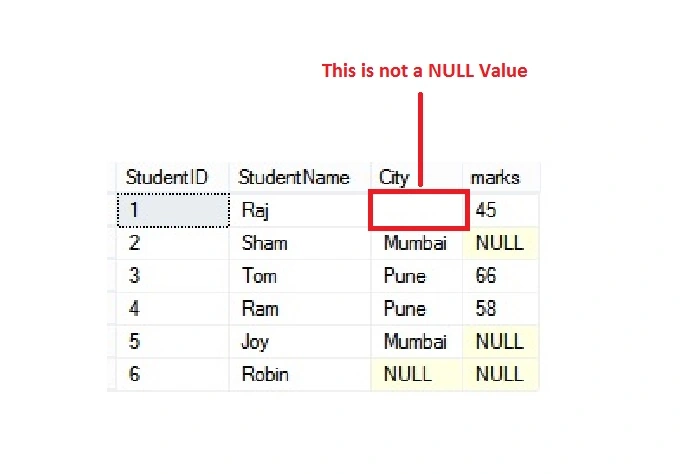
Now, as you can notice in table, there are 4 NULL Values in this table.
If we have to retrieve the records where marks value is null, then this can be done with the help of the following query:
If we have to retrieve the records where marks value is null, then this can be done with the help of the following query:
Select * from Students where marks IS NULL;
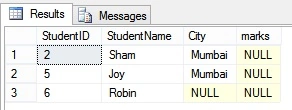
One important thing to notice in the above query is the Where clause. In the where clause, we usually use the 'equal to' operator to compare with any value. But, Null Values cannot be compared with any operators. We use "is null" to check which records in the Students table have marks as null.
Now, if we want to display some value instead of NULL Values when we retrieve the data, then we can use the ISNULL() function.
Select *, ISNULL(marks,0) as marks from Students;
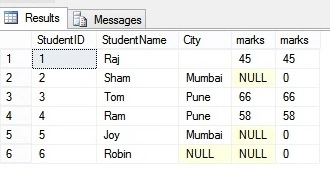
Here, the ISNULL() function first checks the marks column, where ever it finds the NULL values, it replaces them with 0. This is just for display purpose. Internally the table still contains the NULL values.
Also, we have used SQL aliases and function in the above query. We will learn about the SQL aliases and functions in the upcoming articles.
Stay tuned. Happy Learning!
Also, we have used SQL aliases and function in the above query. We will learn about the SQL aliases and functions in the upcoming articles.
Stay tuned. Happy Learning!
SubashPosted Jul 25, 2016, 5:26 AM
Nice Explanition
Amit Kumar SinghPosted Feb 4, 2016, 8:27 AM
Nice Article
Ankit SaxenaPosted Feb 3, 2016, 12:12 PM
Thanks for sharing.
Debasis SahaPosted Feb 1, 2016, 11:41 PM
Nice article...
Yashwant VishwakarmaPosted Feb 1, 2016, 11:13 PM
Informative article , thanks for sharing!!
Mohammed IbrahimPosted Feb 1, 2016, 2:05 PM
nice
Santhakumar MunuswamyPosted Feb 1, 2016, 1:56 PM
Thanks for nice share
Former memberPosted Feb 1, 2016, 12:54 PM
Can we insert null value into primary key?