

The question is, why do we need SQL Paging when we already have built-in paging functionality in Grid View. Sometimes it's not a good habit to load all the data over the network, but instead to transfer only the data required, to improve performance. For that we have SQL paging. Pass only a Page Index and Page Size to load the required data.
The following is my data table structure from which I am fetching the data: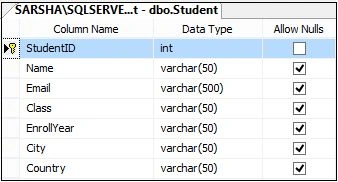
Image 1.
Data in my table:
Image 2.
To do this, I created the following Stored Procedure:
Image 3.
My Stored Procedure is:
- ALTER PROCEDURE [dbo].[GetStudentData]
- (
- @PageIndex INT = 1,
- @PageSize INT = 10,
- @RecordCount INT OUTPUT
- )
- AS
- BEGIN
- SET NOCOUNT ON;
- SELECT ROW_NUMBER() OVER
- (
- ORDER BY StudentID ASC
- )AS RowNumber
- ,StudentID
- ,Name
- ,Class,EnrollYear,City INTO #Results FROM Student
- SELECT * FROM #Results
- WHERE RowNumber BETWEEN(@PageIndex -1) * @PageSize + 1 AND(((@PageIndex -1) * @PageSize + 1) + @PageSize) - 1
- SELECT @RecordCount = COUNT(*) FROM #Results
- DROP TABLE #Results
- END
- <%@ Page Language="C#" AutoEventWireup="true" CodeBehind="SQLPagingInGridView.aspx.cs" Inherits="SQLPaging.SQLPagingInGridView" %>
- <!DOCTYPE html>
- <html xmlns="http://www.w3.org/1999/xhtml">
- <head runat="server">
- <title>SQL Paging Implementation in ASP.NET</title>
- </head>
- <body>
- <form id="form1" runat="server">
- <div>
- <table style="border: solid 15px blue; width: 100%; vertical-align: central;">
- <tr>
- <td style="padding-left: 50px; padding-top: 20px; padding-bottom: 20px; background-color: skyblue; font-size: 20pt; color: orangered;">SQL Paging Implementation in ASP.NET C#
- </td>
- </tr>
- <tr>
- <td style="text-align: left; padding-left: 50px; border: solid 1px red;">
- <asp:GridView ID="GridViewStudent" runat="server" AutoGenerateColumns="False" Width="70%"
- BackColor="White" BorderColor="#3366CC" BorderStyle="None" BorderWidth="1px" CellPadding="4" GridLines="Both">
- <Columns>
- <asp:BoundField DataField="Name" HeaderText="Student Name" />
- <asp:BoundField DataField="Class" HeaderText="Class" />
- <asp:BoundField DataField="EnrollYear" HeaderText="Enroll Year" />
- <asp:BoundField DataField="City" HeaderText="City" />
- </Columns>
- <FooterStyle BackColor="#99CCCC" ForeColor="#003399" />
- <HeaderStyle BackColor="#003399" Font-Bold="True" ForeColor="#CCCCFF" />
- <PagerStyle BackColor="#99CCCC" ForeColor="#003399" HorizontalAlign="Left" />
- <RowStyle BackColor="White" ForeColor="#003399" />
- <SelectedRowStyle BackColor="#009999" Font-Bold="True" ForeColor="#CCFF99" />
- <SortedAscendingCellStyle BackColor="#EDF6F6" />
- <SortedAscendingHeaderStyle BackColor="#0D4AC4" />
- <SortedDescendingCellStyle BackColor="#D6DFDF" />
- <SortedDescendingHeaderStyle BackColor="#002876" />
- </asp:GridView>
- <br />
- <asp:Repeater ID="rptPager" runat="server">
- <ItemTemplate>
- <asp:LinkButton ID="lnkPage" runat="server" Text='<%#Eval("Text") %>' CommandArgument='<%# Eval("Value") %>'
- Enabled='<%# Eval("Enabled") %>' OnClick="lnkbtn_PageIndexChanged"></asp:LinkButton>
- </ItemTemplate>
- </asp:Repeater>
- </td>
- </tr>
- </table>
- </div>
- </form>
- </body>
- </html>
- using System;
- using System.Collections.Generic;
- using System.Data;
- using System.Data.SqlClient;
- using System.Linq;
- using System.Web;
- using System.Web.UI;
- using System.Web.UI.WebControls;
- namespace SQLPaging
- {
- public partial class SQLPagingInGridView : System.Web.UI.Page
- {
- int PageSize = 10;
- protected void Page_Load(object sender, EventArgs e)
- {
- if (!Page.IsPostBack)
- GetStudentData(1, PageSize);
- }
- SqlDataAdapter da;
- DataSet ds = new DataSet();
- public void GetStudentData(int PageIndex, int PageSize)
- {
- using (SqlConnection con = new SqlConnection(@"Data Source=MYPC\SqlServer2k8; Initial Catalog=SchoolManagement; Integrated Security=true;"))
- {
- using (SqlCommand cmd = new SqlCommand("[GetStudentData]", con))
- {
- cmd.CommandType = CommandType.StoredProcedure;
- cmd.Parameters.AddWithValue("@PageIndex", PageIndex);
- cmd.Parameters.AddWithValue("@PageSize", PageSize);
- cmd.Parameters.Add("@RecordCount", SqlDbType.Int, 4);
- cmd.Parameters["@RecordCount"].Direction = ParameterDirection.Output;
- da = new SqlDataAdapter(cmd);
- da.Fill(ds);
- con.Open();
- cmd.ExecuteNonQuery();
- if (ds.Tables[0].Rows.Count > 0)
- {
- GridViewStudent.DataSource = ds.Tables[0];
- GridViewStudent.DataBind();
- }
- int recordCount = Convert.ToInt32(cmd.Parameters["@RecordCount"].Value);
- this.PopulatePager(recordCount, PageIndex);
- }
- }
- }
- private void PopulatePager(int recordCount, int currentPage)
- {
- double dblPageCount = (double)((decimal)recordCount / (PageSize));
- int pageCount = (int)Math.Ceiling(dblPageCount);
- List<ListItem> pages = new List<ListItem>();
- if (pageCount > 0)
- {
- pages.Add(new ListItem("FIRST >> ", "1", currentPage > 1));
- for (int i = 1; i <= pageCount; i++)
- {
- pages.Add(new ListItem(i.ToString(), i.ToString(), i != currentPage));
- }
- pages.Add(new ListItem(" << LAST", pageCount.ToString(), currentPage < pageCount));
- }
- rptPager.DataSource = pages;
- rptPager.DataBind();
- }
- protected void lnkbtn_PageIndexChanged(object sender, EventArgs e)
- {
- int pageIndex = int.Parse((sender as LinkButton).CommandArgument);
- GetStudentData(pageIndex, PageSize);
- }
- }
- }
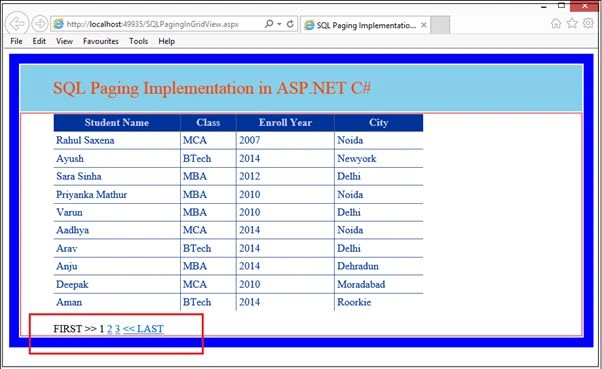
Image 4.
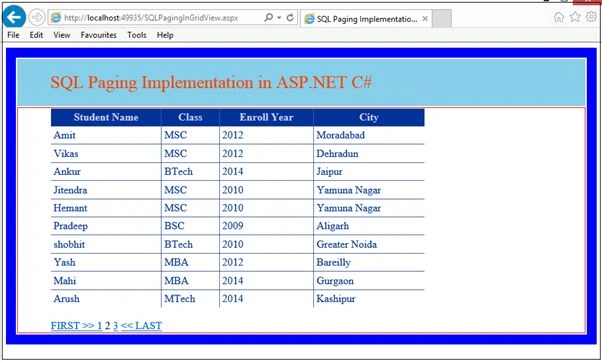
Image 5.
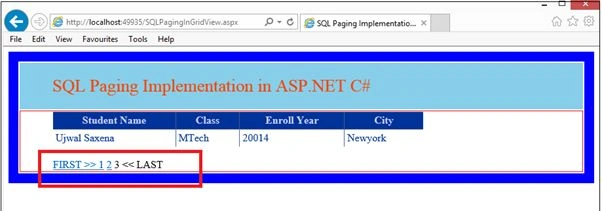
Image 6.
ramkiran kotipalliPosted Oct 3, 2017, 11:25 AM
How to add styles for paging no's
Rahul Kumar SaxenaPosted Feb 26, 2015, 5:10 AM
Thanks Ashish Srivastava...
Rahul Kumar SaxenaPosted Feb 26, 2015, 5:10 AM
Thanks Michal Habalcik...
ASHISH SRIVASTAVAPosted Feb 5, 2015, 11:07 PM
v. good article.. happy coding ;)
Michal HabalcikPosted Feb 5, 2015, 1:26 AM
plain and simple, thanks for sharing