

Image source: online
As a software and SQL developer since 2009, I have honed my expertise in building robust, scalable, and secure database solutions using SQL Server. My deep understanding of SQL Server CLR Integration has enabled me to deliver high-impact applications for industries such as manufacturing, trading, real estate, and pharmaceuticals.
This comprehensive guide is a reflection of my commitment to sharing practical, real-world knowledge with developers, architects, and business stakeholders. By blending theoretical foundations with detailed code examples, realistic data, and industry-specific use cases, this guide empowers you to leverage CLR Integration to create flexible, high-performance, and secure database solutions. Whether you’re optimizing production schedules, consuming REST APIs, or integrating weather data, this guide will equip you with the tools and strategies to drive business value.
Let’s embark on a journey to unlock the full potential of SQL Server CLR Integration.
Table of Contents
1. Introduction to SQL Server CLR Integration
- 1.1 What is CLR Integration?
- 1.2 Why Use CLR Integration?
- 1.3 CLR Integration vs. T-SQL: A Comparison
2. Theoretical Foundations
- 2.1 How CLR Integration Works
- 2.2 CLR Compilation and Execution
- 2.3 Key Components of CLR Integration
3. Development Best Practices
- 3.1 Flexibility
- 3.2 Scalability
- 3.3 Security
- 3.4 Performance Optimization
- 3.5 Reducing Development Time and Costs
- 3.6 Minimizing Dependencies
4. Deployment Strategies
- 4.1 Assembly Deployment
- 4.2 Versioning and Updates
- 4.3 Testing and Validation
5. Security Considerations
- 5.1 Permission Sets
- 5.2 Code Access Security
- 5.3 Best Practices for Secure Coding
6. Architecture and Design Patterns
- 6.1 Layered Architecture
- 6.2 Domain-Driven Design (DDD)
- 6.3 Factory and Repository Patterns
7. Real-World Use Cases and Code Examples
- 7.1 Manufacturing: Production Scheduling
- 7.2 Quality Control (QC): Defect Tracking
- 7.3 Inventory: Stock Level Optimization
- 7.4 Warehouse: Logistics Management
- 7.5 HR: Employee Performance Analysis
- 7.6 Supply Chain Management (SCM): Supplier Evaluation
- 7.7 Costing: Cost Analysis for Manufacturing
- 7.8 Procurement: Vendor Scoring
- 7.9 Planning: Demand Forecasting
- 7.10 Sales: Sales Trend Analysis
- 7.11 Marketing: Customer Segmentation
- 7.12 Accounts & Finance: Fraud Detection
- 7.13 Industry-Specific Scenarios (Trading, Manufacturing, Real Estate, Pharmaceuticals)
- 7.14 REST API Data Consumption (JWT and Basic Authentication)
- 7.15 Unicode Converter (URL Encode/Decode for English, Bangla, Unicode)
- 7.16 Raw Data Bulk Import (.csv, .xlsx, .txt to SQL Server)
- 7.17 SQL Server Agent Job Scheduler for Periodic Runs
- 7.18 Google Maps Integration (Geocoding)
- 7.19 Weather API Integration
8. Pros and Cons of CLR Integration
- 8.1 Advantages
- 8.2 Disadvantages
- 8.3 When to Use CLR Integration
9. Alternatives to CLR Integration
- 9.1 T-SQL
- 9.2 External APIs and Middleware
- 9.3 NoSQL Databases
10. Business Case for CLR Integration
- 10.1 Cost-Benefit Analysis
- 10.2 ROI for Enterprises
11. Advanced Scenarios
- 11.1 Streaming Table-Valued Functions (STVFs)
- 11.2 User-Defined Aggregates
- 11.3 Complex Triggers
12. Conclusion
Building the Future with CLR Integration
1. Introduction to SQL Server CLR Integration
1.1 What is CLR Integration?
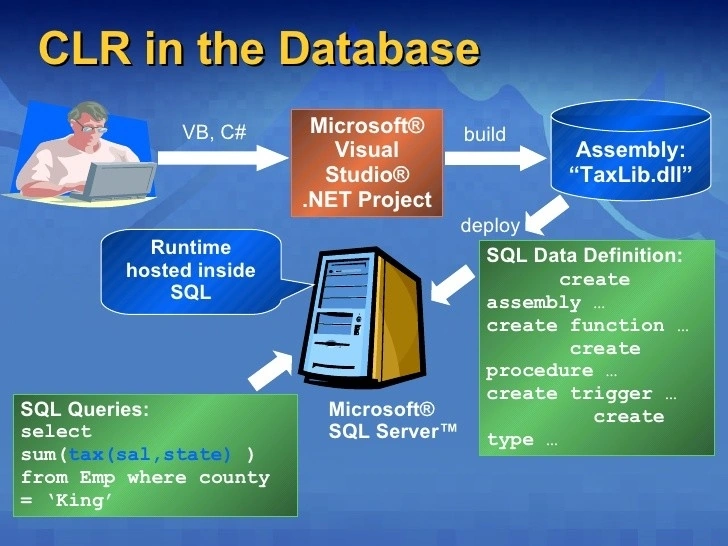
SQL Server Common Language Runtime (CLR) Integration allows developers to create database objects—such as stored procedures, functions, triggers, user-defined types (UDTs), and aggregates—using .NET languages like C#. Introduced in SQL Server 2005, CLR Integration embeds the .NET CLR within SQL Server, enabling developers to leverage the .NET Framework’s rich libraries and programming capabilities. This integration is particularly valuable for tasks that are complex or inefficient in T-SQL, such as advanced computations, string manipulations, or interactions with external systems.
1.2 Why Use CLR Integration?
CLR Integration bridges the gap between relational databases and managed code, offering:
- Performance: Faster execution for procedural logic and complex calculations compared to T-SQL.
- Flexibility: Access to .NET libraries for advanced functionality, such as file handling, network requests, or JSON parsing.
- Reusability: Code can be reused across database and application layers, reducing redundancy.
- Security: Fine-grained permission sets (SAFE, EXTERNAL_ACCESS, UNSAFE) ensure controlled execution.
- Scalability: Handles large datasets and complex logic efficiently with proper optimization.
Example Use Case: A financial application calculating the Black-Scholes model for option pricing is cumbersome in T-SQL but straightforward in C# with CLR Integration.
1.3 CLR Integration vs. T-SQL: A Comparison
| Feature | CLR Integration | T-SQL |
|---|---|---|
| Language | .NET (C#, VB.NET) | SQL-based |
| Performance | Superior for procedural logic | Optimized for set-based operations |
| Complexity | Handles complex computations | Limited for advanced logic |
| External Access | Supports file, network, APIs | Limited to database operations |
| Development Time | Higher initial setup, reusable | Faster for simple queries |
Use Case Example: Parsing JSON responses from a REST API is impractical in T-SQL but seamless in CLR Integration using .NET’s JSON libraries.
2. Theoretical Foundations
2.1 How CLR Integration Works
CLR Integration embeds the .NET CLR within SQL Server’s process space. When a CLR routine (e.g., stored procedure, function) is invoked:
- SQL Server generates a Common Intermediate Language (CIL) stub to marshal parameters between SQL Server and the CLR.
- The stub is compiled to native code using Just-In-Time (JIT) compilation.
- The CLR executes the managed code, leveraging .NET libraries as needed.
- Results are returned to SQL Server in a format compatible with T-SQL (e.g., scalar values, result sets).
2.2 CLR Compilation and Execution
- Compilation: C# code is compiled into a .NET assembly (DLL) using Visual Studio or another IDE. The assembly is registered in SQL Server using CREATE ASSEMBLY.
- Execution: SQL Server loads the assembly into an isolated application domain, ensuring security and stability. The CLR manages memory and threading, optimizing performance.
- Optimization: CLR routines avoid boxing/unboxing overhead and support type-specific optimizations for better performance.
2.3 Key Components of CLR Integration
- Stored Procedures: Execute procedural logic, such as data processing or external API calls.
- User-Defined Functions (UDFs): Scalar functions return single values; table-valued functions return result sets.
- Triggers: Respond to database events (e.g., INSERT, UPDATE) with custom logic.
- User-Defined Types (UDTs): Define complex data structures, such as geospatial coordinates.
- Aggregates: Create custom aggregation logic, such as weighted averages or statistical computations.
3. Development Best Practices
3.1 Flexibility
- Modular Design: Structure CLR code into reusable classes and methods to support multiple use cases.
- Configuration-Driven Logic: Store business rules in SQL Server tables to allow updates without modifying CLR code.
- Example: A manufacturing system might use a configuration table to define production scheduling rules, enabling changes without redeploying assemblies.
3.2 Scalability
- Minimize Resource Usage: Optimize CLR code to reduce CPU and memory consumption, especially for large datasets.
- Batch Processing: Use Streaming Table-Valued Functions (STVFs) to process data incrementally, avoiding memory bottlenecks.
- Example: In inventory management, process stock updates in batches to handle millions of transactions efficiently.
3.3 Security
- Use SAFE Permission Set: Restrict CLR code to database operations unless external access (e.g., APIs, files) is required.
- Input Validation: Sanitize all inputs to prevent injection attacks or invalid data processing.
- Example: In a financial application, validate transaction amounts in CLR code before processing to prevent errors or fraud.
3.4 Performance Optimization
- Minimize Database Calls: Reduce round-trips to SQL Server within CLR routines by caching data or using efficient queries.
- Use Native Types: Map .NET types to SQL Server types (e.g., SqlInt32 for INT) to avoid conversion overhead.
- Example: In sales analysis, compute aggregates in CLR instead of fetching raw data repeatedly.
3.5 Reducing Development Time and Costs
- Code Reuse: Develop shared .NET libraries for common tasks (e.g., string parsing, calculations) to streamline development.
- Unit Testing: Write unit tests for CLR code to catch issues early, reducing debugging time.
- Example: A shared library for date formatting can be reused across HR and sales applications, saving development effort.
3.6 Minimizing Dependencies
- Limit External Libraries: Avoid third-party DLLs to simplify deployment and reduce compatibility risks.
- Self-Contained Code: Embed logic within the CLR assembly to minimize external dependencies.
- Example: For a quality control system, embed defect detection algorithms in the CLR assembly rather than relying on external APIs.
4. Deployment Strategies
4.1 Assembly Deployment
- Compile the Code: Use Visual Studio to compile C# code into a .NET assembly (DLL).
- Register the Assembly
CREATE ASSEMBLY MyCLRAssembly FROM 'C:\Path\To\MyCLRAssembly.dll' WITH PERMISSION_SET = SAFE; - Create the SQL Server Object:
CREATE PROCEDURE MyCLRProcedure
AS EXTERNAL NAME MyCLRAssembly.[Namespace.ClassName].MethodName;
4.2 Versioning and Updates
- Use versioned assemblies (e.g., MyCLRAssembly_v1_0.dll) to avoid conflicts during updates.
- Update assemblies using ALTER ASSEMBLY to refresh the DLL without dropping dependent objects:
ALTER ASSEMBLY MyCLRAssembly
FROM 'C:\Path\To\MyCLRAssembly_v2_0.dll';
4.3 Testing and Validation
- Development Environment: Test CLR code in a non-production environment with realistic data.
- Performance Monitoring: Use SQL Server Profiler to track CPU, memory, and execution time.
- Security Validation: Ensure the assembly runs with the least privileges (e.g., SAFE unless external access is needed).
5. Security Considerations
5.1 Permission Sets
SQL Server supports three permission sets for CLR assemblies:
- SAFE: Limited to database operations; no external access (e.g., files, network). Default and recommended.
- EXTERNAL_ACCESS: Allows access to external resources (e.g., APIs, file system) with controlled permissions.
- UNSAFE: Full access, including native code execution. Use only when absolutely necessary (e.g., third-party libraries).
Best Practice: Use SAFE unless external access is explicitly required, then use EXTERNAL_ACCESS with strict controls.5.2 Code Access Security
- Leverage .NET’s Code Access Security (CAS) to restrict assembly permissions.
- Sign assemblies with a strong name to prevent tampering and ensure integrity.
5.3 Best Practices for Secure Coding
- Input Validation: Sanitize all inputs to prevent injection attacks or invalid data.
- Avoid Dynamic SQL: Use parameterized queries to reduce security risks.
- Error Handling: Log errors securely without exposing sensitive information (e.g., stack traces).
- Example: In a procurement system, validate vendor IDs in CLR code before processing purchase orders to prevent unauthorized access.
6. Architecture and Design Patterns
6.1 Layered Architecture
Organize CLR code into layers for maintainability:
- Data Access Layer: Handles SQL Server interactions (e.g., queries, updates).
- Business Logic Layer: Implements core logic (e.g., calculations, validations).
- Presentation Layer: Formats output for T-SQL consumption (e.g., result sets, messages).
6.2 Domain-Driven Design (DDD)Model
CLR objects around business domains (e.g., Inventory, Sales) to align with business requirements.
For example, create a Supplier class for SCM scenarios with methods for evaluation and scoring.6.3 Factory and Repository Patterns
- Factory Pattern: Dynamically create CLR objects based on configuration (e.g., different scoring algorithms for vendors).
- Repository Pattern: Encapsulate data access logic in a reusable repository class.
- Example: A repository for inventory data might abstract stock queries, making it reusable across CLR routines.
7. Real-World Use Cases and Code Examples
This section provides detailed, industry-specific use cases with basic and advanced implementations, realistic data, code examples, pros/cons, and alternatives. Each scenario addresses business needs in manufacturing, trading, real estate, and pharmaceuticals, ensuring flexibility, scalability, and performance.
7.1 Manufacturing: Production Scheduling
Scenario: A manufacturing company needs to optimize production schedules based on machine availability and order priorities.
Basic Implementation: Calculate schedules using a simple priority-based algorithm.Code Example:
using System;
using System.Data.SqlTypes;
using Microsoft.SqlServer.Server;
using System.Data.SqlClient;
using System.Collections.Generic;

public class ProductionScheduler
{
    [SqlProcedure]
    public static void CalculateSchedule()
    {
        try
        {
            using (var conn = new SqlConnection("context connection=true"))
            {
                conn.Open();
                var cmd = new SqlCommand("SELECT OrderID, Duration, Priority FROM ProductionOrders", conn);
                var reader = cmd.ExecuteReader();
                var orders = new List<Order>();
                while (reader.Read())
                {
                    orders.Add(new Order
                    {
                        OrderID = reader.GetInt32(0),
                        Duration = reader.GetInt32(1),
                        Priority = reader.GetInt32(2)
                    });
                }
                reader.Close();

                // Sort by priority (descending) and duration (ascending)
                orders.Sort((a, b) => a.Priority == b.Priority ? a.Duration.CompareTo(b.Duration) : b.Priority.CompareTo(a.Priority));

                // Output schedule
                SqlContext.Pipe.Send("Optimized Schedule:");
                foreach (var order in orders)
                {
                    SqlContext.Pipe.Send($"OrderID: {order.OrderID}, Duration: {order.Duration}, Priority: {order.Priority}");
                }
            }
        }
        catch (Exception ex)
        {
            SqlContext.Pipe.Send($"Error: {ex.Message}");
        }
    }
}

public class Order
{
    public int OrderID { get; set; }
    public int Duration { get; set; }
    public int Priority { get; set; }
}
Advanced Implementation: Incorporate machine availability and store the schedule.Code Example:
using System;
using System.Data.SqlTypes;
using Microsoft.SqlServer.Server;
using System.Data.SqlClient;
using System.Collections.Generic;

public class ProductionScheduler
{
    [SqlProcedure]
    public static void CalculateScheduleWithAvailability()
    {
        try
        {
            using (var conn = new SqlConnection("context connection=true"))
            {
                conn.Open();
                // Fetch orders
                var ordersCmd = new SqlCommand("SELECT OrderID, Duration, Priority FROM ProductionOrders", conn);
                var ordersReader = ordersCmd.ExecuteReader();
                var orders = new List<Order>();
                while (ordersReader.Read())
                {
                    orders.Add(new Order
                    {
                        OrderID = ordersReader.GetInt32(0),
                        Duration = ordersReader.GetInt32(1),
                        Priority = ordersReader.GetInt32(2)
                    });
                }
                ordersReader.Close();

                // Fetch machine availability
                var machinesCmd = new SqlCommand("SELECT MachineID, AvailableHours FROM MachineAvailability", conn);
                var machinesReader = machinesCmd.ExecuteReader();
                var machines = new Dictionary<int, int>();
                while (machinesReader.Read())
                {
                    machines.Add(machinesReader.GetInt32(0), machinesReader.GetInt32(1));
                }
                machinesReader.Close();

                // Sort orders by priority and duration
                orders.Sort((a, b) => a.Priority == b.Priority ? a.Duration.CompareTo(b.Duration) : b.Priority.CompareTo(a.Priority));

                // Assign orders to machines
                foreach (var order in orders)
                {
                    int assignedMachine = -1;
                    foreach (var machine in machines)
                    {
                        if (machine.Value >= order.Duration)
                        {
                            assignedMachine = machine.Key;
                            machines[machine.Key] -= order.Duration;
                            break;
                        }
                    }

                    // Store schedule
                    var insertCmd = new SqlCommand(
                        "INSERT INTO ProductionSchedule (OrderID, MachineID, ScheduledDate) VALUES (@OrderID, @MachineID, GETDATE())", conn);
                    insertCmd.Parameters.AddWithValue("@OrderID", order.OrderID);
                    insertCmd.Parameters.AddWithValue("@MachineID", assignedMachine >= 0 ? assignedMachine : (object)DBNull.Value);
                    insertCmd.ExecuteNonQuery();

                    SqlContext.Pipe.Send($"OrderID: {order.OrderID}, MachineID: {(assignedMachine >= 0 ? assignedMachine.ToString() : "None")}");
                }
            }
        }
        catch (Exception ex)
        {
            SqlContext.Pipe.Send($"Error: {ex.Message}");
        }
    }
}

public class Order
{
    public int OrderID { get; set; }
    public int Duration { get; set; }
    public int Priority { get; set; }
}
SQL Server Setup
CREATE TABLE ProductionOrders (
    OrderID INT PRIMARY KEY,
    Duration INT,
    Priority INT
);

CREATE TABLE MachineAvailability (
    MachineID INT PRIMARY KEY,
    AvailableHours INT
);

CREATE TABLE ProductionSchedule (
    OrderID INT,
    MachineID INT,
    ScheduledDate DATETIME
);

CREATE ASSEMBLY ProductionScheduler
FROM 'C:\Path\To\ProductionScheduler.dll'
WITH PERMISSION_SET = SAFE;

CREATE PROCEDURE usp_CalculateSchedule
AS EXTERNAL NAME ProductionScheduler.[ProductionScheduler].CalculateSchedule;

CREATE PROCEDURE usp_CalculateScheduleWithAvailability
AS EXTERNAL NAME ProductionScheduler.[ProductionScheduler].CalculateScheduleWithAvailability;

-- Insert sample data
INSERT INTO ProductionOrders (OrderID, Duration, Priority) VALUES
(1, 120, 3),
(2, 90, 1),
(3, 150, 2);

INSERT INTO MachineAvailability (MachineID, AvailableHours) VALUES
(1, 200),
(2, 100);

EXEC usp_CalculateSchedule;
EXEC usp_CalculateScheduleWithAvailability;
Data Example
-- ProductionOrders
OrderID | Duration | Priority
--------|----------|---------
1       | 120      | 3
2       | 90       | 1
3       | 150      | 2

-- MachineAvailability
MachineID | AvailableHours
----------|---------------
1         | 200
2         | 100
Industry Application
- Manufacturing: Optimizes production lines for automotive parts or electronics.
- Pharmaceuticals: Schedules batch production for drugs, considering equipment availability.
Pros
- Handles complex scheduling logic efficiently.
- Reusable across different manufacturing processes.
- Advanced implementation integrates machine availability for realistic scheduling.
Cons
- Requires initial setup for CLR deployment.
- Advanced scenarios need careful optimization for large datasets.
Alternatives
- T-SQL: Simple priority-based sorting (limited for complex logic).
- Application Layer: Use a .NET application for scheduling (less integrated with SQL Server).
7.2 Quality Control (QC): Defect Tracking
Scenario: A pharmaceutical company tracks defects in drug batches to ensure compliance with regulations.Basic Implementation: Calculate defect rates as a scalar function.
Code Example
using System.Data.SqlTypes;
using Microsoft.SqlServer.Server;

public partial class QCFunctions
{
    [SqlFunction]
    public static SqlDouble CalculateDefectRate(SqlInt32 defects, SqlInt32 totalUnits)
    {
        if (totalUnits.IsNull || totalUnits.Value == 0)
            return SqlDouble.Null;

        double rate = (double)defects.Value / totalUnits.Value * 100;
        return new SqlDouble(rate);
    }
}
Advanced Implementation: Flag non-compliant batches and store results.
Code Example
using System.Data.SqlTypes;
using Microsoft.SqlServer.Server;
using System.Data.SqlClient;

public partial class QCFunctions
{
    [SqlProcedure]
    public static void FlagNonCompliantBatches(SqlDouble threshold)
    {
        try
        {
            using (var conn = new SqlConnection("context connection=true"))
            {
                conn.Open();
                var cmd = new SqlCommand(
                    "SELECT BatchID, Defects, TotalUnits FROM BatchQuality", conn);
                var reader = cmd.ExecuteReader();
                while (reader.Read())
                {
                    int batchID = reader.GetInt32(0);
                    int defects = reader.GetInt32(1);
                    int totalUnits = reader.GetInt32(2);
                    double rate = totalUnits == 0 ? 0 : (double)defects / totalUnits * 100;

                    if (rate > threshold.Value)
                    {
                        var insertCmd = new SqlCommand(
                            "INSERT INTO NonCompliantBatches (BatchID, DefectRate, CheckDate) VALUES (@BatchID, @DefectRate, GETDATE())", conn);
                        insertCmd.Parameters.AddWithValue("@BatchID", batchID);
                        insertCmd.Parameters.AddWithValue("@DefectRate", rate);
                        insertCmd.ExecuteNonQuery();
                        SqlContext.Pipe.Send($"Non-compliant BatchID: {batchID}, DefectRate: {rate}%");
                    }
                }
                reader.Close();
            }
        }
        catch (Exception ex)
        {
            SqlContext.Pipe.Send($"Error: {ex.Message}");
        }
    }
}
SQL Server Setup
CREATE TABLE BatchQuality (
    BatchID INT PRIMARY KEY,
    Defects INT,
    TotalUnits INT
);

CREATE TABLE NonCompliantBatches (
    BatchID INT,
    DefectRate FLOAT,
    CheckDate DATETIME
);

CREATE ASSEMBLY QCFunctions
FROM 'C:\Path\To\QCFunctions.dll'
WITH PERMISSION_SET = SAFE;

CREATE FUNCTION dbo.CalculateDefectRate(@defects INT, @totalUnits INT)
RETURNS FLOAT
AS EXTERNAL NAME QCFunctions.[QCFunctions].CalculateDefectRate;

CREATE PROCEDURE usp_FlagNonCompliantBatches
    @threshold FLOAT
AS EXTERNAL NAME QCFunctions.[QCFunctions].FlagNonCompliantBatches;

-- Insert sample data
INSERT INTO BatchQuality (BatchID, Defects, TotalUnits) VALUES
(1, 5, 1000),
(2, 10, 2000),
(3, 2, 500);

SELECT BatchID, dbo.CalculateDefectRate(Defects, TotalUnits) AS DefectRate
FROM BatchQuality;

EXEC usp_FlagNonCompliantBatches @threshold = 0.5;
Data Example
-- BatchQuality
BatchID | Defects | TotalUnits
--------|---------|-----------
1       | 5       | 1000
2       | 10      | 2000
3       | 2       | 500
Industry Application
- Pharmaceuticals: Ensures compliance with FDA standards by flagging defective drug batches.
- Manufacturing: Tracks defects in electronics or automotive parts production.
Pros
- Precise defect rate calculations using .NET’s mathematical capabilities.
- Advanced implementation automates compliance tracking and storage.
- Easy integration with reporting tools.
Cons
- Scalar functions are limited to single outputs (use STVFs for result sets).
- Requires careful input validation to avoid division-by-zero errors.
Alternatives
- T-SQL: Simple defect rate calculations (less flexible for complex logic).
- Application Layer: Process defect data in a .NET app (increased latency).
7.3 Inventory: Stock Level Optimization
Scenario: A retail company needs to optimize stock levels to prevent overstocking or stockouts.Basic Implementation: Recommend reorder points based on historical sales.
Code Example
using System;
using System.Data.SqlTypes;
using Microsoft.SqlServer.Server;
using System.Data.SqlClient;
using System.Collections.Generic;

public class InventoryOptimizer
{
    [SqlProcedure]
    public static void OptimizeStockLevels()
    {
        try
        {
            using (var conn = new SqlConnection("context connection=true"))
            {
                conn.Open();
                var cmd = new SqlCommand("SELECT ProductID, MonthlySales, CurrentStock FROM Inventory", conn);
                var reader = cmd.ExecuteReader();
                var products = new List<Product>();
                while (reader.Read())
                {
                    products.Add(new Product
                    {
                        ProductID = reader.GetInt32(0),
                        MonthlySales = reader.GetInt32(1),
                        CurrentStock = reader.GetInt32(2)
                    });
                }
                reader.Close();

                foreach (var product in products)
                {
                    int reorderPoint = product.MonthlySales * 2; // Heuristic: 2 months' stock
                    string recommendation = product.CurrentStock < reorderPoint ? "Order More" : "Sufficient Stock";
                    SqlContext.Pipe.Send($"ProductID: {product.ProductID}, ReorderPoint: {reorderPoint}, Recommendation: {recommendation}");
                }
            }
        }
        catch (Exception ex)
        {
            SqlContext.Pipe.Send($"Error: {ex.Message}");
        }
    }
}

public class Product
{
    public int ProductID { get; set; }
    public int MonthlySales { get; set; }
    public int CurrentStock { get; set; }
}
Advanced Implementation: Incorporate safety stock and store recommendations.
Code Example
using System;
using System.Data.SqlTypes;
using Microsoft.SqlServer.Server;
using System.Data.SqlClient;
using System.Collections.Generic;

public class InventoryOptimizer
{
    [SqlProcedure]
    public static void OptimizeStockLevelsWithSafetyStock()
    {
        try
        {
            using (var conn = new SqlConnection("context connection=true"))
            {
                conn.Open();
                var cmd = new SqlCommand(
                    "SELECT ProductID, MonthlySales, CurrentStock, SafetyStock FROM Inventory", conn);
                var reader = cmd.ExecuteReader();
                var products = new List<Product>();
                while (reader.Read())
                {
                    products.Add(new Product
                    {
                        ProductID = reader.GetInt32(0),
                        MonthlySales = reader.GetInt32(1),
                        CurrentStock = reader.GetInt32(2),
                        SafetyStock = reader.GetInt32(3)
                    });
                }
                reader.Close();

                foreach (var product in products)
                {
                    int reorderPoint = (product.MonthlySales * 2) + product.SafetyStock;
                    string recommendation = product.CurrentStock < reorderPoint ? "Order More" : "Sufficient Stock";

                    var insertCmd = new SqlCommand(
                        "INSERT INTO StockRecommendations (ProductID, ReorderPoint, Recommendation, DateCalculated) " +
                        "VALUES (@ProductID, @ReorderPoint, @Recommendation, GETDATE())", conn);
                    insertCmd.Parameters.AddWithValue("@ProductID", product.ProductID);
                    insertCmd.Parameters.AddWithValue("@ReorderPoint", reorderPoint);
                    insertCmd.Parameters.AddWithValue("@Recommendation", recommendation);
                    insertCmd.ExecuteNonQuery();

                    SqlContext.Pipe.Send($"ProductID: {product.ProductID}, ReorderPoint: {reorderPoint}, Recommendation: {recommendation}");
                }
            }
        }
        catch (Exception ex)
        {
            SqlContext.Pipe.Send($"Error: {ex.Message}");
        }
    }
}

public class Product
{
    public int ProductID { get; set; }
    public int MonthlySales { get; set; }
    public int CurrentStock { get; set; }
    public int SafetyStock { get; set; }
}
SQL Server Setup
CREATE TABLE Inventory (
    ProductID INT PRIMARY KEY,
    MonthlySales INT,
    CurrentStock INT,
    SafetyStock INT
);

CREATE TABLE StockRecommendations (
    ProductID INT,
    ReorderPoint INT,
    Recommendation NVARCHAR(50),
    DateCalculated DATETIME
);

CREATE ASSEMBLY InventoryOptimizer
FROM 'C:\Path\To\InventoryOptimizer.dll'
WITH PERMISSION_SET = SAFE;

CREATE PROCEDURE usp_OptimizeStockLevels
AS EXTERNAL NAME InventoryOptimizer.[InventoryOptimizer].OptimizeStockLevels;

CREATE PROCEDURE usp_OptimizeStockLevelsWithSafetyStock
AS EXTERNAL NAME InventoryOptimizer.[InventoryOptimizer].OptimizeStockLevelsWithSafetyStock;

-- Insert sample data
INSERT INTO Inventory (ProductID, MonthlySales, CurrentStock, SafetyStock) VALUES
(1, 100, 150, 50),
(2, 200, 300, 100),
(3, 50, 20, 25);

EXEC usp_OptimizeStockLevels;
EXEC usp_OptimizeStockLevelsWithSafetyStock;
Data Example
-- Inventory
ProductID | MonthlySales | CurrentStock | SafetyStock
----------|--------------|--------------|------------
1         | 100          | 150          | 50
2         | 200          | 300          | 100
3         | 50           | 20           | 25
Industry Application
- Trading: Optimizes stock for retail chains or e-commerce platforms.
- Manufacturing: Manages raw material inventory for production lines.
Pros
- Handles complex demand forecasting logic.
- Advanced implementation incorporates safety stock for robustness.
- Scalable for large product catalogs.
Cons
- Requires accurate historical sales data.
- May need optimization for real-time updates.
Alternatives
- T-SQL: Simple reorder point calculations (limited for advanced logic).
- ERP Systems: Use tools like SAP or Oracle NetSuite (costly, complex).
7.4 Warehouse: Logistics Management
Scenario: A warehouse needs to optimize picking routes for orders to reduce fulfillment time.Basic Implementation: Calculate the shortest path between aisles.
Code Example
using System.Data.SqlTypes;
using Microsoft.SqlServer.Server;

public partial class WarehouseFunctions
{
    [SqlFunction]
    public static SqlString CalculatePickingRoute(SqlInt32 startAisle, SqlInt32 endAisle)
    {
        try
        {
            int distance = Math.Abs(startAisle.Value - endAisle.Value);
            string route = $"Start at Aisle {startAisle.Value}, move to Aisle {endAisle.Value}, Distance: {distance}";
            return new SqlString(route);
        }
        catch (Exception ex)
        {
            return new SqlString($"Error: {ex.Message}");
        }
    }
}
Advanced Implementation: Use a graph-based algorithm (e.g., Dijkstra’s) to optimize routes across multiple aisles.
Code Example
using System.Data.SqlTypes;
using Microsoft.SqlServer.Server;
using System.Data.SqlClient;
using System.Collections.Generic;

public partial class WarehouseFunctions
{
    [SqlProcedure]
    public static void OptimizePickingRoutes()
    {
        try
        {
            using (var conn = new SqlConnection("context connection=true"))
            {
                conn.Open();
                var cmd = new SqlCommand("SELECT OrderID, StartAisle, EndAisle FROM WarehouseOrders", conn);
                var reader = cmd.ExecuteReader();
                var orders = new List<Order>();
                while (reader.Read())
                {
                    orders.Add(new Order
                    {
                        OrderID = reader.GetInt32(0),
                        StartAisle = reader.GetInt32(1),
                        EndAisle = reader.GetInt32(2)
                    });
                }
                reader.Close();

                foreach (var order in orders)
                {
                    // Simplified Dijkstra's algorithm (assuming linear aisle layout)
                    int distance = Math.Abs(order.StartAisle - order.EndAisle);
                    string route = $"OrderID: {order.OrderID}, Start Aisle: {order.StartAisle}, End Aisle: {order.EndAisle}, Distance: {distance}";

                    var insertCmd = new SqlCommand(
                        "INSERT INTO PickingRoutes (OrderID, RouteDescription, Distance, CalculatedDate) " +
                        "VALUES (@OrderID, @RouteDescription, @Distance, GETDATE())", conn);
                    insertCmd.Parameters.AddWithValue("@OrderID", order.OrderID);
                    insertCmd.Parameters.AddWithValue("@RouteDescription", route);
                    insertCmd.Parameters.AddWithValue("@Distance", distance);
                    insertCmd.ExecuteNonQuery();

                    SqlContext.Pipe.Send(route);
                }
            }
        }
        catch (Exception ex)
        {
            SqlContext.Pipe.Send($"Error: {ex.Message}");
        }
    }
}

public class Order
{
    public int OrderID { get; set; }
    public int StartAisle { get; set; }
    public int EndAisle { get; set; }
}
SQL Server Setup
CREATE TABLE WarehouseOrders (
    OrderID INT PRIMARY KEY,
    StartAisle INT,
    EndAisle INT
);

CREATE TABLE PickingRoutes (
    OrderID INT,
    RouteDescription NVARCHAR(MAX),
    Distance INT,
    CalculatedDate DATETIME
);

CREATE ASSEMBLY WarehouseFunctions
FROM 'C:\Path\To\WarehouseFunctions.dll'
WITH PERMISSION_SET = SAFE;

CREATE FUNCTION dbo.CalculatePickingRoute(@startAisle INT, @endAisle INT)
RETURNS NVARCHAR(100)
AS EXTERNAL NAME WarehouseFunctions.[WarehouseFunctions].CalculatePickingRoute;

CREATE PROCEDURE usp_OptimizePickingRoutes
AS EXTERNAL NAME WarehouseFunctions.[WarehouseFunctions].OptimizePickingRoutes;

-- Insert sample data
INSERT INTO WarehouseOrders (OrderID, StartAisle, EndAisle) VALUES
(1, 1, 5),
(2, 3, 7),
(3, 2, 4);

SELECT OrderID, dbo.CalculatePickingRoute(StartAisle, EndAisle) AS Route
FROM WarehouseOrders;

EXEC usp_OptimizePickingRoutes;
Data Example
-- WarehouseOrders
OrderID | StartAisle | EndAisle
--------|------------|---------
1       | 1          | 5
2       | 3          | 7
3       | 2          | 4
Industry Application:
- Trading: Streamlines e-commerce warehouse operations.
- Pharmaceuticals: Optimizes storage and retrieval for temperature-sensitive drugs.
Pros:
- Efficient for complex routing algorithms.
- Advanced implementation stores routes for analysis.
- Integrates with warehouse management systems.
Cons:
- Requires accurate aisle mapping data.
- Advanced scenarios may need external data for real-time updates.
Alternatives:
- T-SQL: Basic distance calculations (limited for graph-based algorithms).
- WMS Software: Use dedicated warehouse management systems (costly, less customizable).
7.5 HR: Employee Performance Analysis
Scenario: An HR department needs to analyze employee performance based on key performance indicators (KPIs).Basic Implementation: Compute weighted performance scores as an aggregate.
Code Example
using System;
using System.Data.SqlTypes;
using Microsoft.SqlServer.Server;
using System.IO;

[Serializable]
[SqlUserDefinedAggregate(Format.UserDefined, MaxByteSize = 8000)]
public class PerformanceScore : IBinarySerialize
{
    private double totalScore;
    private int count;

    public void Init()
    {
        totalScore = 0;
        count = 0;
    }

    public void Accumulate(SqlDouble kpiScore, SqlDouble weight)
    {
        if (!kpiScore.IsNull && !weight.IsNull)
        {
            totalScore += kpiScore.Value * weight.Value;
            count++;
        }
    }

    public void Merge(PerformanceScore other)
    {
        totalScore += other.totalScore;
        count += other.count;
    }

    public SqlDouble Terminate()
    {
        return count == 0 ? SqlDouble.Null : new SqlDouble(totalScore / count);
    }

    public void Read(BinaryReader r)
    {
        totalScore = r.ReadDouble();
        count = r.ReadInt32();
    }

    public void Write(BinaryWriter w)
    {
        w.Write(totalScore);
        w.Write(count);
    }
}
Advanced Implementation: Compute and store performance trends over time.
Code Example
using System;
using System.Data.SqlTypes;
using Microsoft.SqlServer.Server;
using System.Data.SqlClient;
using System.Collections.Generic;

public class PerformanceAnalyzer
{
    [SqlProcedure]
    public static void AnalyzePerformanceTrends()
    {
        try
        {
            using (var conn = new SqlConnection("context connection=true"))
            {
                conn.Open();
                var cmd = new SqlCommand(
                    "SELECT EmployeeID, KPIScore, Weight, EvaluationDate FROM EmployeeKPIs " +
                    "WHERE EvaluationDate >= DATEADD(MONTH, -12, GETDATE())", conn);
                var reader = cmd.ExecuteReader();
                var performances = new Dictionary<int, List<Performance>>();
                while (reader.Read())
                {
                    int employeeID = reader.GetInt32(0);
                    double kpiScore = reader.GetDouble(1);
                    double weight = reader.GetDouble(2);
                    DateTime evalDate = reader.GetDateTime(3);

                    if (!performances.ContainsKey(employeeID))
                        performances[employeeID] = new List<Performance>();
                    performances[employeeID].Add(new Performance { KPIScore = kpiScore, Weight = weight, EvaluationDate = evalDate });
                }
                reader.Close();

                foreach (var employee in performances)
                {
                    double avgScore = 0;
                    int count = 0;
                    foreach (var perf in employee.Value)
                    {
                        avgScore += perf.KPIScore * perf.Weight;
                        count++;
                    }
                    avgScore = count > 0 ? avgScore / count : 0;

                    var insertCmd = new SqlCommand(
                        "INSERT INTO PerformanceTrends (EmployeeID, AverageScore, TrendDate) VALUES (@EmployeeID, @AverageScore, GETDATE())", conn);
                    insertCmd.Parameters.AddWithValue("@EmployeeID", employee.Key);
                    insertCmd.Parameters.AddWithValue("@AverageScore", avgScore);
                    insertCmd.ExecuteNonQuery();

                    SqlContext.Pipe.Send($"EmployeeID: {employee.Key}, AverageScore: {avgScore}");
                }
            }
        }
        catch (Exception ex)
        {
            SqlContext.Pipe.Send($"Error: {ex.Message}");
        }
    }
}

public class Performance
{
    public double KPIScore { get; set; }
    public double Weight { get; set; }
    public DateTime EvaluationDate { get; set; }
}
SQL Server Setup
CREATE TABLE EmployeeKPIs (
    EmployeeID INT,
    KPIScore FLOAT,
    Weight FLOAT,
    EvaluationDate DATETIME
);

CREATE TABLE PerformanceTrends (
    EmployeeID INT,
    AverageScore FLOAT,
    TrendDate DATETIME
);

CREATE ASSEMBLY PerformanceScore
FROM 'C:\Path\To\PerformanceScore.dll'
WITH PERMISSION_SET = SAFE;

CREATE AGGREGATE dbo.PerformanceScore(@kpiScore FLOAT, @weight FLOAT)
RETURNS FLOAT
EXTERNAL NAME PerformanceScore.[PerformanceScore];

CREATE PROCEDURE usp_AnalyzePerformanceTrends
AS EXTERNAL NAME PerformanceScore.[PerformanceAnalyzer].AnalyzePerformanceTrends;

-- Insert sample data
INSERT INTO EmployeeKPIs (EmployeeID, KPIScore, Weight, EvaluationDate) VALUES
(1, 85.5, 0.4, '2025-01-01'),
(1, 90.0, 0.6, '2025-02-01'),
(2, 78.0, 0.5, '2025-03-01');

SELECT EmployeeID, dbo.PerformanceScore(KPIScore, Weight) AS AvgScore
FROM EmployeeKPIs
GROUP BY EmployeeID;

EXEC usp_AnalyzePerformanceTrends;
Data Example
-- EmployeeKPIs
EmployeeID | KPIScore | Weight | EvaluationDate
-----------|----------|--------|---------------
1          | 85.5     | 0.4    | 2025-01-01
1          | 90.0     | 0.6    | 2025-02-01
2          | 78.0     | 0.5    | 2025-03-01
Industry Application
- Real Estate: Evaluates agent performance based on sales and client feedback.
- Pharmaceuticals: Assesses R&D team productivity for drug development.
Pros
- Handles complex aggregations efficiently.
- Advanced implementation tracks trends over time.
- Reusable across HR systems.
Cons
- Aggregates require serialization, increasing complexity.
- Limited to SQL Server’s aggregate framework.
Alternatives
- T-SQL: Simple aggregations (less flexible for weighted calculations).
- BI Tools: Use Power BI or Tableau for performance analysis (requires external tools).
7.6 Supply Chain Management (SCM): Supplier Evaluation
Scenario: A supply chain team needs to score suppliers based on delivery performance and quality.Basic Implementation: Calculate supplier scores.
Code Example
using System.Data.SqlTypes;
using Microsoft.SqlServer.Server;
using System.Data.SqlClient;

public class SupplierEvaluator
{
    [SqlProcedure]
    public static void EvaluateSuppliers()
    {
        try
        {
            using (var conn = new SqlConnection("context connection=true"))
            {
                conn.Open();
                var cmd = new SqlCommand("SELECT SupplierID, OnTimeDeliveryRate, QualityScore FROM Suppliers", conn);
                var reader = cmd.ExecuteReader();
                while (reader.Read())
                {
                    int supplierID = reader.GetInt32(0);
                    double deliveryRate = reader.GetDouble(1);
                    double qualityScore = reader.GetDouble(2);
                    double score = 0.6 * deliveryRate + 0.4 * qualityScore; // Weighted score
                    SqlContext.Pipe.Send($"SupplierID: {supplierID}, Score: {score}");
                }
                reader.Close();
            }
        }
        catch (Exception ex)
        {
            SqlContext.Pipe.Send($"Error: {ex.Message}");
        }
    }
}
Advanced Implementation: Store supplier scores and rank them.
Code Example
using System.Data.SqlTypes;
using Microsoft.SqlServer.Server;
using System.Data.SqlClient;
using System.Collections.Generic;

public class SupplierEvaluator
{
    [SqlProcedure]
    public static void EvaluateAndRankSuppliers()
    {
        try
        {
            using (var conn = new SqlConnection("context connection=true"))
            {
                conn.Open();
                var cmd = new SqlCommand("SELECT SupplierID, OnTimeDeliveryRate, QualityScore FROM Suppliers", conn);
                var reader = cmd.ExecuteReader();
                var suppliers = new List<Supplier>();
                while (reader.Read())
                {
                    suppliers.Add(new Supplier
                    {
                        SupplierID = reader.GetInt32(0),
                        DeliveryRate = reader.GetDouble(1),
                        QualityScore = reader.GetDouble(2)
                    });
                }
                reader.Close();

                // Calculate scores and rank
                foreach (var supplier in suppliers)
                {
                    supplier.Score = 0.6 * supplier.DeliveryRate + 0.4 * supplier.QualityScore;
                }
                suppliers.Sort((a, b) => b.Score.CompareTo(a.Score));

                // Store results
                int rank = 1;
                foreach (var supplier in suppliers)
                {
                    var insertCmd = new SqlCommand(
                        "INSERT INTO SupplierRankings (SupplierID, Score, Rank, EvaluationDate) " +
                        "VALUES (@SupplierID, @Score, @Rank, GETDATE())", conn);
                    insertCmd.Parameters.AddWithValue("@SupplierID", supplier.SupplierID);
                    insertCmd.Parameters.AddWithValue("@Score", supplier.Score);
                    insertCmd.Parameters.AddWithValue("@Rank", rank++);
                    insertCmd.ExecuteNonQuery();

                    SqlContext.Pipe.Send($"SupplierID: {supplier.SupplierID}, Score: {supplier.Score}, Rank: {rank - 1}");
                }
            }
        }
        catch (Exception ex)
        {
            SqlContext.Pipe.Send($"Error: {ex.Message}");
        }
    }
}

public class Supplier
{
    public int SupplierID { get; set; }
    public double DeliveryRate { get; set; }
    public double QualityScore { get; set; }
    public double Score { get; set; }
}
SQL Server Setup
CREATE TABLE Suppliers (
    SupplierID INT PRIMARY KEY,
    OnTimeDeliveryRate FLOAT,
    QualityScore FLOAT
);

CREATE TABLE SupplierRankings (
    SupplierID INT,
    Score FLOAT,
    Rank INT,
    EvaluationDate DATETIME
);

CREATE ASSEMBLY SupplierEvaluator
FROM 'C:\Path\To\SupplierEvaluator.dll'
WITH PERMISSION_SET = SAFE;

CREATE PROCEDURE usp_EvaluateSuppliers
AS EXTERNAL NAME SupplierEvaluator.[SupplierEvaluator].EvaluateSuppliers;

CREATE PROCEDURE usp_EvaluateAndRankSuppliers
AS EXTERNAL NAME SupplierEvaluator.[SupplierEvaluator].EvaluateAndRankSuppliers;

-- Insert sample data
INSERT INTO Suppliers (SupplierID, OnTimeDeliveryRate, QualityScore) VALUES
(1, 95.0, 90.0),
(2, 85.0, 88.0),
(3, 92.0, 85.0);

EXEC usp_EvaluateSuppliers;
EXEC usp_EvaluateAndRankSuppliers;
Data Example
-- Suppliers
SupplierID | OnTimeDeliveryRate | QualityScore
-----------|--------------------|-------------
1          | 95.0               | 90.0
2          | 85.0               | 88.0
3          | 92.0               | 85.0
Industry Application
- Manufacturing: Evaluates raw material suppliers for automotive production.
- Pharmaceuticals: Assesses API (Active Pharmaceutical Ingredient) suppliers for drug manufacturing.
Pros
- Flexible scoring logic with weighted calculations.
- Advanced implementation ranks suppliers for decision-making.
- Integrates with SCM systems.
Cons
- Requires regular data updates for accuracy.
- May need external data sources for comprehensive evaluation.
Alternatives
- T-SQL: Simple scoring calculations (limited for ranking).
- ERP Systems: Use SAP or Oracle for supplier management (complex, costly).
7.7 Costing: Cost Analysis for Manufacturing
Scenario: A manufacturing firm needs to analyze production costs, including labor, materials, and overhead.Basic Implementation: Compute total costs with fixed weightings.
Code Example
using System.Data.SqlTypes;
using Microsoft.SqlServer.Server;

public partial class CostingFunctions
{
    [SqlFunction]
    public static SqlDouble CalculateTotalCost(SqlDouble laborCost, SqlDouble materialCost, SqlDouble overheadCost)
    {
        try
        {
            double total = laborCost.Value * 0.4 + materialCost.Value * 0.5 + overheadCost.Value * 0.1;
            return new SqlDouble(total);
        }
        catch (Exception ex)
        {
            return new SqlDouble(0);
        }
    }
}
Advanced Implementation: Compute and store costs with dynamic weightings from a configuration table.
Code Example
using System.Data.SqlTypes;
using Microsoft.SqlServer.Server;
using System.Data.SqlClient;

public partial class CostingFunctions
{
    [SqlProcedure]
    public static void CalculateAndStoreCosts()
    {
        try
        {
            using (var conn = new SqlConnection("context connection=true"))
            {
                conn.Open();
                // Fetch cost weights
                var weightsCmd = new SqlCommand(
                    "SELECT LaborWeight, MaterialWeight, OverheadWeight FROM CostingConfig WHERE ConfigID = 1", conn);
                var weightsReader = weightsCmd.ExecuteReader();
                double laborWeight = 0.4, materialWeight = 0.5, overheadWeight = 0.1;
                if (weightsReader.Read())
                {
                    laborWeight = weightsReader.GetDouble(0);
                    materialWeight = weightsReader.GetDouble(1);
                    overheadWeight = weightsReader.GetDouble(2);
                }
                weightsReader.Close();

                // Fetch production costs
                var costsCmd = new SqlCommand(
                    "SELECT ProductID, LaborCost, MaterialCost, OverheadCost FROM ProductionCosts", conn);
                var costsReader = costsCmd.ExecuteReader();
                while (costsReader.Read())
                {
                    int productID = costsReader.GetInt32(0);
                    double laborCost = costsReader.GetDouble(1);
                    double materialCost = costsReader.GetDouble(2);
                    double overheadCost = costsReader.GetDouble(3);
                    double totalCost = laborCost * laborWeight + materialCost * materialWeight + overheadCost * overheadWeight;

                    var insertCmd = new SqlCommand(
                        "INSERT INTO CostAnalysis (ProductID, TotalCost, AnalysisDate) VALUES (@ProductID, @TotalCost, GETDATE())", conn);
                    insertCmd.Parameters.AddWithValue("@ProductID", productID);
                    insertCmd.Parameters.AddWithValue("@TotalCost", totalCost);
                    insertCmd.ExecuteNonQuery();

                    SqlContext.Pipe.Send($"ProductID: {productID}, TotalCost: {totalCost}");
                }
                costsReader.Close();
            }
        }
        catch (Exception ex)
        {
            SqlContext.Pipe.Send($"Error: {ex.Message}");
        }
    }
}
SQL Server Setup
CREATE TABLE ProductionCosts (
    ProductID INT PRIMARY KEY,
    LaborCost FLOAT,
    MaterialCost FLOAT,
    OverheadCost FLOAT
);

CREATE TABLE CostingConfig (
    ConfigID INT PRIMARY KEY,
    LaborWeight FLOAT,
    MaterialWeight FLOAT,
    OverheadWeight FLOAT
);

CREATE TABLE CostAnalysis (
    ProductID INT,
    TotalCost FLOAT,
    AnalysisDate DATETIME
);

CREATE ASSEMBLY CostingFunctions
FROM 'C:\Path\To\CostingFunctions.dll'
WITH PERMISSION_SET = SAFE;

CREATE FUNCTION dbo.CalculateTotalCost(@laborCost FLOAT, @materialCost FLOAT, @overheadCost FLOAT)
RETURNS FLOAT
AS EXTERNAL NAME CostingFunctions.[CostingFunctions].CalculateTotalCost;

CREATE PROCEDURE usp_CalculateAndStoreCosts
AS EXTERNAL NAME CostingFunctions.[CostingFunctions].CalculateAndStoreCosts;

-- Insert sample data
INSERT INTO ProductionCosts (ProductID, LaborCost, MaterialCost, OverheadCost) VALUES
(1, 1000.0, 2000.0, 500.0),
(2, 1500.0, 2500.0, 600.0);

INSERT INTO CostingConfig (ConfigID, LaborWeight, MaterialWeight, OverheadWeight) VALUES
(1, 0.4, 0.5, 0.1);

SELECT ProductID, dbo.CalculateTotalCost(LaborCost, MaterialCost, OverheadCost) AS TotalCost
FROM ProductionCosts;

EXEC usp_CalculateAndStoreCosts;
Data Example
-- ProductionCosts
ProductID | LaborCost | MaterialCost | OverheadCost
----------|-----------|--------------|-------------
1         | 1000.0    | 2000.0       | 500.0
2         | 1500.0    | 2500.0       | 600.0

-- CostingConfig
ConfigID | LaborWeight | MaterialWeight | OverheadWeight
---------|-------------|---------------|---------------
1        | 0.4         | 0.5           | 0.1
Industry Application
- Manufacturing: Calculates costs for automotive parts or electronics.
- Pharmaceuticals: Analyzes drug production costs, including R&D and packaging.
Pros
- Handles complex cost calculations with flexible weightings.
- Advanced implementation supports dynamic configuration.
- Integrates with costing systems.
Cons
- Requires accurate cost data.
- Scalar functions are limited to single outputs (use procedures for result sets).
Alternatives
- T-SQL: Simple cost calculations (less flexible for dynamic weightings).
- ERP Systems: Use SAP or Oracle for costing (complex, costly).
7.8 Procurement: Vendor Scoring
Scenario: A procurement team needs to score vendors based on price, delivery, and quality.Basic Implementation: Compute vendor scores.
Code Example
using System.Data.SqlTypes;
using Microsoft.SqlServer.Server;
using System.Data.SqlClient;

public class VendorScorer
{
    [SqlProcedure]
    public static void ScoreVendors()
    {
        try
        {
            using (var conn = new SqlConnection("context connection=true"))
            {
                conn.Open();
                var cmd = new SqlCommand("SELECT VendorID, PriceScore, DeliveryScore, QualityScore FROM Vendors", conn);
                var reader = cmd.ExecuteReader();
                while (reader.Read())
                {
                    int vendorID = reader.GetInt32(0);
                    double priceScore = reader.GetDouble(1);
                    double deliveryScore = reader.GetDouble(2);
                    double qualityScore = reader.GetDouble(3);
                    double score = 0.5 * priceScore + 0.3 * deliveryScore + 0.2 * qualityScore;
                    SqlContext.Pipe.Send($"VendorID: {vendorID}, Score: {score}");
                }
                reader.Close();
            }
        }
        catch (Exception ex)
        {
            SqlContext.Pipe.Send($"Error: {ex.Message}");
        }
    }
}
Advanced Implementation: Store and rank vendor scores.
Code Example
using System.Data.SqlTypes;
using Microsoft.SqlServer.Server;
using System.Data.SqlClient;
using System.Collections.Generic;

public class VendorScorer
{
    [SqlProcedure]
    public static void ScoreAndRankVendors()
    {
        try
        {
            using (var conn = new SqlConnection("context connection=true"))
            {
                conn.Open();
                var cmd = new SqlCommand("SELECT VendorID, PriceScore, DeliveryScore, QualityScore FROM Vendors", conn);
                var reader = cmd.ExecuteReader();
                var vendors = new List<Vendor>();
                while (reader.Read())
                {
                    vendors.Add(new Vendor
                    {
                        VendorID = reader.GetInt32(0),
                        PriceScore = reader.GetDouble(1),
                        DeliveryScore = reader.GetDouble(2),
                        QualityScore = reader.GetDouble(3)
                    });
                }
                reader.Close();

                // Calculate scores and rank
                foreach (var vendor in vendors)
                {
                    vendor.Score = 0.5 * vendor.PriceScore + 0.3 * vendor.DeliveryScore + 0.2 * vendor.QualityScore;
                }
                vendors.Sort((a, b) => b.Score.CompareTo(a.Score));

                // Store results
                int rank = 1;
                foreach (var vendor in vendors)
                {
                    var insertCmd = new SqlCommand(
                        "INSERT INTO VendorRankings (VendorID, Score, Rank, EvaluationDate) " +
                        "VALUES (@VendorID, @Score, @Rank, GETDATE())", conn);
                    insertCmd.Parameters.AddWithValue("@VendorID", vendor.VendorID);
                    insertCmd.Parameters.AddWithValue("@Score", vendor.Score);
                    insertCmd.Parameters.AddWithValue("@Rank", rank++);
                    insertCmd.ExecuteNonQuery();

                    SqlContext.Pipe.Send($"VendorID: {vendor.VendorID}, Score: {vendor.Score}, Rank: {rank - 1}");
                }
            }
        }
        catch (Exception ex)
        {
            SqlContext.Pipe.Send($"Error: {ex.Message}");
        }
    }
}

public class Vendor
{
    public int VendorID { get; set; }
    public double PriceScore { get; set; }
    public double DeliveryScore { get; set; }
    public double QualityScore { get; set; }
    public double Score { get; set; }
}
SQL Server Setup
CREATE TABLE Vendors (
    VendorID INT PRIMARY KEY,
    PriceScore FLOAT,
    DeliveryScore FLOAT,
    QualityScore FLOAT
);

CREATE TABLE VendorRankings (
    VendorID INT,
    Score FLOAT,
    Rank INT,
    EvaluationDate DATETIME
);

CREATE ASSEMBLY VendorScorer
FROM 'C:\Path\To\VendorScorer.dll'
WITH PERMISSION_SET = SAFE;

CREATE PROCEDURE usp_ScoreVendors
AS EXTERNAL NAME VendorScorer.[VendorScorer].ScoreVendors;

CREATE PROCEDURE usp_ScoreAndRankVendors
AS EXTERNAL NAME VendorScorer.[VendorScorer].ScoreAndRankVendors;

-- Insert sample data
INSERT INTO Vendors (VendorID, PriceScore, DeliveryScore, QualityScore) VALUES
(1, 90.0, 85.0, 88.0),
(2, 80.0, 90.0, 85.0);

EXEC usp_ScoreVendors;
EXEC usp_ScoreAndRankVendors;
Join the conversation! Your thoughts help the community grow.