

Introduction
This detailed article will discuss the Merge statement in SQL Server.
We are going to cover,
- What is MERGE Statement
- Syntax of MERGE Statement
- UPDATE Record using MERGE Statement.
- INSERT Record using MERGE Statement.
- DELETE Record using MERGE Statement.
- TOP Clause with MERGE Statement.
- OUTPUT clause with MERGE Statement.
What is MERGE Statement?
In the real world, we often need to sync or merge two tables. For example, we have two tables
- Target
- Source
We want to sync both tables.
I mean,
- if the record does not exist in the target table, we want to insert it from Source Table; if a record exists in the Target Table, then update it from the Source table.
- Or the record exists in the source table and not in the target table, then deleted from the Target table.
Any guess as to how will you achieve it before SQL 2008?
The answer would be writing three different SQL statements based on the condition: Insert, Update and Delete. This is where the MERGE statement comes into the picture. It will help you to achieve this in a single SQL statement instead of three different statements.
"The Merge statement is a very popular clause in SQL which is mainly used to handle three different statements (insert, Update and Delete) in a single statement called MERGE."
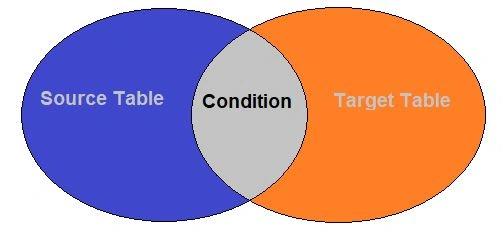
With MERGE Statement, we require two tables,
- Source Table – This table contains the changes that must be applied to the Target Table.
- Target Table – The table which required changes.
Let's see the below image to get an understanding,
Syntax of MARGE Statement
MERGE TOP (value) <target_table>
USING <table_source>
ON <merge_search_condition>
    [ WHEN MATCHED [ AND <clause_search_condition> ]
        THEN <merge_matched> ]
    [ WHEN NOT MATCHED [ BY TARGET ] [ AND <clause_search_condition> ]
        THEN <merge_not_matched> ]
    [ WHEN NOT MATCHED BY SOURCE [ AND <clause_search_condition> ]
        THEN <merge_matched> ]
    [ <output_clause> ]
    [ OPTION ( <query_hint> ) ]
;
Please Note that MERGE Statement must terminate by ";"
To get a better understanding, we are going to create two tables like below,
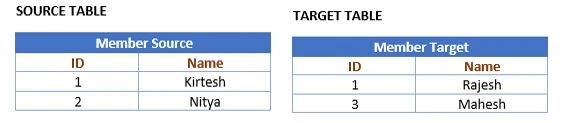
The below script helps you to create tables with sample data.
CREATE TABLE [dbo].[MemberSource](
	[Id] [int] NOT NULL,
	[Name] [varchar](30) NOT NULL
)
GO

CREATE TABLE [dbo].[MemberTarget](
	[Id] [int] NOT NULL,
	[Name] [varchar](30) NOT NULL
)
GO

INSERT INTO MemberSource
values(1,'Kirtesh'),
(2,'Nitya')
GO

INSERT INTO MemberTarget
values(1,'Rajesh'),
(3,'Mahesh')
GO
Now we will use the MERGE Statement to Insert, Update and Delete records in the "MemberTarget" table from the "MemberSource" table.
UPDATE MATCH RECORDS WITH MERGE
Both of the tables have ID=1. If data exists in the target table, then update the record from the source table. So, in this case, we will update the description from MemberSource to the MemberTarget table.
WHEN MATCH Clause – This Clause is used to UPDATE and DELETE records based on match conditions.
Only Two WHEN MATCHED clauses can be in the MERGE Statement. If we have 2 WHEN MATCHED clauses in the MERGE Statement,
- One should be used for an UPDATE
- And another should be used for DELETE.
Both WHEN MATCHED Clause cannot be used with MERGE's UPDATE OR DELETE statement.
In our case, "MemberSource" is the source table, "MemberTarget" is the Target table, and ID is used for joining conditions.
Let's see the below script,
MERGE MemberTarget T
USING MemberSource S ON T.ID=S.ID
WHEN MATCHED THEN
UPDATE SET T.Name= S.Name;
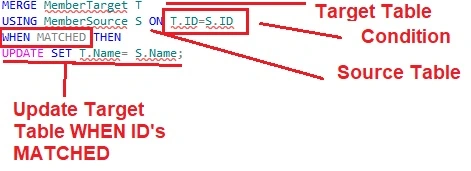
Let's execute the below script to see the output of the above script.
SELECT * FROM [MemberTarget]
Result
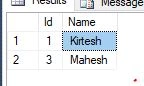
The record is updated successfully for ID =1.
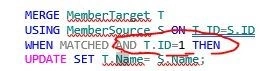
We can also add additional search conditions with WHEN MATCHED conditions.
MERGE MemberTarget T
USING MemberSource S ON T.ID=S.ID
WHEN MATCHED AND T.ID=1 THEN
UPDATE SET T.Name= S.Name;
A question comes to mind: What will happen if more than one row matches the condition of the MERGE Statement?
UPDATE Or DELETE will fail and throw an error message "The Merge statement attempts to UPDATE or DELETE the same row more than once."
INSERT USING MERGE STATEMENT
WHEN NOT MATCHED BY TARGET clause is used to insert a row in the Target table. Please note that the WHEN NOT MATCHED BY TARGET clause can use only once in the MERGE Statement.
In our case, ID =1 and Name=Nitya rows are not in the Source table. We will use the MERGE statement to insert this row in the Target table.
Let's see the below script,
MERGE MemberTarget T
USING MemberSource S ON T.ID=S.ID
WHEN NOT MATCHED BY TARGET THEN
INSERT (ID,Name)
values (S.ID,S.Name);
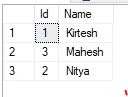
The above script adds a new row in the Target table.
SELECT * FROM [MemberTarget]
Result
In the MERGE Statement, we can use additional search conditions with WHEN NOT MATCHED BY TARGET.
DELETE USING A MERGE STATEMENT
WHEN NOT MATCHED BY SOURCE can be used to delete records from the Target table based on the join condition. This can be used only once in the MERGE Statement.
In the case of 2 WHEN NOT MATCHED BY SOURCE Clause,
- One can use it for an UPDATE.
- And Another should use for DELETE.
Let's see the below script,
MERGE MemberTarget T
USING MemberSource S ON T.ID=S.ID
WHEN NOT MATCHED BY SOURCE THEN
DELETE;
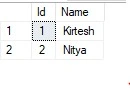
Now use the below script for the result,
SELECT * FROM [MemberTarget]
Result
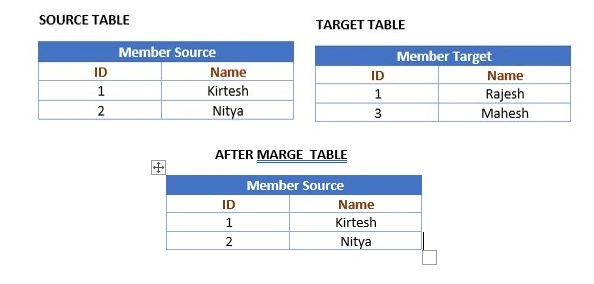
The below diagram explains to you all the changes we did today,
Consolidated MERGER Script,
MERGE MemberTarget T
USING MemberSource S ON T.ID=S.ID

WHEN MATCHED THEN
UPDATE SET T.Name= S.Name

WHEN NOT MATCHED BY TARGET THEN
INSERT (ID,Name)
values (S.ID,S.Name)

WHEN NOT MATCHED BY SOURCE THEN
DELETE;
TOP Clause in MERGE Statement
We can use the Top clause with MERGE Statement to limit the number of rows that will be affected.
Suppose we have tables like the ones below,
Let's write TOP Clause to limit the number of rows affected is 1 with MERGE Statement,
MERGE TOP (1) MemberTarget T
USING MemberSource S ON T.ID=S.ID

WHEN MATCHED THEN
UPDATE SET T.Name= S.Name

WHEN NOT MATCHED BY TARGET THEN
INSERT (ID,Name)
values (S.ID,S.Name)

WHEN NOT MATCHED BY SOURCE THEN
DELETE;
Result
SELECT * FROM MemberTarget
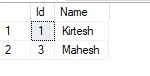
See the below diagram to understand the TOP clause with MERGE Statement,
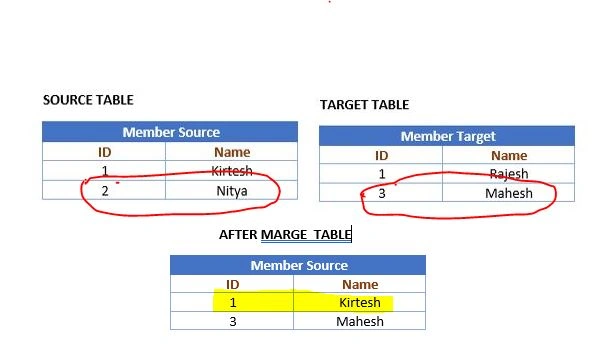
It has updated only one record and not inserted and deleted records in the target table as we have applied the Top clause in the MERGE statement.
OUTPUT Clause with MERGE
The output clause helps us to understand that row is inserted, updated, or deleted in the target table. $action is used to determine whether the row is inserted, Updated, or Deleted. Let's see the below script,
MERGE MemberTarget T
USING MemberSource S ON T.ID=S.ID

WHEN MATCHED THEN
UPDATE SET T.Name= S.Name

WHEN NOT MATCHED BY TARGET THEN
INSERT (ID,Name)
values (S.ID,S.Name)

WHEN NOT MATCHED BY SOURCE THEN
DELETE
OUTPUT DELETED.*, $action AS [Action], INSERTED.* ;
Result
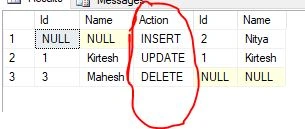
Conclusion
In this article, we learned about the Merge statement in SQL Server. That's all for this article. I hope you enjoyed it and found it helpful. Continue learning about the Merge statement in SQL Server here: Uses of Merge Statement in SQL Server.
Join the conversation! Your thoughts help the community grow.