
Overview

SQLite DataBase

SQLiteOpenHelper
  1. getWritableDataBase()
  2. getReadableDataBase()
  3. onCreate()
  4. onUpgrade()
Some query methods in SQLiteDataBase:
- execSQL()
- Insert()---------------ContentValues----------Put(String key,String value)
- Query()------Cursor------moveToFirst(),moveToNext(),getCount(),moveToPosition()
- update()
- delete()
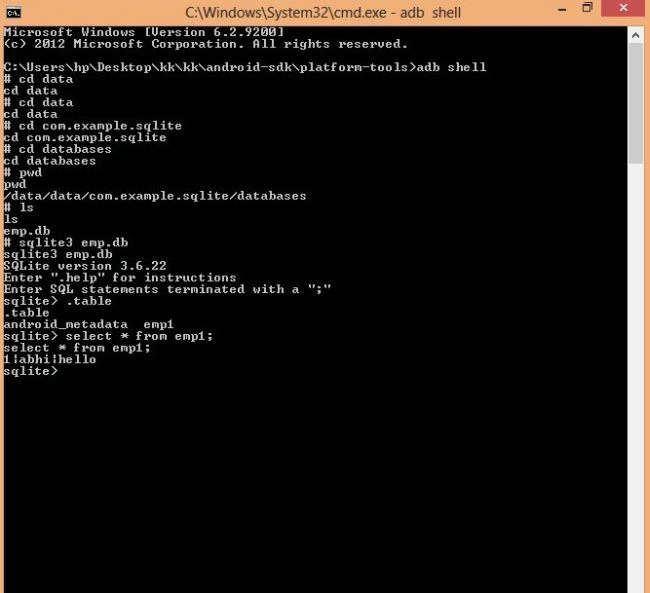
Now there are some commands that need to be written in a Command Prompt to see the entries in the database.
The commands are as follows:
  1. set path of the bin
  2. set path of platform-tools
  3. adb shell
  4. cd data
  5. cd package name of the application
  6. cd databases
  7. pwd(present working directory)
  8. ls
  9. SQLite3 (name of database -db)
  10. table
  11. select * from table name;
Here are some snapshots of this.
SQLite-in-Android.jpg
The procedure of coding:
  1. Make an XML file activity_main.xml with two EditTexts and one Button.
  2. Just look them up in the MainActivity.java file
  3. Use another class named Mydatabase.java
  4. After that follow the commands as given above to see the entries in the database.
Code
MainActivity.java
  1. package com.example.sqlite;
  2. import android.os.Bundle;
  3. import android.app.Activity;
  4. import android.content.ContentValues;
  5. import android.database.sqlite.SQLiteDatabase;
  6. import android.database.sqlite.SQLiteOpenHelper;
  7. import android.view.Menu;
  8. import android.view.View;
  9. import android.view.View.OnClickListener;
  10. import android.widget.Button;
  11. import android.widget.EditText;
  12. import android.widget.Toast;
  13. public class MainActivity extends Activity implements OnClickListener
  14. {
  15. EditText euser, epass;
  16. Button inser;
  17. Mydatabase o1=new Mydatabase(this,"emp.db",null, 1);
  18. @Override
  19. protected void onCreate(Bundle savedInstanceState)
  20. {
  21. super.onCreate(savedInstanceState);
  22. setContentView(R.layout.activity_main);
  23. euser=(EditText) findViewById(R.id.editText1);
  24. epass=(EditText) findViewById(R.id.editText2);
  25. inser=(Button) findViewById(R.id.button1);
  26. inser.setOnClickListener(new OnClickListener()
  27. {
  28. @Override
  29. public void onClick(View v)
  30. {
  31. // TODO Auto-generated method stub
  32. add();
  33. }
  34. });
  35. }
  36. public void add()
  37. {
  38. SQLiteDatabase db=o1.getWritableDatabase();
  39. ContentValues cv=new ContentValues();
  40. cv.put(Mydatabase.user, euser.getText().toString());
  41. cv.put(Mydatabase.pass, epass.getText().toString());
  42. db.insert(Mydatabase.dtab, null, cv);
  43. Toast.makeText(getApplicationContext(), "hii", 1000).show();
  44. }
  45. @Override
  46. public void onClick(View v)
  47. {
  48. // TODO Auto-generated method stub
  49. }
  50. }
Mydatabse.java
  1. package com.example.sqlite;
  2. import android.content.Context;
  3. import android.database.sqlite.SQLiteDatabase;
  4. import android.database.sqlite.SQLiteDatabase.CursorFactory;
  5. import android.database.sqlite.SQLiteOpenHelper;
  6. import android.database.sqlite.*;
  7. public class Mydatabase extends SQLiteOpenHelper
  8. {
  9. //declare dbname
  10. public static final String dbname="emp.db";
  11. public static final String dtab="emp1";
  12. //declare clmn nm
  13. public static final String user="user";
  14. public static final String pass="pass";
  15. public static final int dver=1;
  16. public Mydatabase(Context database, String dbname, CursorFactory factory, int dver)
  17. {
  18. super(database, dbname, factory, dver);
  19. // TODO Auto-generated constructor stub
  20. }
  21. @Override
  22. public void onCreate(SQLiteDatabase db)
  23. {
  24. // TODO Auto-generated method stub
  25. String str="create table emp1(_id integer primary key autoincrement,user text,pass text not null);"; //first ; query termination and later ; is statement termination
  26. db.execSQL(str);
  27. }
  28. @Override
  29. public void onUpgrade(SQLiteDatabase db, int oldVersion, int newVersion)
  30. {
  31. // TODO Auto-generated method stub
  32. }
  33. }
activity_main.xml
  1. <RelativeLayout xmlns:android="http://schemas.android.com/apk/res/android"
  2. xmlns:tools="http://schemas.android.com/tools"
  3. android:layout_width="match_parent"
  4. android:layout_height="match_parent"
  5. android:paddingBottom="@dimen/activity_vertical_margin"
  6. android:paddingLeft="@dimen/activity_horizontal_margin"
  7. android:paddingRight="@dimen/activity_horizontal_margin"
  8. android:paddingTop="@dimen/activity_vertical_margin"
  9. tools:context=".MainActivity" >
  10. <Button
  11. android:id="@+id/button1"
  12. android:hint="press"
  13. android:layout_width="wrap_content"
  14. android:layout_height="wrap_content"
  15. android:layout_alignParentBottom="true"
  16. android:layout_centerHorizontal="true"
  17. android:layout_marginBottom="102dp"
  18. android:text="Button" />
  19. <EditText
  20. android:id="@+id/editText1"
  21. android:hint="please enter username"
  22. android:layout_width="wrap_content"
  23. android:layout_height="wrap_content"
  24. android:layout_alignParentTop="true"
  25. android:layout_marginTop="44dp"
  26. android:ems="10"
  27. android:inputType="textPersonName" >
  28. <requestFocus />
  29. </EditText>
  30. <EditText
  31. android:id="@+id/editText2"
  32. android:hint="please enter password"
  33. android:layout_width="wrap_content"
  34. android:layout_height="wrap_content"
  35. android:layout_alignRight="@+id/editText1"
  36. android:layout_below="@+id/editText1"
  37. android:layout_marginTop="57dp"
  38. android:ems="10"
  39. android:inputType="textPersonName" />
  40. </RelativeLayout>