

SQL Server developers, DBAs or if you are just a normal developer who often uses
the SSMS if you are assigned to optimize the database performance and you're not
much familiar or don't want to play around with DMVs and DMFs then Performance
Dashboard Reports are for you.
Go and download the performance dashboard reports from
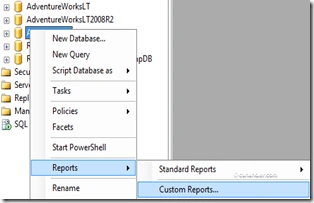
here. and add it as a custom report to Management Studio (SSMS). It is a
free download! Read on below to find out how to install it and use it on your
SQL Server. I have also included custom modified files as an attachment at end of
the post that allows you to use this for a SQL Server 2008 instance. This is
provided "as is" with no guarantees.
What will you get by these reports?
Well, these reports are created by analyzing the performance aspects of a SQL Server
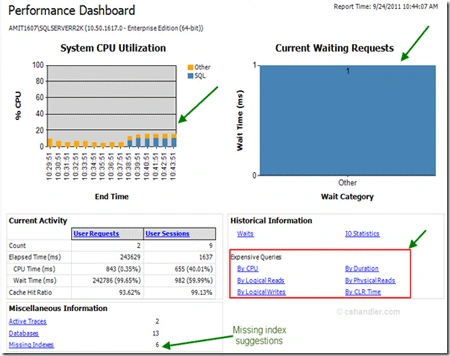
instance. The reports are mainly intended to quickly identify performance
problems and help resolve them. These reports use the DMV's that came out with
SQL 2005, so they are very fast & reliable when troubleshooting a
performance problem. Some of the common problems that can be detected using the
Dashboard Reports are:
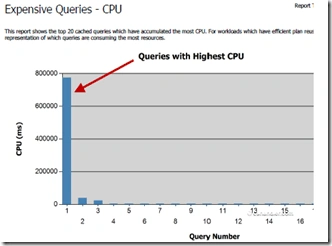
- CPU bottlenecks (which queries are consuming the most CPU and Plan for this query)
- IO bottlenecks (which queries are performing the most IO and Plan for this query).
- Index recommendations generated by the query optimizer (missing index recommendations pulled from sys.dm_db_missing_index_details and sys.dm_db_missing_index_group_stats)
- Blocking
- Latch contention and other Wait Types
Pre-Requisites
- You need to have Management Studio installed on the machine where you intend to use the Performance Dashboard Reports (could be either client or server machine).
- If you are still using SQL Server 2005 then it needs to have at a minimum SP2 applied (build 9.0.3042 or greater)
Steps to Install:
For SQLServer 2005
- Run the setup exe downloaded fromHERE.
- Once you install the above, go to %\Program Files\Microsoft SQL Server\90\Tools\PerformanceDashboard and run the setup.sql script against the SQL instance that you want to monitor the performance for.
For SQLServer 2008 R2
- Run the setup exe downloaded fromHERE.
- Once you install the above. Download the attachment from the link at end of this post and extract the files. You'll find two files there copy them and paste them to %\Program Files\Microsoft SQL Server\90\Tools\PerformanceDashboard. Overwrite the old files and run the setup.sql script against the SQL instance that you want to monitor the performance for.
Amit ChoudharyPosted Oct 3, 2011, 11:03 AM
Thanks Karthik :) your comment made it worth here..
Karthikeyan AnbarasanPosted Oct 3, 2011, 9:08 AM
Learned something new today