

Most of the application requires feedback from users, at that time we need rating like star rating, so, in this article, I am going to explain how can we create this using Angular.
For implementing rating, we need a star icon which is provided by Glyphicon and Font Awesome library, so in this, we are going to add Font-Awesome library in our application. Now, the question is how can we install the font-awesome library in our project? For this, please follow the following steps,
Create a new project called "SampleRating" using the below command:
For implementing rating, we need a star icon which is provided by Glyphicon and Font Awesome library, so in this, we are going to add Font-Awesome library in our application. Now, the question is how can we install the font-awesome library in our project? For this, please follow the following steps,
Create a new project called "SampleRating" using the below command:
- ng new "SampleRating"
- cd SampleRating
- npm install --save font-awesome // use --save for add the dependency to package.json file.
- "../node_modules/font-awesome/css/font-awesome.css"
Now, your "styles" property in "angular-cli.json" file looks like this:

To verify whether our font-awesome library is added or not, we should use any one of the icons of that into our "app.component.html" file: like,
- <h1>
- Checking Font Awesome Library <i class="fa fa-star"></i>
- </h1>
Then, run the project, we will see the star icon on browser, like this:

That means "font awesome" library was added successfully.
Now, let's understand how we can implement the "Star-Rating" in our project.
First, go to app.component.ts file and add the following code, inside the export class "AppComponent",
First, go to app.component.ts file and add the following code, inside the export class "AppComponent",
- title = 'Star Rating';
- starList: boolean[] = [true,true,true,true,true]; // create a list which contains status of 5 stars
- rating:number;
- //Create a function which receives the value counting of stars click,
- //and according to that value we do change the value of that star in list.
- setStar(data:any){
- this.rating=data+1;
- for(var i=0;i<=4;i++){
- if(i<=data){
- this.starList[i]=false;
- }
- else{
- this.starList[i]=true;
- }
- }
- }
- <h1>
- {{title}}
- </h1>
- <br>
- <a *ngFor="let item of starList; let i=index " (click)="setStar(i)">
- <i class="fa" [ngClass]="{'fa-star-o':item,'fa-star':!item}"></i>
- </a>
- <br>
- Rating :- {{rating}} stars
Here, we used ngFor directive to retrieve the starList, and on click, we called “SetStar()” method and passed the index as “i”.
According to that loop, now we can implement the condition class on the basis of “ngClass”:
- <i class="fa" [ngClass]="{'fa-star-o':item,'fa-star':!item}"></i>
If you are not comfortable using ngClass then instead using ngClass, you can also use “*ngIf” like :
- //use these lines instead of above line
- <i *ngIf="item" class="fa fa-star-o"></i>
- <i *ngIf="!item" class="fa fa-star"></i>

I think now we can easily understand how we can give the star-rating functionality. Now, try out the same thing in a table, that is, now we are going to learn how to provide a rating to each row.
Put the below code inside the “app.component.ts” file:
Put the below code inside the “app.component.ts” file:
- title = 'Star Rating';
- recordList:any[]=[
- {'Id':1,'Framework':'Angular JS', 'myList':[true,true,true,true,true]},
- {'Id':2,'Framework':'Angular 2', 'myList':[true,true,true,true,true]},
- {'Id':3,'Framework':'Angular 4', 'myList':[true,true,true,true,true]},
- {'Id':4,'Framework':'Angular 5', 'myList':[true,true,true,true,true]},
- {'Id':5,'Framework':'Angular 6', 'myList':[true,true,true,true,true]},
- ];
- setStarTable(record:any,data:any){
- this.rating=data+1;
- var tableList = this.recordList.find(function (obj: any) { return obj.Id === record.Id });
- for(var i=0;i<=4;i++){
- if(i<=data){
- tableList.myList[i]=false;
- }
- else{
- tableList.myList[i]=true;
- }
- }
- }
In this, we created a list of frameworks called “recordList” and inside that list we created another list for stars called “myList”.
Here, we created a function called “setStarTable” and inside that function, we took “record” as a row and “data” which receives the value of counting of stars click as per row.
After that we filtered out the list and stored data into “tableList “on the basis of selected row with the help of .find() like this:
Here, we created a function called “setStarTable” and inside that function, we took “record” as a row and “data” which receives the value of counting of stars click as per row.
After that we filtered out the list and stored data into “tableList “on the basis of selected row with the help of .find() like this:
- var tableList = this.recordList.find(function (obj: any) { return obj.Id === record.Id });
Now, go to “app.component.html” file, and put the below code,
- <h1>
- {{title}}
- </h1>
- <br>
- <table border=1>
- <caption>Frameworks Rating</caption>
- <tr>
- <td>Id</td>
- <td>Framework Name</td>
- <td>Rating</td>
- </tr>
- <tr *ngFor="let record of recordList">
- <td>{{record.Id}}</td>
- <td>{{record.Framework}}</td>
- <td>
- <a *ngFor="let item of record.myList; let i=index " (click)="setStarTable(record,i)">
- <i class="fa" [ngClass]="{'fa-star-o':item,'fa-star':!item}"></i>
- </a>
- </td>
- </tr>
- </table>
Now, the output is:
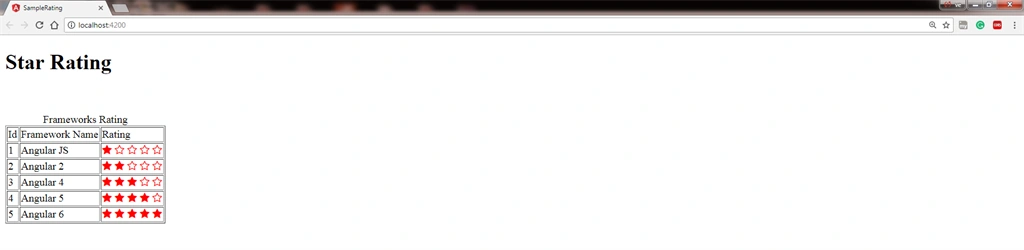
I have attached "SampleRating", a sample project along with this article. This project contains an example of star-rating, but before running this project install node_modules in this project by using the below command:
- npm install
As we know, most developers need to implement such kind of functionality in their project, so, after having read this article, we can say that we have the knowledge of how can we implement star rating as well as how we can install the font-awesome library in the Angular project.
I hope it was helpful to you. If you face any problem drop a comment or message to me.
Pouya BabaiePosted Dec 8, 2021, 12:03 PM
I want to implement this with an Api call , there is a property in the json object called "star" which is the value for a comment rating , i want to go throw each comment , each comment have 5 grey colored star and base on the "star" value i want to color them to yellow , can you help me ?
minhaz pathanPosted Aug 24, 2019, 8:36 AM
How to sort them based on the star rating afte clicking
Nitin JainPosted Mar 9, 2019, 12:46 PM
Hi Mahesh, I tried to implement above example on angular material data table but its update on all rows instead of one. Could you please assist me.
kamal kantPosted Sep 6, 2018, 8:48 AM
Nice article........Keep it up :)
Akash AgrawalPosted Aug 6, 2018, 7:41 AM
Can you please explain how to use angular-star-rating module instead font-awesome.
Bác PhiPosted Jun 13, 2018, 9:55 PM
I want to show my face as 2 stars? Help me .
Bhuvan ChawlaPosted Jun 13, 2018, 7:49 AM
How to insert the float rating value in this bar please tell me
Humayun Kabir MamunPosted Apr 17, 2018, 2:13 PM
Thanks for this nice article...
Khumana RamPosted Apr 17, 2018, 6:38 AM
Its really interesting and awesome article.... Great Post... Keep it up... M.Verma
Bhairab DuttPosted Apr 17, 2018, 1:44 AM
Nice Article to know How to create the rating control with simple steps in angular 4....