

When building multi-agent systems with LangGraph, developers often face a foundational choice: should they use a StateGraph or a MessageGraph? While both are used to orchestrate agents, they represent two different philosophies of data management. In an enterprise environment, where applications must handle complex RAG pipelines, maintain audit trails, and manage strict compliance, understanding this distinction is critical.
In this guide, we will break down the differences, explore when to use each, and build a robust Enterprise Multi-Agent RAG System using the superior choice for complex workflows: the StateGraph.
The Core Difference: Flexibility vs. Convention
1. MessageGraph (The "Chat" Specialist)
A MessageGraph is a specialized subclass of StateGraph. It is designed specifically for conversational AI.
State: It has a single, pre-defined state: a list of
BaseMessageobjects (like HumanMessage and AIMessage).Use Case: Ideal for simple chatbots where the only thing that matters is the history of the conversation.
Limitation: It is rigid. If you want to track anything else—like retrieved document IDs, API status codes, or a "retry count"—you have to hack it into the message metadata, which is messy and hard to manage.
2. StateGraph (The "Enterprise" Workhorse)
A StateGraph is the general-purpose engine of LangGraph.
State: You define a custom
TypedDictor Pydantic model. You decide exactly what data flows through your graph.Use Case: Essential for RAG, multi-step reasoning, and any system where agents need to share more than just text.
Advantage: It allows for structured memory. You can track the "why" and "how" of an agent's decision, not just the "what."
Comparison Table
| Feature | MessageGraph | StateGraph |
|---|---|---|
| Primary State | List of Messages (List[BaseMessage]) | Custom TypedDict / Pydantic Model |
| Complexity | Low (Opinionated) | High (Flexible) |
| RAG Integration | Difficult (Context must be in messages) | Native (Dedicated context field) |
| Loop Prevention | Hard to track step counts | Easy (Add step_count to state) |
| Best For | Simple Chatbots, Customer Support Bots | Enterprise RAG, Complex Workflows, Data Pipelines |
The Real-World Use Case: TechCorp "Smart Contract" Analyzer
You are building an AI system for TechCorp that analyzes legal contracts. The process is complex:
Extraction: An agent extracts key clauses from a PDF.
Risk Assessment: A second agent checks those clauses against a database of legal precedents (RAG).
Summary: A third agent writes a plain-English summary for the manager.
Why MessageGraph fails here: A MessageGraph can only pass messages. How do you pass the extracted clauses from Step 1 to Step 2 without them getting lost in a long chat history? How do you track if the Risk Assessment failed so you can trigger a fallback?
Why StateGraph wins: We can define a state that holds the raw_text, extracted_clauses, risk_score, and final_summary as separate fields. This makes the pipeline observable, debuggable, and resilient.
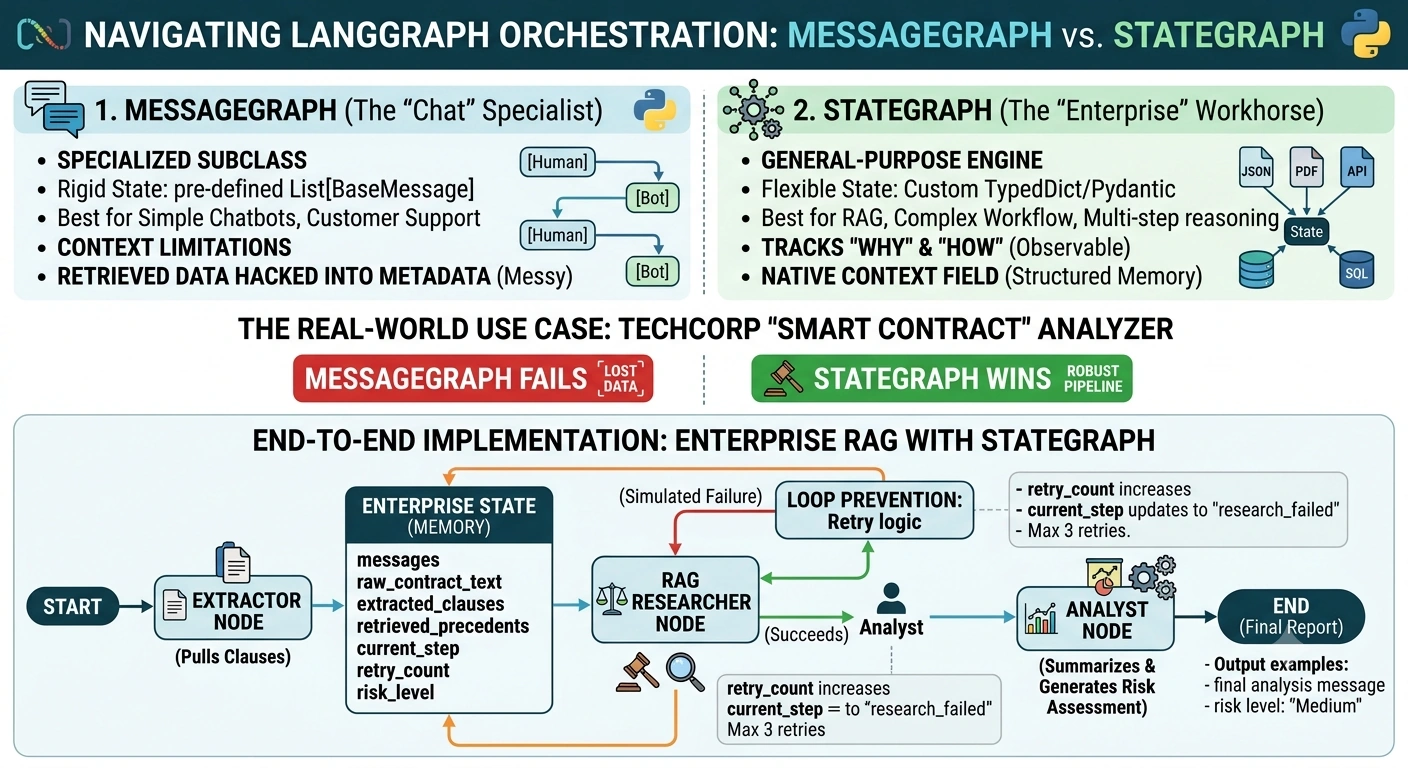
End-to-End Implementation: Enterprise RAG with StateGraph
We will build a multi-agent system that uses a custom state to manage memory and prevent infinite loops during the RAG retrieval process.
Step 1: Define the Enterprise State
We will use a TypedDict to define the "memory" of our application. Notice how we include fields for context and metadata that a MessageGraph wouldn't naturally support.
from typing import TypedDict, List, Annotated, Optionalimport operator
from langgraph.graph import StateGraph, END
from langchain_core.messages import HumanMessage, AIMessage

class ContractAnalysisState(TypedDict):
    # The user's input
    messages: Annotated[List[HumanMessage | AIMessage], operator.add]

    # RAG Specific State
    raw_contract_text: str
    extracted_clauses: List[str]
    retrieved_precedents: List[str]

    # Metadata for Loop Prevention & Observability
    current_step: str
    retry_count: int
    risk_level: Optional[str] # "Low", "Medium", "High"
Step 2: Build the Agent Nodes
Node 1: The Extractor
This agent simulates reading a contract and pulling out specific clauses.
def extractor_node(state: ContractAnalysisState) -> ContractAnalysisState:
    print(" [Extractor] Parsing contract...")
    # In a real app, this would use an LLM to extract clauses
    mock_clauses = [
        "Clause 4.1: Termination requires 90 days notice.",
        "Clause 7.2: Liability is capped at $1M."
    ]
    return {
        "extracted_clauses": mock_clauses,
        "current_step": "extraction_complete",
        "messages": [AIMessage(content="Clauses extracted successfully.")]
    }
Node 2: The RAG Researcher
This agent takes the extracted clauses and searches for legal precedents. We include loop detection by checking the retry_count.
def rag_researcher_node(state: ContractAnalysisState) -> ContractAnalysisState:
    print(f"⚖️ [Researcher] Searching precedents (Attempt {state['retry_count'] + 1})...")

    # Simulate a failure on the first try to demonstrate resilience
    if state["retry_count"] == 0:
        return {
            "retrieved_precedents": [],
            "retry_count": state["retry_count"] + 1,
            "current_step": "research_failed",
            "messages": [AIMessage(content="Search failed. Retrying...")]
        }

    # Successful retrieval on retry
    mock_precedents = [
        "Precedent A: 90-day notice is standard in Tech Sector.",
        "Precedent B: Liability caps are enforceable if reasonable."
    ]
    return {
        "retrieved_precedents": mock_precedents,
        "current_step": "research_complete",
        "messages": [AIMessage(content="Precedents found.")]
    }
Node 3: The Analyst (Summarizer)
This agent combines the clauses and precedents into a final risk assessment.
def analyst_node(state: ContractAnalysisState) -> ContractAnalysisState:
    print(" [Analyst] Generating final report...")

    if not state["retrieved_precedents"]:
        return {
            "risk_level": "Unknown",
            "messages": [AIMessage(content="Could not determine risk due to missing data.")]
        }

    return {
        "risk_level": "Medium",
        "messages": [AIMessage(content="Analysis Complete: Risk Level is Medium.")]
    }
Step 3: Define Routing Logic
We use conditional edges to handle the flow, including the retry logic for the RAG component.
def route_after_research(state: ContractAnalysisState) -> str:
    if state["current_step"] == "research_failed" and state["retry_count"] < 3:
        return "rag_researcher" # Retry
    return "analyst" # Move to next step

def build_enterprise_graph():
    workflow = StateGraph(ContractAnalysisState)

    workflow.add_node("extractor", extractor_node)
    workflow.add_node("rag_researcher", rag_researcher_node)
    workflow.add_node("analyst", analyst_node)

    workflow.set_entry_point("extractor")
    workflow.add_edge("extractor", "rag_researcher")

    workflow.add_conditional_edges(
        "rag_researcher",
        route_after_research,
        {
            "rag_researcher": "rag_researcher",
            "analyst": "analyst"
        }
    )

    workflow.add_edge("analyst", END)

    return workflow.compile()

app = build_enterprise_graph()
Running the System
Let's invoke the graph with a sample contract.
initial_state = {
    "messages": [HumanMessage(content="Analyze this contract.")],
    "raw_contract_text": "Sample Contract Text...",
    "extracted_clauses": [],
    "retrieved_precedents": [],
    "current_step": "start",
    "retry_count": 0,
    "risk_level": None
}

result = app.invoke(initial_state)

print("\n--- Final Analysis ---")
for msg in result["messages"]:
    print(f"{msg.type}: {msg.content}")
print(f"Risk Level: {result['risk_level']}")
Output Trace:
Extractor: Pulls clauses.
Researcher (Attempt 1): Fails (simulated).
retry_countbecomes 1.Router: Sees failure, routes back to Researcher.
Researcher (Attempt 2): Succeeds. Finds precedents.
Analyst: Generates "Medium" risk level.
When to Use Which? A Quick Guide
| Scenario | Recommended Graph | Why? |
|---|---|---|
| Simple Q&A Bot | MessageGraph | You only need chat history. It's faster to set up. |
| RAG Application | StateGraph | You need to store retrieved documents separately from the chat history. |
| Multi-Agent Team | StateGraph | Agents need to share structured data (e.g., JSON results, API tokens). |
| Workflow with Loops | StateGraph | You need a step_count or status field to prevent infinite recursion. |
| Compliance/Audit | StateGraph | You need to log every intermediate state change for legal review. |
Conclusion
While MessageGraph offers a quick start for simple conversational interfaces, StateGraph is the backbone of enterprise AI. In the TechCorp example, the ability to explicitly track retrieved_precedents and retry_count allowed us to build a system that was not only intelligent but also resilient and observable. In the enterprise, where every decision must be traceable and every failure must be handled gracefully, the flexibility of StateGraph is not just a feature—it's a requirement.
Join the conversation! Your thoughts help the community grow.