

Introduction
This article explains the “Static Constructor ” in C#. There is the possibility in C# to add the static no-parameter constructor for a class. It will be executed only once, unlike the normal (or you can say the instance) constructor that is executed whenever the object is created.
Example
Class DemoClass
{
    Static DemoClass()
    {
        //code inside this constructor
    }
}
The Static Constructor is invoked at most once and is always executed just before any reference for that class is created in our code.
Uses of Static Constructor
It is basically used to initialise the static fields and properties of the class. It can be used mainly where, in our program, we want to do something before any reference for the class is created, like changing the background of the application.
There should at most one Static Constructor in a class and also Static Constructor can't take any parameters.
Example
We will write a simple Console C# program that helps you to understand the uses of a Static Constructor in a program.
In this program we will change the Background of our application based on the weekdays.
Like in the weekend (Saturday & Sunday) it should be Blue and in weekdays it should be any other color, say Black.
Since we are doing it in a console and to make it simpler, let's just set the color in a static field and show the color type (Blue or Black) in the console window.
Agenda for Static Constructor
- In Visual Studio create a new console C# program
- Add a Class
- Add a static Constructor in the Class
- Show the value from Main Program
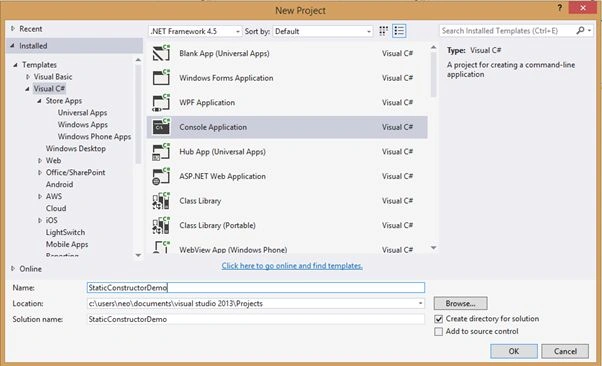
Step 1. In Visual Studio create a new C# Console Project as in the following.
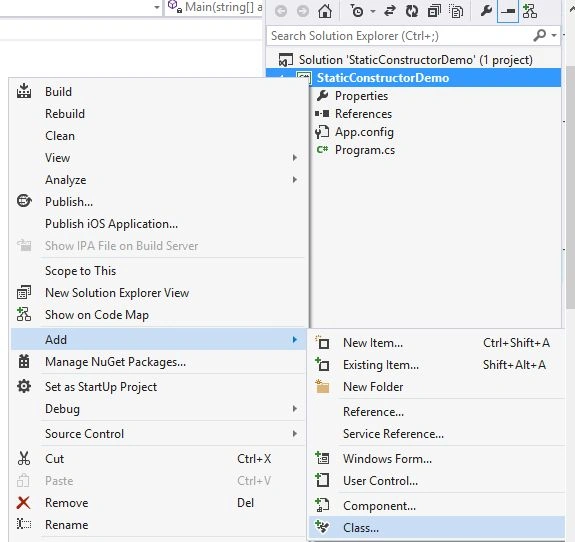
Step 2. In the Solution Explorer window, right-click on the solution and add a class.
I have here added a class named “ColorChoice” in my project.
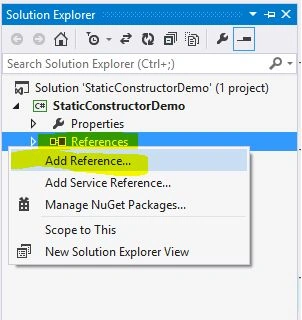
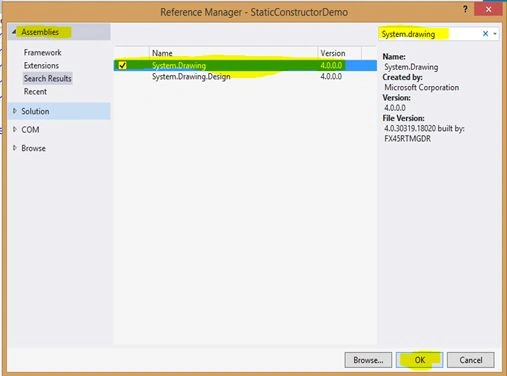
Step 3. We will use the builtin .Net color property, for this we need to have add a reference “System.Drawing.dll” to our project.
Go to the Solution Explorer window and right-click on the References and select "Add Reference...". In the Reference Window search for “System.Drawing” add it to your project.

Join the conversation! Your thoughts help the community grow.