

Today, in this article let's play around with one of the interesting and most useful concepts in SharePoint 2010.
Question: What is a Status List?
In simple terms it "Displays a status of a particular activity towards meeting its goal".
I think we are now good to go and implement this wonderful concept.
Step 1: Open SharePoint 2010 Central Administration and navigate to a specific site:

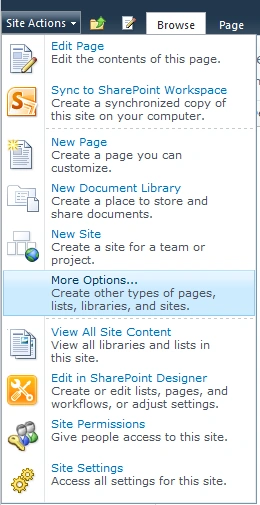
Step 2: Navigate to "Site Actions" -> "More Options...":
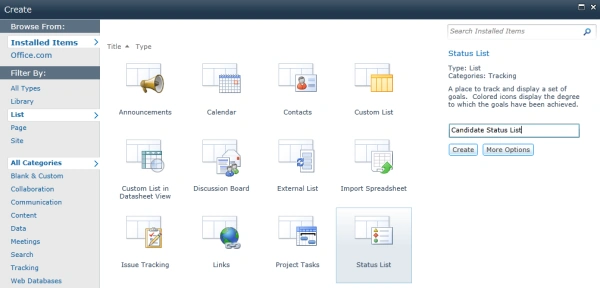
Step 3: Select status list from the listed category. Give a name to the status list:
Step 4: The status list has been created. The site looks like this:

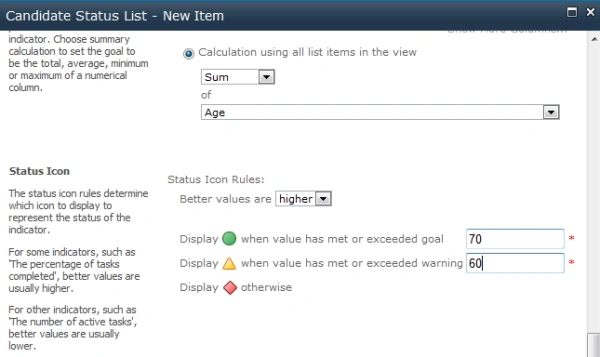
Step 5: Adding a new status:


Step 6: The status has been added and the site looks like this:

I hope this article is useful for you. I look forward to your comments and feedback.
Mehul GadhiaPosted Mar 8, 2013, 9:17 AM
Hello Vijay, When I follow the above mentioned steps and open the dialog to select the "Status List", I do not see the Status List as you do. What am I doing wrong or missing? Thanks, Mehul