

Hey Guys! I am writing this article on the encryption of the video using Azure Media Service. I am going to explain this topic with a real scenario that I faced in my project.
I was working on one of the projects in which the following requirement was raised by the client:
The published URL generated by Azure Media Service shouldn’t be accessible publicly to all of the users. It should be accessed only by authorized users. There should be some token provided to the authorized user by using which the user can see the video.
I researched various approaches for the above requirement and finally, got the following solution.
Solution
Azure Media Services provides the feature of content protection. By using this feature, we can dynamically encrypt the video using AES (Advanced Encryption Standard) or any other technique of DRM (Digital Rights Management) system. Some Major DRM systems are -Microsoft PlayReady, Google WideDivine, and Apple FairPlay.
In this article, I am going to talk about the encryption of video using AES (Advanced Encryption Standard).
Steps for implementing content protection of video using AES.
Prerequisites
- Azure Subscription.
- Configured Azure Media Services.
Step 1
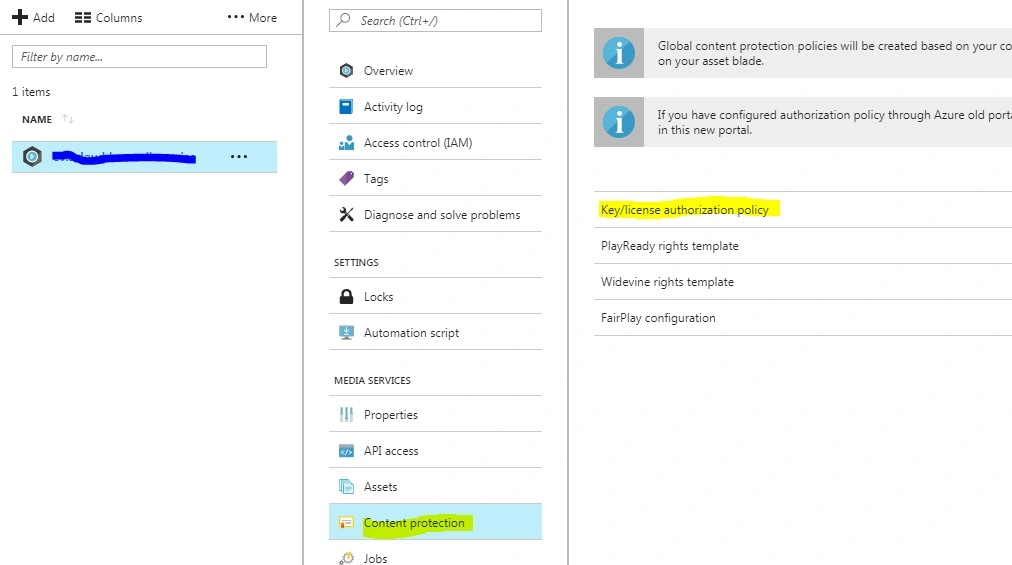
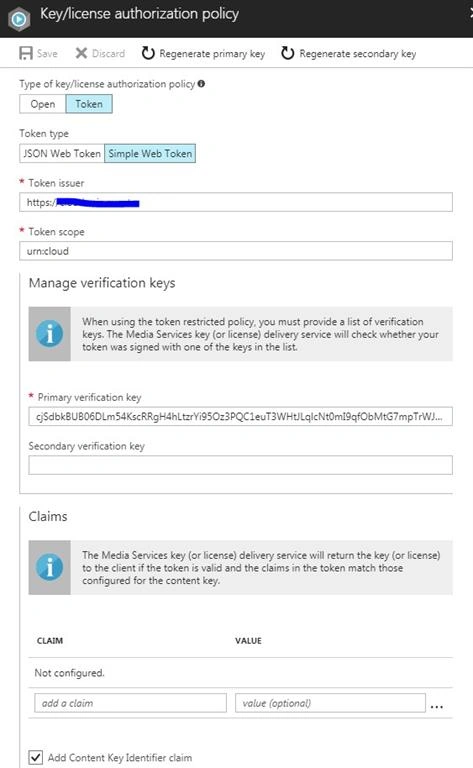
Configure the content protection policy for Azure Media Services.
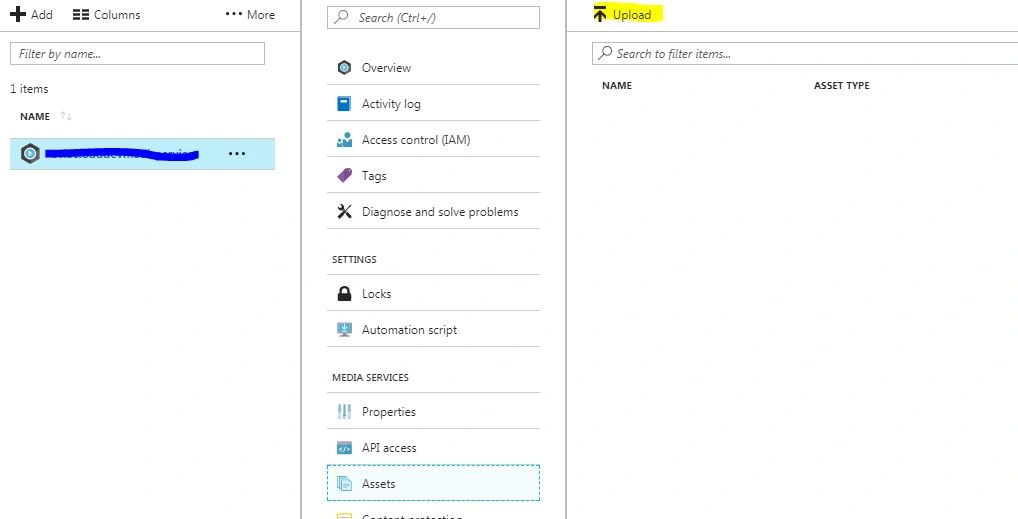
Upload MP4 video using the Asset tab in configured Azure Media Services.
Step 3
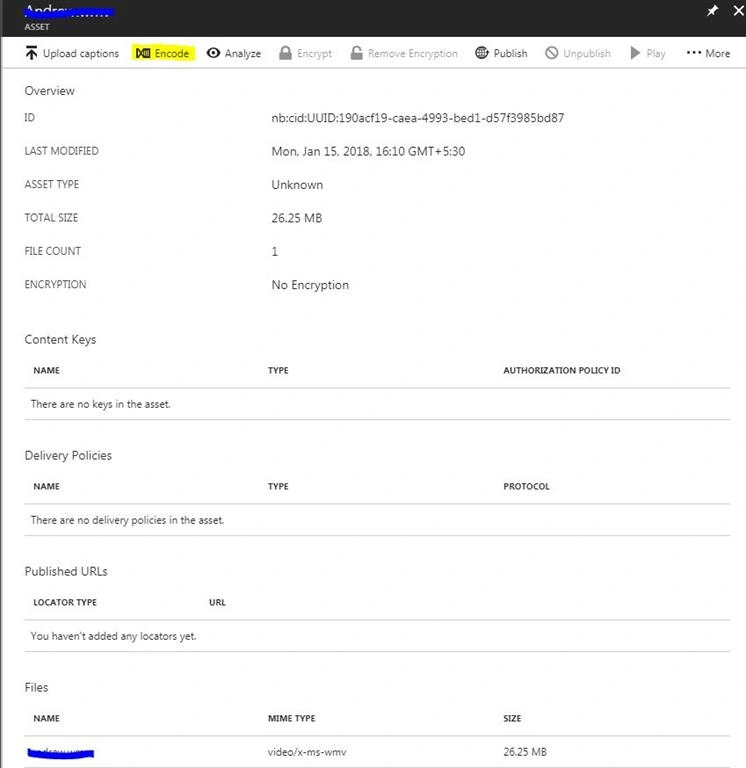
Encode the video using the Encode option.
Step 4
Get the encoded asset from Azure Media Services using the following code.
- private static CloudMediaContext _context = null;
- static string tenantDomain = ConfigurationManager.AppSettings["TenantDomain"];
- static string clientId = ConfigurationManager.AppSettings["ClientId"];
- static string clientKey = ConfigurationManager.AppSettings["ClientKey"];
- static string apiServer = ConfigurationManager.AppSettings["ApiServer"];
- static string assetId = "nb:cid:UUID:XXXX-XXXX-XXXX-XXXX-XXXXXXX“;
- public IAsset GetAssetByid(string id)
- {
- var tokenCredentials = new AzureAdTokenCredentials(tenantDomain, new AzureAdClientSymmetricKey(clientId, clientKey), AzureEnvironments.AzureCloudEnvironment);
- var tokenProvider = new AzureAdTokenProvider(tokenCredentials);
- _context = new CloudMediaContext(new Uri(apiServer), tokenProvider);
- var assetInstance =
- from a in _context.Assets
- where a.Id == assetId
- select a;
- IAsset asset = assetInstance.FirstOrDefault();
- }
Step 5
Add the code for creating a content key and attach it to the asset.
The content key is used to secure the asset. It provides a key using which the encoded asset is going to be encrypted. The following code can be used to create the content key.
- public static IContentKey CreateContentKeys(IAsset asset)
- {
- Guid keyId = Guid.NewGuid();
- byte[] contentKey = GetRandomBuffer(16);
- if(asset.ContentKeys.Count>0)
- {
- return asset.ContentKeys[0];
- }
- IContentKey key = _context.ContentKeys.Create(keyId, contentKey, "ContentKey",
- ContentKeyType.EnvelopeEncryption);
- asset.ContentKeys.Add(key);
- return key;
- }
- static private byte[] GetRandomBuffer(int size)
- {
- byte[] randomBytes = new byte[size];
- using (RNGCryptoServiceProvider rng = new RNGCryptoServiceProvider())
- {
- rng.GetBytes(randomBytes);
- }
- return randomBytes;
- }
Step 6
Create a token restriction authorization policy and attach to the content key.
- static public string AddTokenRestrictedAuthorizationPolicy(IContentKey contentKey)
- {
- string tokenTemplateString = null;
- if (!string.IsNullOrEmpty(contentKey.AuthorizationPolicyId))
- {
- tokenTemplateString = GetTemplateString(contentKey);
- return tokenTemplateString;
- }
- else
- {
- tokenTemplateString = GenerateTokenRequirements();
- }
- IContentKeyAuthorizationPolicy policy = _context.
- ContentKeyAuthorizationPolicies.
- CreateAsync("HLS token restricted authorization policy").Result;
- List<ContentKeyAuthorizationPolicyRestriction> restrictions =
- new List<ContentKeyAuthorizationPolicyRestriction>();
- ContentKeyAuthorizationPolicyRestriction restriction =
- new ContentKeyAuthorizationPolicyRestriction
- {
- Name = "Token Authorization Policy",
- KeyRestrictionType = (int)ContentKeyRestrictionType.TokenRestricted,
- Requirements = tokenTemplateString
- };
- restrictions.Add(restriction);
- IContentKeyAuthorizationPolicyOption policyOption =
- _context.ContentKeyAuthorizationPolicyOptions.Create(
- "Token option for HLS",
- ContentKeyDeliveryType.BaselineHttp,
- restrictions,
- null );
- policy.Options.Add(policyOption);
- // Add ContentKeyAutorizationPolicy to ContentKey
- contentKey.AuthorizationPolicyId = policy.Id;
- contentKey = contentKey.UpdateAsync().Result;
- Console.WriteLine("Adding Key to Asset: Key ID is " + contentKey.Id);
- return tokenTemplateString;
- }
- public static string GetTemplateString(IContentKey key)
- {
- var authorizationPolicy = _context.ContentKeyAuthorizationPolicies.Where(x => x.Id == key.AuthorizationPolicyId).FirstOrDefault();
- string templatestring = authorizationPolicy.Options.FirstOrDefault().Restrictions.FirstOrDefault().Requirements;
- return templatestring;
- }
- public static string GetAuthorizationToken(IContentKey key,string tokenTemplateString)
- {
- if (tokenRestriction && !String.IsNullOrEmpty(tokenTemplateString))
- {
- TokenRestrictionTemplate tokenTemplate =
- TokenRestrictionTemplateSerializer.Deserialize(tokenTemplateString);
- Guid rawkey = EncryptionUtils.GetKeyIdAsGuid(key.Id);
- string authorizationToken = TokenRestrictionTemplateSerializer.GenerateTestToken(tokenTemplate, null, rawkey, DateTime.UtcNow.AddDays(365));
- Console.WriteLine("The authorization token is:\nBearer {0}", authorizationToken);
- Console.WriteLine();
- return authorizationToken;
- }
- return string.Empty;
- }
Step 7
Create an Asset Delivery Policy for the asset.
- static public void CreateAssetDeliveryPolicy(IAsset asset, IContentKey key)
- {
- if (asset.DeliveryPolicies.Count > 0)
- return;
- Uri keyAcquisitionUri = key.GetKeyDeliveryUrl(ContentKeyDeliveryType.BaselineHttp);
- string envelopeEncryptionIV = Convert.ToBase64String(GetRandomBuffer(16));
- // The following policy configuration specifies:
- // key url that will have KID=<Guid> appended to the envelope and
- // the Initialization Vector (IV) to use for the envelope encryption.
- Dictionary<AssetDeliveryPolicyConfigurationKey, string> assetDeliveryPolicyConfiguration =
- new Dictionary<AssetDeliveryPolicyConfigurationKey, string>
- {
- {
- AssetDeliveryPolicyConfigurationKey.EnvelopeKeyAcquisitionUrl, keyAcquisitionUri.ToString()}
- };
- IAssetDeliveryPolicy assetDeliveryPolicy =
- _context.AssetDeliveryPolicies.Create(
- "AssetDeliveryPolicy",
- AssetDeliveryPolicyType.DynamicEnvelopeEncryption,
- AssetDeliveryProtocol.SmoothStreaming | AssetDeliveryProtocol.HLS | AssetDeliveryProtocol.Dash,
- assetDeliveryPolicyConfiguration);
- // Add AssetDelivery Policy to the asset
- asset.DeliveryPolicies.Add(assetDeliveryPolicy);
- Console.WriteLine();
- Console.WriteLine("Adding Asset Delivery Policy: " +
- assetDeliveryPolicy.AssetDeliveryPolicyType);
- }
- static public string GetStreamingOriginLocator(IAsset asset)
- {
- // Get a reference to the streaming manifest file from the
- // collection of files in the asset.
- var assetFile = asset.AssetFiles.Where(f => f.Name.ToLower().
- EndsWith(".ism")).
- FirstOrDefault();
- IAccessPolicy policy = _context.AccessPolicies.Create("Streaming policy",
- TimeSpan.FromDays(30),
- AccessPermissions.Read);
- ILocator originLocator = _context.Locators.CreateLocator(LocatorType.OnDemandOrigin, asset,
- policy,
- DateTime.UtcNow.AddMinutes(-5));
- return originLocator.Path + assetFile.Name;
- }
- public static string GetAuthorizationToken(IContentKey key,string tokenTemplateString)
- {
- if (tokenRestriction && !String.IsNullOrEmpty(tokenTemplateString))
- {
- TokenRestrictionTemplate tokenTemplate =
- TokenRestrictionTemplateSerializer.Deserialize(tokenTemplateString);
- Guid rawkey = EncryptionUtils.GetKeyIdAsGuid(key.Id);
- string authorizationToken = TokenRestrictionTemplateSerializer.
- GenerateTestToken(tokenTemplate, null, rawkey, DateTime.UtcNow.AddDays(365));
- Console.WriteLine("The authorization token is:\nBearer {0}", authorizationToken);
- Console.WriteLine();
- return authorizationToken;
- }
- return string.Empty;
- }
sandesh manoharPosted Apr 19, 2019, 5:57 AM
Can we have different token issuer and audience dynamically using code
sandesh manoharPosted Apr 18, 2019, 8:16 AM
Can you help us how to protect this url and token in .net mvc application
sandesh manoharPosted Apr 18, 2019, 8:15 AM
To play video we need to set manifest url and token using jquery or data-setup attribute to the azure media player
Deepak DixitPosted Jan 31, 2018, 6:30 AM
Thanks for post such great article
Gaurav AgrawalPosted Jan 25, 2018, 2:14 AM
Really nice article. Appreciate your effort. Keep it up!!
Rajesh DhimanPosted Jan 23, 2018, 3:04 AM
Very good article with good code stuff, it helps a lot. Thank you Krishna.
Satish SinghPosted Jan 18, 2018, 3:52 AM
Excellent article krishna!!!