

Introduction
In today's article, I will tell you how to store an URL and return to the same page from where you navigated in an ASP.NET application.
This article will show you how to store the URL of the previous page that will be displayed in the label at runtime. Also, you will be able to return to the same page from where you navigated without using the browser's go back button.
Step 1
First of all, I have added four WebPages to my application among which navigation will be done.
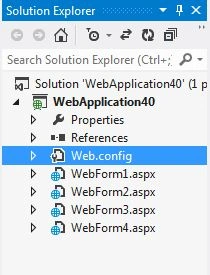
These can be done by right-clicking on the application and choosing "Add New Item".
Step 2
Then I worked on one of the WebPages. I am working on the .aspx page, here I added three link buttons that will redirect to the rest of the pages.
- <div>
- <asp:LinkButton ID="lnkbtn1" runat="server" PostBackUrl="~/WebForm4.aspx" Text="page number 4"></asp:LinkButton>
- <br />
- <asp:LinkButton ID="lnkbtn2" runat="server" PostBackUrl="~/WebForm3.aspx" Text="page number 3"></asp:LinkButton>
- <br />
- <asp:LinkButton ID="lnkbtn3" runat="server" PostBackUrl="~/WebForm2.aspx" Text="page number 2"></asp:LinkButton>
- </div>
As you can see I passed the path of the rest of the pages in the PostBackUrl Property of the Link buttons.
Step 3
After this, I added an HTML Link button that will redirect the user from where he was earlier.
- <div>
- <a href="javascript:history.go(-1)">Go back</a>
- </div>
For returning to one page we can use this single line of code of JavaScript: "javascript:history.go(-1)".
This will check the history and will take the user one page back.
Step 4
At the end, I took the Label that will display the URL of the page from where we have just arrived.
- <div>
- <asp:Label ID="label1" runat="server"></asp:Label>
- </div>
But now the question is, how will we store the URL in this Label?
So, for that we will go to the .aspx.cs page and write the following code in the page Load:
- protected void Page_Load(object sender, EventArgs e)
- {
- string referencepage = HttpContext.Current.Request.UrlReferrer.AbsoluteUri;
- label1.Text = "You Came from:-" + referencepage;
- }
This code will get the URL of the previous page and will display it in the Label. As you can see, I took AbsoluteUri, this will return the complete URL of the page like: "You Came from:http://localhost:18388/WebForm4.aspx" but if you want to display only the WebPage name then instead of AbsoluteUri you can use AbsolutePath.
Step 5
Now our work on the first page is completed, the same work is to be done on all the remaining WebPages.
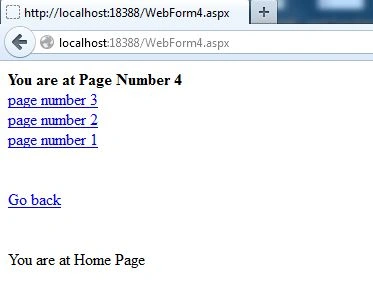
The complete code of my WebPage is as follows:
.aspx:
Join the conversation! Your thoughts help the community grow.