

Introduction
In this article, you'll learn how to create a .NET console application that streams conversations using the Amazon Bedrock Converse API. The application utilizes the Anthropic Claude 3 Sonnet model as an example, demonstrating how to generate responses through the ConverseStream operation.
Prerequisites
- Create an AWS account and log in. Ensure the IAM user you use has sufficient permissions to make necessary AWS service calls and manage AWS resources.
- Download and install the AWS Command Line Interface (CLI).
- Configure the AWS CLI.
- Download and install Visual Studio or Visual Studio Code.
- Download and install .NET 8.0 SDK
- Access to Amazon Bedrock foundation model
Tools
Visual Studio 2022
Steps Involved
Perform the following steps to create a .NET console application in Visual Studio 2022 to send input text, inference parameters, and additional model-specific parameters.
- Open Visual Studio 2022.
- Click File -> New -> Project.
- Select the Console App template. Click Next.
- Enter the project name and click Next.
- Select the .NET 8.0 framework. Click Create.
- Add the following NuGet packages.
AWSSDK.BedrockRuntime - Open Program. cs and replace the code with the following.
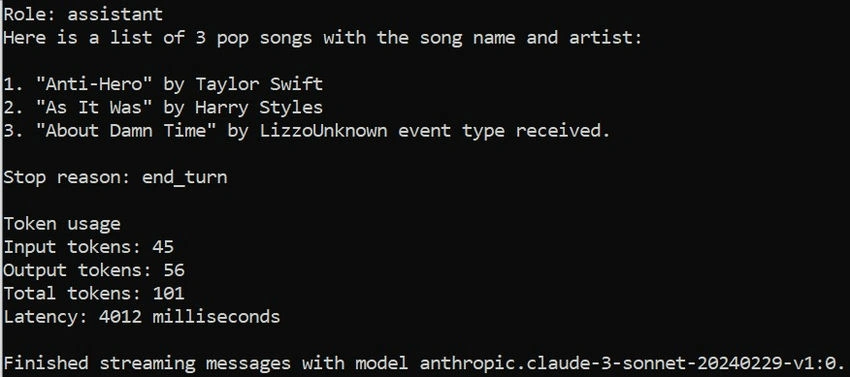
using Amazon; using Amazon.BedrockRuntime; using Amazon.BedrockRuntime.Model; using Amazon.Runtime.Documents; namespace AmazonBedrockConverseStreamApp { internal class Program { /// <summary> /// Main entry point of the console application. /// </summary> /// <param name="args">Command-line arguments.</param> static async Task Main(string[] args) { // Fetch the model ID from an environment variable or use a default value. var modelId = Environment.GetEnvironmentVariable("MODEL_ID") ?? "anthropic.claude-3-sonnet-20240229-v1:0"; // Fetch the system prompt text from an environment variable or use a default value. var systemPromptText = Environment.GetEnvironmentVariable("SYSTEM_PROMPT_TEXT") ?? "You are an app that creates playlists for a radio station that plays rock and pop music. Only return song names and the artist."; // Fetch the AWS region from an environment variable or use a default value. var awsRegion = Environment.GetEnvironmentVariable("AWS_REGION") ?? "us-east-1"; // Store the initial message text in a variable for easy modification and reuse. var initialMessageText = "Create a list of 3 pop songs."; // Configure the Amazon Bedrock Runtime client with the specified AWS region. var config = new AmazonBedrockRuntimeConfig { RegionEndpoint = RegionEndpoint.GetBySystemName(awsRegion) }; // Create the system prompt as a list of SystemContentBlock objects. // This will guide the model on how to structure its responses. var systemPrompts = new List<SystemContentBlock> { new SystemContentBlock { Text = systemPromptText } }; // Define the initial message sent to the model by the user. var initialMessage = new Message { Role = "user", // Indicates the role of the sender (in this case, the user). Content = new List<ContentBlock> { new ContentBlock { Text = initialMessageText } } }; // Create the Bedrock Runtime client using the provided configuration. using var bedrockClient = new AmazonBedrockRuntimeClient(config); try { // Stream the conversation with the specified model, messages, and system prompts. await StreamConversationAsync(bedrockClient, modelId, new List<Message> { initialMessage }, systemPrompts); } catch (AmazonBedrockRuntimeException ex) { // Handle AWS-specific runtime exceptions and log them to the console. Console.WriteLine($"AWS Bedrock Runtime error: {ex.Message}"); } catch (Exception ex) { // Handle any unexpected exceptions and log them to the console. Console.WriteLine($"Unexpected error: {ex.Message}"); } } /// <summary> /// Streams a conversation with the specified model, handling and displaying each event. /// </summary> /// <param name="bedrockClient">The Bedrock Runtime client used to communicate with the service.</param> /// <param name="modelId">The ID of the model to use.</param> /// <param name="messages">The list of messages to send to the model.</param> /// <param name="systemPrompts">The list of system prompts to guide the model's responses.</param> /// <returns>A task that represents the asynchronous operation.</returns> private static async Task StreamConversationAsync( IAmazonBedrockRuntime bedrockClient, string modelId, List<Message> messages, List<SystemContentBlock> systemPrompts) { // Configure the inference settings for the model, such as temperature, which controls randomness. var inferenceConfig = new InferenceConfiguration { Temperature = 0.5f // A lower value makes the output more deterministic, while a higher value increases variability. }; // Define additional fields specific to the model, such as the number of top predictions to consider. var additionalModelFields = new Document(new Dictionary<string, Document> { { "top_k", new Document(200) } // 'top_k' controls the number of highest-probability predictions considered during sampling. }); // Prepare the request to be sent to the Bedrock service. var request = new ConverseStreamRequest { ModelId = modelId, Messages = messages, System = systemPrompts, InferenceConfig = inferenceConfig, AdditionalModelRequestFields = additionalModelFields }; // Send the request to the Bedrock service and start receiving a stream of events. var response = await bedrockClient.ConverseStreamAsync(request); // Access the stream of events from the response. var stream = response.Stream; if (stream != null) { // Iterate over each event in the stream and handle it accordingly. foreach (var eventItem in stream) { switch (eventItem) { case MessageStartEvent messageStart: // Log the start of a message, including the role of the sender. Console.WriteLine($"\nRole: {messageStart.Role}"); break; case ContentBlockDeltaEvent contentBlockDelta: // Append the content text to the output as it streams in. if (contentBlockDelta.Delta?.Text != null) { Console.Write(contentBlockDelta.Delta.Text); } break; case MessageStopEvent messageStop: // Log the reason why the message streaming stopped. Console.WriteLine($"\nStop reason: {messageStop.StopReason}"); break; case ConverseStreamMetadataEvent metadata: // Log token usage and latency information. if (metadata.Usage != null) { Console.WriteLine("\nToken usage"); Console.WriteLine($"Input tokens: {metadata.Usage.InputTokens}"); Console.WriteLine($"Output tokens: {metadata.Usage.OutputTokens}"); Console.WriteLine($"Total tokens: {metadata.Usage.TotalTokens}"); } if (metadata.Metrics != null) { Console.WriteLine($"Latency: {metadata.Metrics.LatencyMs} milliseconds"); } break; default: // Handle unknown or unexpected event types. Console.WriteLine("Unknown event type received."); break; } } } // Log that the conversation has completed. Console.WriteLine($"\nFinished streaming messages with model {modelId}."); } } } - Press F5 to run the application. You should see the below streaming conversation output.
Summary
This article describes how to create a .NET console application that streams conversations using the Amazon Bedrock Converse API.
Join the conversation! Your thoughts help the community grow.