

Before reading this article, please go through the following previous parts of the series:
We have now arrived at the point to get some knowledge about Java string class methods. To fully understand, let's move forward to learn about other methods by the same easy and simple way.
Method: Java String compareTo()
This method is basically used to compare two strings that may be different or the same. It compares both the strings lexicographically.
A Lexicographical comparison compares each character of both the strings converted into their Unicode values for comparison. If the strings are equal (difference of Unicode values) then it returns 0 (zero) and if the first string is lexicographically greater than the second string then it returns a positive value otherwise a negative value.
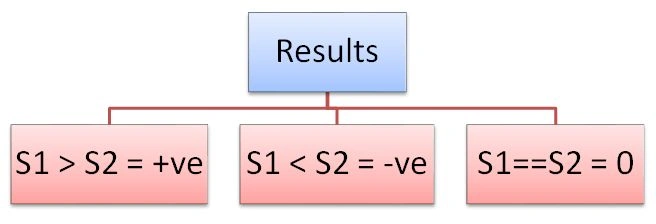
- Java String compareTo(String str).
- Java String compareTo(Object obj).
The first one does the comparison of the two string literals.
String1.compareTo(String2) where String1 and String2 are string literals.
The second one does the comparison between a string and an object.
String1.compareTo(String object) where String1 is a literal whose value would be compared with the string specified in the method argument.
Let's go through the example.
Example
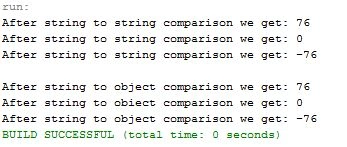
The following example shows outputs for both the variants.
- public class CompareTo
- {
- public static void main(String args[])
- {
- String str1="Apple is a fruit";
- String str2="Apple is also a brand";
- String str3="Apple is a fruit";
- System.out.println("After string to string comparison we get: "+str2.compareTo(str1));//positive
- System.out.println("After string to string comparison we get: "+str1.compareTo(str3));//zero
- System.out.println("After string to string comparison we get: "+str1.compareTo(str2));//negative
- System.out.println();
- System.out.println("After string to object comparison we get: "+str2.compareTo("Apple is a fruit"));//positive
- System.out.println("After string to object comparison we get: "+str1.compareTo("Apple is a fruit"));//zero
- System.out.println("After string to object comparison we get: "+str1.compareTo("Apple is also a brand"));//negative
- }
- }
Method: Java String compareToIgnoreCase()
This method is quite similar to the preceding method but with the difference that this method ignores the cases (uppercase and lowercase). It also compares lexicographically as does the preceding method and returns the same values for the preceding specified condition.
Example
In this example, we took three strings s1=lowercase, s2=uppercase, s3=mixedcase to compare these three strings.
- public class CompareTo
- {
- public static void main(String args[])
- {
- String str1="love programming";
- String str2="LOVE PROGRAMMING";
- String str3="Love Programming";
- System.out.println("After string to string comparison we get: "+str1.compareToIgnoreCase(str1));//equal strings hence returns zero
- System.out.println("After string to string comparison we get: "+str1.compareToIgnoreCase(str2));//ignores case sensitivity hence returns zero
- System.out.println("After string to string comparison we get: "+str1.compareToIgnoreCase(str3));//ignores case sensitivity hence returns zero
- System.out.println();
- System.out.println("After string to object comparison we get: "+str1.compareToIgnoreCase("love programming"));//equal strings hence returns zero
- System.out.println("After string to object comparison we get: "+str1.compareToIgnoreCase("LOVE PROGRAMMING"));//ignores case sensitivity hence returns zero
- System.out.println("After string to object comparison we get: "+str1.compareToIgnoreCase("Love Programming"));//ignores case sensitivity hence returns zero
- }
- }
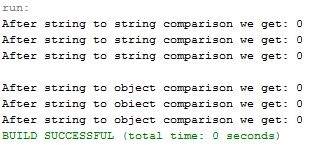
In the preceding output, we can observe that the method ignores the case sensitivity and returns zero (0) for all the comparisons.
Method: Java String concat()
This method is used to combine two or more strings to produce a combined single string. It combines the specified string at the end of the given string.
This method can be used more than one time in a single statement to produce a big string. This is like appending another string to one string.
Example
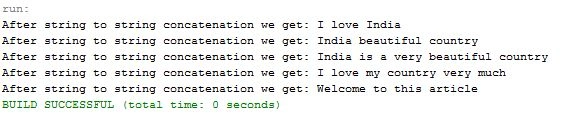
The following example showsthat there are four possible ways to concatenate by using various strings.
- public class Concat
- {
- public static void main(String args[])
- {
- String str1="India";
- String str2=" is a very";
- String str3=" beautiful country";
- String str4="I love ";
- // one way of concatenation
- System.out.println("After string to string concatenation we get: "+str4.concat( str1));//add 'India' after 'I love'
- System.out.println("After string to string concatenation we get: "+str1.concat( str3));//add 'beautiful country' after 'India'
- //second way of concatenation
- System.out.println("After string to string concatenation we get: "+str1.concat( str2.concat( str3)));//returns 'India is a very beautiful country'
- //third way of concatenation
- System.out.println("After string to string concatenation we get: "+str4.concat(" my").concat(" country").concat(" very much "));
- //returns 'I love my country very much'
- //fourth way of concatenation.
- String str5="Welcome";
- str5=str5.concat(" to this");
- str5=str5.concat(" article");
- System.out.println("After string to string concatenation we get: "+str5);
- }
- }
Method: Java String contains()
When the sequence of characters needs to be found, then this method is very helpful. This method searches the character sequence in the given string. It returns values in Boolean, in other words, true or false. If the sequence of characters is found then it returns true otherwise false.
Note: If the sequence of characters is found null then it throws an exception, in other words
NullPointerException().
Let's see the example.
Example
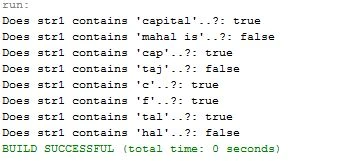
The example contains three possible ways to check the character sequences.
- public class Contains
- {
- public static void main(String args[])
- {
- String str1="Delhi is the capital of India";
- //one way to find charactersequence
- System.out.println("Does str1 contains 'capital'..?: "+str1.contains("capital"));
- System.out.println("Does str1 contains 'mahal is'..?: "+str1.contains("mahal is"));
- //second way to find charactersequence
- boolean find1=str1.contains("cap");
- boolean find2=str1.contains("Taj");
- boolean find3= str1.contains("c");
- boolean find4= str1.contains("f");
- System.out.println("Does str1 contains 'cap'..?: "+find1);
- System.out.println("Does str1 contains 'taj'..?: "+find2);
- System.out.println("Does str1 contains 'c'..?: "+find3);
- System.out.println("Does str1 contains 'f'..?: "+find4);
- //third way to find charactersequence
- CharSequence cs1="tal";
- CharSequence cs2="hal";
- boolean verify1=str1.contains(cs1);
- boolean verify2=str1.contains(cs2);
- System.out.println("Does str1 contains 'tal'..?: "+verify1);
- System.out.println("Does str1 contains 'hal'..?: "+verify2);
- }
- }
To continue further please follow the link below.
Thank you, keep learning and sharing.
Santhakumar MunuswamyPosted May 4, 2015, 2:23 PM
Thanks for nice article
Karthik Muthu KaruppanPosted May 4, 2015, 1:55 PM
good
Abhishek JaiswalPosted May 4, 2015, 11:03 AM
Keep going. very helpful for JAVA developers! :)