

Method: Java String equals()
We will divide this method into its three variants to get a clear understanding of all the equals() methods. Its variants are as in the following.
- Java String equals(String str)
- Java String equalsIgnoreCase(String str)
- Java String contentEquals(StringBuffer strbuf)
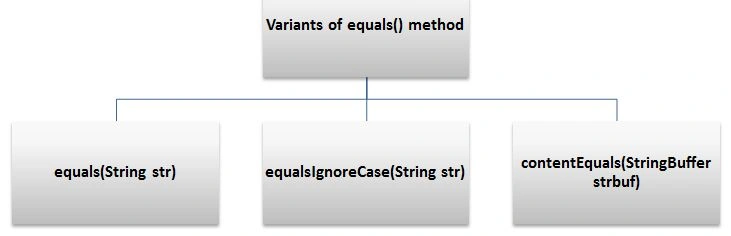
All the three variants are used to compare the two strings but they all have slight differences, let's move forward and explain them.
The Java String equals(String str) method compares two strings. It returns Boolean values true or false as output. This method considers the content as well as the string cases (upper and lower case) for comparison. It returns true only if both the content and the case of the string matches, otherwise it returns false. The String equals() method overrides the equals() method of the object class.
The Java String equalsIgnoreCase() method is approximately similar to the preceding variant but with the difference that it does not consider string cases and the rest is the same as in the preceding variant.
The Java String contentEquals() method is usually similar to equals() but with the difference that it only considers the content of the string. If the content of the strings matches, it returns true otherwise false.
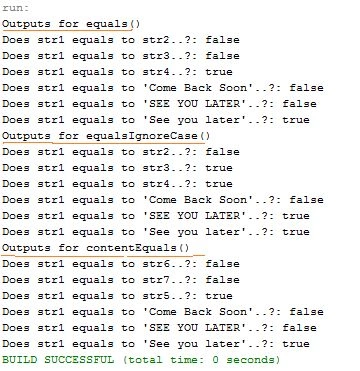
Let's use an example to understand all the three variants together using various strings.
Example
- public class EqualsVariants
- {
- public static void main(String args[])
- {
- String str1="See you later";
- String str2="Come Back Soon";
- String str3="SEE YOU LATER";
- String str4="See you later";
- System.out.println("Outputs for equals()");
- System.out.println("Does str1 equals to str2..?: "+str1.equals(str2));//content not same hence returns false
- System.out.println("Does str1 equals to str3..?: "+str1.equals(str3));//case not same hence returns false
- System.out.println("Does str1 equals to str4..?: "+str1.equals(str4));//content and case both are same hence returns true
- System.out.println("Does str1 equals to 'Come Back Soon'..?: "+str1.equals("Come Back Soon"));//false
- System.out.println("Does str1 equals to 'SEE YOU LATER'..?: "+str1.equals("SEE YOU LATER"));//false
- System.out.println("Does str1 equals to 'See you later'..?: "+str1.equals("See you later"));//true
- System.out.println("Outputs for equalsIgnoreCase()");
- System.out.println("Does str1 equals to str2..?: "+str1.equalsIgnoreCase(str2));//content not same hence returns false
- System.out.println("Does str1 equals to str3..?: "+str1.equalsIgnoreCase(str3));//case is not same hence by ignoring the case it returns true
- System.out.println("Does str1 equals to str4..?: "+str1.equalsIgnoreCase(str4));//content and case both are same hence returns true
- System.out.println("Does str1 equals to 'Come Back Soon'..?: "+str1.equalsIgnoreCase("Come Back Soon"));//false
- System.out.println("Does str1 equals to 'SEE YOU LATER'..?: "+str1.equalsIgnoreCase("SEE YOU LATER"));//true
- System.out.println("Does str1 equals to 'See you later'..?: "+str1.equalsIgnoreCase("See you later"));//true
- //for contentEquals() we have to StringBuffers of above strings as it works with StringBuffer
- StringBuffer str5= new StringBuffer("See you later");
- StringBuffer str6= new StringBuffer("Come Back Soon");
- StringBuffer str7= new StringBuffer("SEE YOU LATER");
- System.out.println("Outputs for contentEquals()");
- System.out.println("Does str1 equals to str6..?: "+str1.contentEquals(str6));//content not same hence returns false
- System.out.println("Does str1 equals to str7..?: "+str1.contentEquals(str7));//case is not same hence returns false
- System.out.println("Does str1 equals to str5..?: "+str1.contentEquals(str5));//content and case both are same hence returns true
- System.out.println("Does str1 equals to 'Come Back Soon'..?: "+str1.contentEquals("Come Back Soon"));//false
- System.out.println("Does str1 equals to 'SEE YOU LATER'..?: "+str1.contentEquals("SEE YOU LATER"));//false
- System.out.println("Does str1 equals to 'See you later'..?: "+str1.contentEquals("See you later"));//true
- }
- }
Gopi ChandPosted May 6, 2015, 2:45 PM
Sure Abhishek Jaiswal...it will be my pleasure
Santhakumar MunuswamyPosted May 6, 2015, 2:39 PM
Good
Gopi ChandPosted May 6, 2015, 6:28 AM
Okay..you will get more than what you want... :)
Abhishek JaiswalPosted May 6, 2015, 3:35 AM
Do it then, it will be of great use! :)
Gopi ChandPosted May 6, 2015, 3:11 AM
Yes it is possible Abhishek Jaiswal.
Abhishek JaiswalPosted May 6, 2015, 2:39 AM
Good one. If possible, then write on 'String Buffer class' too. :)