

Introduction
In the current Software Development phase, logging is an integral part. The development process has been changed and in today's scenario, there are different API calls. So, structured logging is essential for debugging, troubleshooting, or logging any other information. Serilog is useful for structured logging and therefore, the main purpose of using Serilog is to log the Structured Data.
Example for Logging
Have a look at the examples shown below.
Log.Information("the value of PI is {val}", Math.PI);
Where {val} is called a Named Property and Math.PI is the value of the named property.
Log.Information("New user added to our system {UserName}, Age {UserAge}", name, age);
Sinks
Sinks are the places where we store our log messages. For our demo application, we will use the sinks like a Console or File. There are many other sinks available that allow storing data in a structured format like Ravan DB/Seq.
Here's a list of some commonly used sinks.
- Azure Table Storage
- Console
- File/Rolling file
- Log4Net
- Logger
- MongoDB
- Microsoft SQL Server
- Raven DB
- Seq
Logging Structured Data
- Collection
- Objects
- Destructured Object
We will now create a sample application for Serilog.
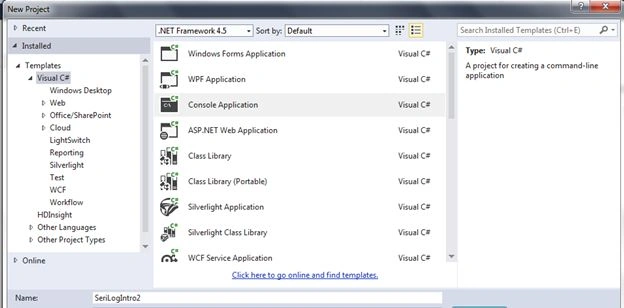
Next, install the Nugget package for Serilog as shown below.


Code Sample for creating a console sink
using System;
using System.Collections.Generic;
using System.Linq;
using System.Text;
using System.Threading.Tasks;
using Serilog;

namespace SeriLogIntro2
{
    class Program
    {
        static void Main(string[] args)
        {
            ILogger logger = new LoggerConfiguration()
                //.WriteTo.RollingFile("rollingfile.txt")
                //.WriteTo.File("test.txt")
                .WriteTo.Console()
                .CreateLogger();

            logger.Information("User name is {username} and age is {age}", "vivek", 34);
            Console.ReadLine();
        }
    }
}
Now, have a look at the preceding example. Commented lines are for writing the logging-in and rolling files.
From the following lines of code, you can understand how to assign the logger.
Log.Logger = logger;
Log.Logger = logger;

IEnumerable<string> favShape = new List<string> { "square", "triangle" };
Log.Information("Favorite shape is {shape}", favShape);

var favShape1 = new Shape()
{
    Square = 1,
    Triangle = 2,
    Rectangle = 3
};
logger.Information("Favorite shape is {@shape}", favShape1);

Formatting
There are many formatting options available for Serilog.
logger.Information("User name is {username} and age is {age}", "vivek", 34);
logger.Information("User name is {username:l} and age is {age}", "vivek", 34); //name without ""
The default Serilog shows a string in “”, but with the option {username:l}, we can remove “.
Here's an example of numbers formatting.
Log.Information("The value of PI is {val:0.00}", Math.PI);
Logging Levels
- Verbose: Very low-level debugging
- Debug: low-level control logic
- Information
- Warning
- Error
- Fatal
By default, the logging level is set to Information. We can set the minimum logging level in the code.
ILogger logger = new LoggerConfiguration()
    .WriteTo.Console()
    .MinimumLevel.Verbose()
    .CreateLogger();

Log.Verbose("Calculated {cvv} for {CardNumber}", check, card);
Log.Debug("Applying gold card for {Customer}", customer);
Log.Information("New {Card} placed by {Customer}", card, customer);
Log.Warning(exception, "Failed to save new {Order}, retrying in {Wait} milliseconds", order, retryDelay);
Log.Error("Failed to save new {file}", file);
Log.Error(exception, "Failed to save new {file}", file);
Log.Fatal("Unhandled exception, application is terminating");
Adding the Log Context
var contextLogger = Log.Logger.ForContext<Program>();
I have introduced some basic understanding of Serilog in this article. There will be an introduction to some advanced features of Serilog and the Seq (Sinks) in my next article.
Krishna satyaPosted Nov 29, 2018, 2:29 AM
Good.....Can u please give me the example for how to initialize the logger in WCF. For Console Application it was working fine. But same thing if i am trying to do, its creating unique file for each log.
Santhakumar MunuswamyPosted May 12, 2015, 3:18 PM
Good
Gowtham RajamanickamPosted May 12, 2015, 1:16 PM
goood
NitinPosted May 12, 2015, 12:50 PM
good one
Sibeesh VenuPosted May 12, 2015, 6:26 AM
Good one
Abhishek JaiswalPosted May 12, 2015, 5:20 AM
Very informative! :)
Manoj KulkarniPosted May 12, 2015, 4:09 AM
Nice article. Thank you for sharing