
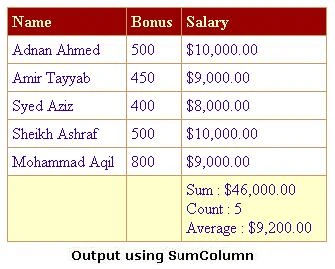
Introduction
A normal requirement in any ASP.Net application is to sum/average up the values
in a DataGrid column to the Footer. In this article we will compare the normal
methods and later create our own custom DataGrid column "SumColumn", derived
from BoundColumn to avoid repetition of the same code.
Background
Let us consider the example of a DataGrid showing the list of employees. Columns
are Name, Salary and Bonus. Normal solutions are
- Query database for the sum:
One way is to compute the sum of the data through a SQL query. For example, to compute the sum of all salaries in Employee Table, the following SQL statement could be used:
SELECT SUM(Salary)FROM Employees
After firing the query using ADO.Net, we will save the result of query in a local variable e.g. internalSum. Dividing internalSum by the no of Items in DataGrid will yield average. Then we have to loop through the DataGrid Items Collection to find the Footer and set the value.
For Each dgItem In Me.dgEmployee.Items
If dgItem.ItemType = ListItemType.Footer Then
values = "Sum : " & internalSum & "<br>"
values += "Average : " & (internalSum / Me.dgEmployee.Items.Count)
dgItem.Cells(0).Text = values
End If
Next
Disadvantages:
- Two round trips to the database server; one for records and one for sum.
- Also, if you want to compute sum for Bonus as well, then one will need one more SQL query i.e. no of queries will be (n+1) where n is the number of columns you want to sum up.
- To show the sum in the Footer, one has to loop through the Items collection of the DataGrid, checking the Footer ItemType, setting the value.
- Two round trips to the database server; one for records and one for sum.
- Use DataTable Compute() Method:
Another way is to use the Compute() method of the DataTable i.e. to get the same output as in first approach, we have to do likeinternalSum = dtEmployee.Compute("SUM(Salary)",String.Empty).ToString
internalAvg = dtEmployee.Compute("AVG(Salary)",String.Empty).ToString
Now do the above described looping technique and set the value in DataGrid footer.
Disadvantages:- The results of the SQL query, the one that's being bound to the DataGrid, must be retrieved in a DataTable; no custom collection, Array or ArrayList will work.
- To show the sum in the Footer, one has to loop through the Items collection of the DataGrid.
- The results of the SQL query, the one that's being bound to the DataGrid, must be retrieved in a DataTable; no custom collection, Array or ArrayList will work.
- Use DataGrid ItemDataBound Event:
The idea is to use the ItemDataBound event of the DataGrid, grabbing the corresponding item value of all the rows of the DataGrid and summing it up. We have to keep the count of Items as well to calculate average. Then we could display the values in the Footer.
Private Sub dgEmployee_ItemDataBound(ByVal senderAs Object, _
ByVal e As System.Web.UI.WebControls.DataGridItemEventArgs)
Handles dgEmployee.ItemDataBound
Select Case e.Item.ItemType
Case ListItemType.Item, ListItemType.AlternatingItem
internalSum += CType(e.Item.Cells(1).Text,Double)
internalCount += 1
Case ListItemType.Footer
e.Item.Cells(0).Text = "Sum : " & Me.FormatDataValue(internalSum) & "<br>"
e.Item.Cells(0).Text += "Count : " & internalCount & "<br>"
e.Item.Cells(0).Text += "Average : " & _
Me.FormatDataValue(internalSum / internalCount)
End Select
End Sub
ADVANTAGES:
- The DataSource of the DataGrid can be of any type. It is not restricted to be DataTable as in second solution.
- Only one query as compare to (n+1) queries in first solution.
- No extra loop of DataGrid Item Collection to find Footer as in first and second solution.
- The DataSource of the DataGrid can be of any type. It is not restricted to be DataTable as in second solution.
Problem
At this point you will be thinking that if the last solution does not have
problems, what we are going to do. If it ain't broken, why fix it. Actually I am
tired of repeating the same old code in code behind of pages containing DataGrid.
Are you not tired as well? I want to do it in an easier way; a way that is
elegant as well. What if we do not have to write a single line of code and it
will be done automatically. I am sure you will enjoy it as I do. May be you have
heard that quote too
Laziness is the mother of invention.
SumColumn for the Rescue
Introduction to Solution
Now it is the time to pull the cat out of the bag. Solution to this
problem is to build the desired functionality right into a custom DataGridColumn
that we can then use on any page! Confused, let me explain. We are going to
create our own custom DataGrid column which we will refer as "SumColumn",
inherited from DataGrid BoundColumn. Due to its base class, the new SumColumn
class will have all of the built-in functionality already present in the
BoundColumn class. We just need to implement our sum functionality. Inheriting
powerful controls like the BoundColumn class and adding new functionality to
them is one of the OO features of the .NET Framework.
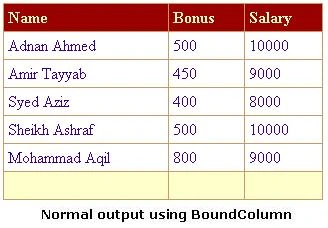
Before we dive into creating our custom column class, let's first look at an example that simply uses a normal BoundColumn control to display the data. For this, we set up a simple DataGrid that displays the Name, Salary and Bonus from Employee Table.
<asp:datagridid="dgEmployee"runat="server"ShowFooter="True"AutoGenerateColumns="False"
ID="Datagridid1"
NAME="Datagridid1">
<FooterStyleForeColor="#330099"></FooterStyle>
<SelectedItemStyleForeColor="#663399"
</SelectedItemStyle>
<ItemStyleForeColor="#330099"></ItemStyle>
<HeaderStyleFont-Bold="True"ForeColor="#FFFFCC"></HeaderStyle>
<Columns>
< asp:BoundColumn DataField ="Name" HeaderText ="Name"></
asp:BoundColumn
>
< asp:BoundColumn DataField ="Bonus" HeaderText ="Bonus"></
asp:BoundColumn
>
< asp:BoundColumn DataField ="Salary" HeaderText ="Salary"></
asp:BoundColumn
>
</Columns>
</asp:datagrid>
And in the code behind, we would do in the page load event.
dgEmployee.DataSource = GetEmployees()
dgEmployee.DataBind()
Where GetEmployees() will return a DataTable containing the employee records.
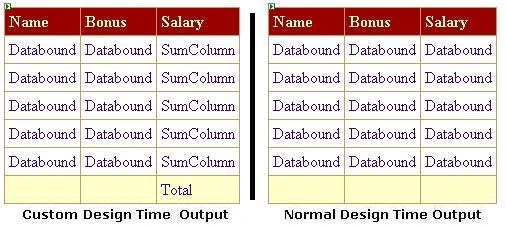
Normal output will be like (depending upon the data)
1st Pass: Creating the Initial Draft
If you have Visual Studio .NET, create a new VB.Net project of type
Class Library named CustomWebControls. You will need to add the reference of
System.Web.dll assembly in your project. Otherwise create a file SumColumn.vb.
We will make the class step by step as we proceed.
Imports System
Imports System.Web
Imports System.Web.UI
Imports System.Web.UI.WebControls
Imports System.ComponentModel
Public
Class SumColumn
Inherits BoundColumn
End Class
BoundColumn class has two methods that are normally overridden to provide some
custom functionality. One is FormatDataValue() and other is InitializeCell().
The FormatDataValue method is normally used along with the DataFormatString
property to format numeric and date information. Therefore we are going to use
the second one i.e. InitializeCell. This method is much like the DataGrid
ItemCreated method. The signature of the method is
Public
Overrides Sub InitializeCell(ByVal
cell As
System.Web.UI.WebControls.TableCell, _
ByVal columnIndex
As Integer,
ByVal itemType
As System.Web.UI.WebControls.ListItemType)
We do not have the value of cell at this time because cell is just being
created. We should somehow link ourselves with the binding of the cell. This can
be done by attaching a handler on the fly to the cell DataBound event
Public Overrides
Sub InitializeCell(ByVal
cell As System.Web.UI.WebControls.TableCell, _
ByVal columnIndex
As Integer,
ByVal itemType As
System.Web.UI.WebControls.ListItemType)
MyBase.InitializeCell(cell, columnIndex,
itemType)
Select Case
itemType
Case ListItemType.AlternatingItem,
ListItemType.Item, ListItemType.Footer
AddHandler cell.DataBinding,
AddressOf CellItemDataBound
End Select
End Sub
We have called the InitializeCell method of the base class so that it can do the
routine work. We have also filter the ItemType using select case because we only
want to deal with Item, AlternalteItem and Footer. Our method, CellItemDataBound
has been attached with the DataBinding event of cell. Inside this method we will
do our magic. Just recall the third solution described previously.
Private Sub
CellItemDataBound(ByVal sender
As Object,
ByVal e As
EventArgs)
Dim cell As
TableCell = CType(sender, TableCell)
Dim DGI As
DataGridItem = CType(cell.NamingContainer,
DataGridItem)
Dim dValue As
Decimal
Dim dataItem
As Object =
DGI.DataItem
Select Case
DGI.ItemType
Case ListItemType.AlternatingItem,
ListItemType.Item
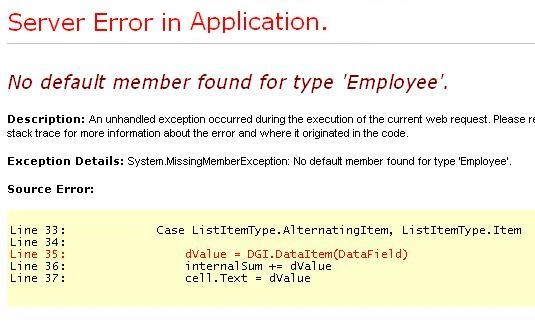
dValue = DGI.DataItem(DataField)
internalSum += dValue
internalCount += 1
cell.Text = Me.FormatDataValue(dValue)
Case ListItemType.Footer
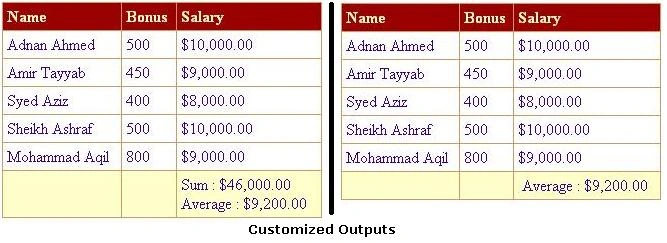
cell.Text = "Sum : " & Me.FormatDataValue(internalSum)
& "<br>"
cell.Text += "Count : " & internalCount & "<br>"
cell.Text += "Average : " & Me.FormatDataValue(internalSum
/ internalCount)
End Select
End Sub
Code is pretty straight forward. We just grabbed the DataItem out of the sender object, and then check the ItemType. If it is Item or AlternateItem, we set the text of the cell; add to internalSum and increment the internalCount. If it is Footer, we just concatenate the values and set the text of cell. Please note that we have called FormatDataValue method of base class to format the output. No complications till yet.
Compile the class library project. Add the reference of its output to your web project. Register the tag at the top of aspx page.
<%@ Register TagPrefix="Custom" Namespace="CustomWebControls" Assembly="CustomWebControls" %>
Join the conversation! Your thoughts help the community grow.