

Introduction
An array is a collection of variables that are stored in contiguous memory locations. It is used to store multiple values of the same type under a single name, allowing you to easily access and manipulate the values.
Key Points
- Fixed Size: The size of an array is defined when it is created, and it cannot change during runtime.
- Homogeneous Elements: Arrays can only store elements of the same data type (e.g., all integers, all strings).
- Zero-Based Indexing: The index of the first element in an array is 0. Each subsequent element is accessed using an index number.
- Efficient Memory Usage: Arrays are stored in contiguous memory locations, which makes them efficient for accessing elements.
Step 1. Declaring Arrays.
You can declare an array in C# in various ways. Here are a few examples.
// Declaring an array of integers
int[] numbers = new int[5]; // Array of 5 integers

// Declaring and initializing an array
string[] names = { "Alice", "Bob", "Charlie" };

// Declaring with explicit size and initialization
double[] prices = new double[] { 10.5, 20.3, 15.7 };

// Declaring an array with initialization after declaration
int[] scores;
scores = new int[] { 88, 92, 74, 100 };
Step 2. Accessing Array Elements.
Array elements are accessed using an index, which starts at 0.
Console.WriteLine(names[0]);  // Prints "Alice"
Console.WriteLine(prices[1]); // Prints 20.3
Step 3. Modifying Array Elements.
You can assign a new value to an element in an array.
numbers[0] = 10; // Sets the first element to 10
prices[2] = 18.9; // Changes the third element to 18.9
Step 4. Iterating Over Arrays.
You can use a for loop or for each loop to iterate through an array.
// Using for loop
for (int i = 0; i < numbers.Length; i++)
{
    Console.WriteLine(numbers[i]);
}
// Using foreach loop
foreach (string name in names)
{
    Console.WriteLine(name);
}
Step 5. Multidimensional Arrays.
C# supports multidimensional arrays (e.g., 2D arrays).
// Declaring a 2D array
int[,] matrix = new int[3, 3];

// Initializing a 2D array
int[,] matrix2 = { { 1, 2, 3 }, { 4, 5, 6 }, { 7, 8, 9 } };

// Accessing 2D array elements
Console.WriteLine(matrix2[0, 1]); // Prints 2
Step 6. Jagged Arrays.
A jagged array is an array of arrays (arrays that can have different lengths).
// Declaring a jagged array
int[][] jaggedArray = new int[3][];

// Initializing a jagged array
jaggedArray[0] = new int[] { 1, 2 };
jaggedArray[1] = new int[] { 3, 4, 5 };
jaggedArray[2] = new int[] { 6, 7, 8, 9 };

// Accessing jagged array elements
Console.WriteLine(jaggedArray[1][2]); // Prints 5
Step 7. Array Methods.
You can use built-in methods to manipulate arrays.
- Array.Sort(): Sorts the array.
Array.Sort(numbers); // Sorts the array in ascending order - Array.Reverse(): Reverses the array.
Array.Reverse(numbers); // Reverses the order of elements - Array.Copy(): Copies elements from one array to another.
int[] copiedArray = new int[3]; Array.Copy(numbers, copiedArray, 3); // Copies first 3 elements from numbers to copiedArray - Array.Find(): Finds an element based on a condition.
int found = Array.Find(numbers, x => x > 10); // Finds first element greater than 10
Console.WriteLine(found);
Step 8. Array Length and Bounds.
- Length: Represents the number of elements in the array.
- GetLength(): Provides the length of a specific dimension in a multidimensional array.
Console.WriteLine(numbers.Length); // Prints length of the array
Console.WriteLine(matrix2.GetLength(0)); // Prints number of rows in the 2D array
Console.WriteLine(matrix2.GetLength(1)); // Prints number of columns in the 2D array
Step 9. Array Initialization with Specific Values.
You can initialize an array with specific values or use Enumerable. Repeat to create arrays filled with the same value.
// Initializing an array with a specific value
int[] filledArray = new int[5] { 1, 1, 1, 1, 1 };

// Using Enumerable.Repeat to fill the array with the same value
var repeatedArray = Enumerable.Repeat(10, 5).ToArray(); // Array of size 5, all elements are 10
Step 10. Using LINQ with Arrays.
LINQ (Language Integrated Query) provides powerful ways to manipulate and query arrays.
using System.Linq;
// Create an array
int[] numbers = { 5, 3, 8, 6, 2 };

// Find all even numbers in the array
var evenNumbers = numbers.Where(n => n % 2 == 0).ToArray();

// Find the first number greater than 4
var firstGreaterThan4 = numbers.FirstOrDefault(n => n > 4);

// Find the sum of all elements in the array
var sum = numbers.Sum();

// Find the average of the elements
var average = numbers.Average();

// Display results
Console.WriteLine("Even Numbers: " + string.Join(", ", evenNumbers));
Console.WriteLine("First greater than 4: " + firstGreaterThan4);
Console.WriteLine("Sum: " + sum);
Console.WriteLine("Average: " + average);
Step 11. An array of Objects.
You can also create arrays of objects in C#.
// Define a class
public class Person
{
    public string Name { get; set; }
    public int Age { get; set; }
    public Person(string name, int age)
    {
        Name = name;
        Age = age;
    }
}
// Create an array of objects
Person[] people = {
    new Person("Alice", 25),
    new Person("Bob", 30),
    new Person("Charlie", 35)
};
// Accessing elements
Console.WriteLine(people[0].Name); // Prints "Alice"
Console.WriteLine(people[1].Age);  // Prints 30
Step 12. Handling Arrays with Methods.
You can pass arrays to methods and manipulate them. Arrays are passed by reference, so changes made inside the method will affect the original array.
using System;
public class Program
{
    public static void Main()
    {
        int[] numbers = { 1, 2, 3, 4, 5 };
        Console.WriteLine("Before Method Call:");
        foreach (int num in numbers)
        {
            Console.WriteLine(num);
        }
        ModifyArray(numbers); // Pass array to method

        Console.WriteLine("\nAfter Method Call:");
        foreach (int num in numbers)
        {
            Console.WriteLine(num);
        }
    }
    // Method that modifies the array
    public static void ModifyArray(int[] arr)
    {
        for (int i = 0; i < arr.Length; i++)
        {
            arr[i] *= 2; // Double each element
        }
    }
}
Step 13. Copying Arrays.
In C#, you can copy arrays in various ways.
- Array.Copy(): Copies elements from one array to another.
- Array.Clone(): Creates a shallow copy of the array.
- Array.ConstrainedCopy(): Copies elements with additional safety checks.
// Using Array.Copy() to copy elements
int[] originalArray = { 1, 2, 3, 4, 5 };
int[] copiedArray = new int[5];
Array.Copy(originalArray, copiedArray, 5); // Copy 5 elements

// Using Clone() to create a shallow copy
int[] clonedArray = (int[])originalArray.Clone();

// Modify original array and display both
originalArray[0] = 100;
Console.WriteLine("Original Array: " + string.Join(", ", originalArray));
Console.WriteLine("Cloned Array: " + string.Join(", ", clonedArray));
Step 14. Array Resizing.
C# does not directly allow resizing an array, but you can use Array.Resize() to create a new array with a different size.
// Original array
int[] numbers = { 1, 2, 3 };

// Resize the array
Array.Resize(ref numbers, 5); // Resize to 5 elements

// Initialize the newly resized array
numbers[3] = 4;
numbers[4] = 5;
Console.WriteLine(string.Join(", ", numbers)); // Prints "1, 2, 3, 4, 5"
Step 15. Array vs List.
While arrays have a fixed size, List<T> is more flexible because it can dynamically grow or shrink for example.
int[] numbers = { 1, 2, 3, 4, 5 };
ArraySegment<int> segment = new ArraySegment<int>(numbers, 1, 3); // Sub-array from index 1, length 3
foreach (var item in segment)
{
    Console.WriteLine(item); // Prints "2, 3, 4"
}
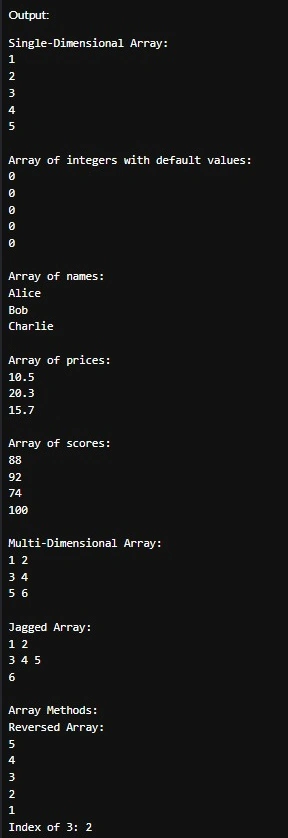
Sample Output of Program
Benefits of Using Arrays
- Memory Efficiency: Arrays are allocated in contiguous memory blocks, which makes them efficient in terms of memory usage.
- Fast Access: Accessing array elements by index is very fast, making them ideal for tasks that require frequent access to individual elements.
- Simplicity: Arrays are simple to understand and use, especially when working with large amounts of data of the same type.
Drawbacks of Arrays
- Fixed Size: Once an array is created, its size cannot be changed. This can be limiting if you need a dynamically sized collection.
- No Built-in Features for Dynamic Resizing: Arrays do not have built-in methods to add or remove elements (e.g., for dynamically changing data).
Join the conversation! Your thoughts help the community grow.