

Introduction
Today, in this article let's play around with one of the interesting and most useful concepts in SharePoint 2010.
Question: What is Survey?
In simple terms "It is a questionnaire that a group of people is requested to answer based on contextual scenario output". I think we are now good to go and implement this wonderful concept.
Step 1: Open SharePoint 2010 Central Administration and navigate to a specific site:
Step 2: Navigate to "Site Actions" -> "More Options...":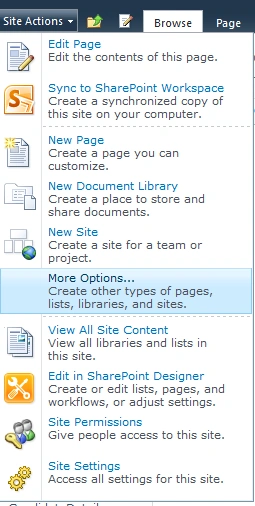
Step 3: Select "Survey" from the listed categories. Give a name to the survey: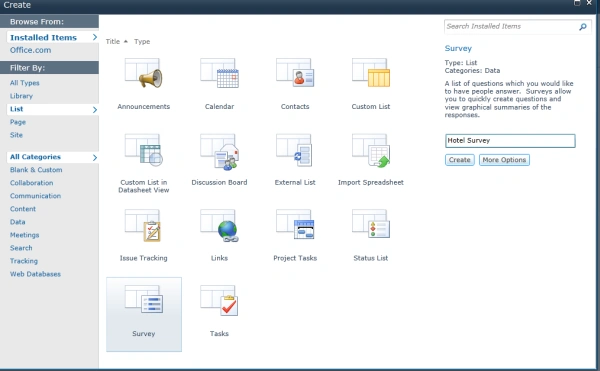

Step 4: Enter the first question:
Step 5: Enter the second question:
Step 6: Enter the third question:
Step 7: The List settings looks like this: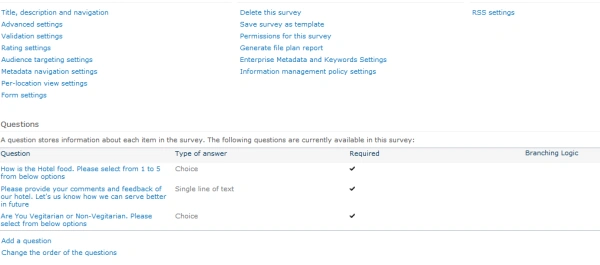
Step 8: Responding to the survey:
Step 9: The Questions screen looks like this:
Step 10: The Answered questions looks like this:
Step 11: The Survey logged looks like this:
Step 12: The Graphical format look up screen:
I hope this article is useful for you. I look forward for your comments and feedback.
Jean PaulPosted May 30, 2012, 1:32 PM
That's a Cool Information Vivek.. So we follow each other. Great!
Vijay PrativadiPosted May 30, 2012, 1:30 PM
Thanks Jean Paul....You doing great aswell....I also follow up your articles!
Jean PaulPosted May 30, 2012, 12:30 PM
Good Article Vijay.. Thank You for sharing.
Venkatesan JayakanthamPosted May 28, 2012, 4:38 AM
Too Good. Cheers, Venkatesan Prabu .J Head, Kaashiv InfoTech, Chennai. Free Ebooks - http://www.kaashivinfotech.com/Ebooks.aspx http://venkattechnicalblog.blogspot.in/