


This article will provide some light on a tag of HTML5 named SVG. SVG stands for “Scalable Vector Graphics”. It is basically used to define vector-based graphics for the web. A very good advantage of the SVG is that if we zoom or resize an image then there is no loss of quality of the image.
SVG always defined the graphics in XML format. Using SVG we can animate every attribute in the file.

We can use this SVG tag inside the HTML tag or outside. If we use SVG from outside then for linking this SVG page to an HTML page we use:
SVG always defined the graphics in XML format. Using SVG we can animate every attribute in the file.
We can use this SVG tag inside the HTML tag or outside. If we use SVG from outside then for linking this SVG page to an HTML page we use:
Now we move to do some work on SVG.
1. How to make a rectangle using SVG
- <?xml version="1.0" encoding="utf-8"?>
- <!DOCTYPE svg PUBLIC "-//W3C//DTD SVG 1.1//EN" "http://www.w3.org/Graphics/SVG/1.1/DTD/svg11.dtd">
- <!--Scalable Vector Graphic-->
- <svg version="1.1"
- xmlns="http://www.w3.org/2000/svg"
- xmlns:xlink="http://www.w3.org/1999/xlink"
- xmlns:ev="http://www.w3.org/2001/xml-events"
- baseProfile="full">
- <rect x="10" y="10" height="100" width="100"
- style="stroke:#333; stroke-width:4; fill:#0F0"/>
- </svg>
Output
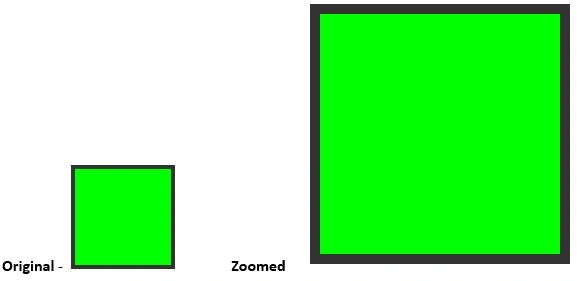
So here we can see examples of an SVG in which there is no loss of image quality after zooming the image.
2. Make text using SVG
- <?xml version="1.0" encoding="utf-8"?>
- <!DOCTYPE svg PUBLIC "-//W3C//DTD SVG 1.1//EN" "http://www.w3.org/Graphics/SVG/1.1/DTD/svg11.dtd">
- <!--Scalable Vector Graphic-->
- <svg version="1.1"
- xmlns="http://www.w3.org/2000/svg"
- xmlns:xlink="http://www.w3.org/1999/xlink"
- xmlns:ev="http://www.w3.org/2001/xml-events"
- baseProfile="full">
- <text x="20" y="40"
- style="stroke:none; fill:#000000;">
- sanjay kumar singh
- </text>
- </svg>
Output

Here we can also see that there is no loss of image quality after zooming the image.
INKSCAPE software
Inkscape is a professional vector graphics editor for Windows, Mac OS X, and Linux. It's free and open source.

Download Inkscape:
http://sourceforge.net/projects/inkscape/files/latest/download?source=files
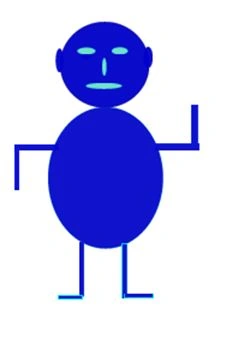
Here I make a man using the Inkscape tool.
Code that is automatically generated by the Inkscape tool to only make the man:
- <SVG
- xmlns:dc="http://purl.org/dc/elements/1.1/"
- xmlns:cc="http://creativecommons.org/ns#"
- xmlns:rdf="http://www.w3.org/1999/02/22-rdf-syntax-ns#"
- xmlns:SVG="http://www.w3.org/2000/SVG"
- xmlns="http://www.w3.org/2000/SVG"
- xmlns:sodipodi="http://sodipodi.sourceforge.net/DTD/sodipodi-0.dtd"
- xmlns:inkscape="http://www.inkscape.org/namespaces/inkscape"
- width="744.09448819"
- height="1052.3622047"
- id="SVG3787"
- version="1.1"
- inkscape:version="0.48.5 r10040"
- sodipodi:docname="drawing.SVG">
- <defs
- id="defs3789" />
- <sodipodi:namedview
- id="base"
- pagecolor="#ffffff"
- bordercolor="#666666"
- borderopacity="1.0"
- inkscape:pageopacity="0.0"
- inkscape:pageshadow="2"
- inkscape:zoom="0.35"
- inkscape:cx="-70.714286"
- inkscape:cy="520"
- inkscape:document-units="px"
- inkscape:current-layer="layer1"
- showgrid="false"
- inkscape:window-width="1366"
- inkscape:window-height="705"
- inkscape:window-x="-8"
- inkscape:window-y="-8"
- inkscape:window-maximized="1" />
- <metadata
- id="metadata3792">
- <rdf:RDF>
- <cc:Work
- rdf:about="">
- <dc:format>image/SVG+xml</dc:format>
- <dc:type
- rdf:resource="http://purl.org/dc/dcmitype/StillImage" />
- <dc:title></dc:title>
- </cc:Work>
- </rdf:RDF>
- </metadata>
- <g
- inkscape:label="Layer 1"
- inkscape:groupmode="layer"
- id="layer1">
- <path
- sodipodi:type="arc"
- style="opacity:0.95999995;fill:#0000ca;fill-opacity:1;stroke:#010900;stroke-opacity:0.96296297"
- id="path4305"
- sodipodi:cx="534.28571"
- sodipodi:cy="360.93362"
- sodipodi:rx="148.57143"
- sodipodi:ry="142.85715"
- d="m 682.85713,360.93362 a 148.57143,142.85715 0 1 1 -297.14285,0 148.57143,142.85715 0 1 1 297.14285,0 z"
- transform="translate(-185.71429,-145.71428)" />
- <path
- sodipodi:type="arc"
- style="opacity:0.95999995;fill:#0000ca;fill-opacity:1;stroke:#0109e3;stroke-opacity:0.96296297"
- id="path4315"
- sodipodi:cx="188.57143"
- sodipodi:cy="200.93361"
- sodipodi:rx="22.857143"
- sodipodi:ry="40"
- d="m 211.42857,200.93361 a 22.857143,40 0 1 1 -45.71429,0 22.857143,40 0 1 1 45.71429,0 z"
- transform="matrix(0.57125058,0,0,1,90.649876,0)" />
- <path
- sodipodi:type="arc"
- style="opacity:0.95999995;fill:#0000ca;fill-opacity:1;stroke:#0109e3;stroke-opacity:0.96296297"
- id="path4317"
- sodipodi:cx="492.85715"
- sodipodi:cy="190.93361"
- sodipodi:rx="15.714286"
- sodipodi:ry="35.714287"
- d="m 508.57143,190.93361 a 15.714286,35.714287 0 1 1 -31.42857,0 15.714286,35.714287 0 1 1 31.42857,0 z" />
- <path
- sodipodi:type="arc"
- style="opacity:0.95999995;fill:#0000ca;fill-opacity:1;stroke:#0109e3;stroke-opacity:0.96296297"
- id="path4319"
- sodipodi:cx="284.28571"
- sodipodi:cy="180.93361"
- sodipodi:rx="18.571428"
- sodipodi:ry="17.142857"
- d="m 302.85713,180.93361 a 18.571428,17.142857 0 1 1 -37.14285,0 18.571428,17.142857 0 1 1 37.14285,0 z" />
- <path
- sodipodi:type="arc"
- style="opacity:0.95999995000000005;fill:#71ecca;fill-opacity:1;stroke:#01f3e3;stroke-opacity:0.96296296999999997"
- id="path4321"
- sodipodi:cx="280"
- sodipodi:cy="179.50504"
- sodipodi:rx="22.857143"
- sodipodi:ry="21.428572"
- d="m 302.85714,179.50504 a 22.857143,21.428572 0 1 1 -45.71428,0 22.857143,21.428572 0 1 1 45.71428,0 z"
- transform="matrix(1.3288976,0,0,0.54378156,-84.573681,72.117398)" />
- <path
- sodipodi:type="arc"
- style="opacity:0.95999995;fill:#71ecca;fill-opacity:1;stroke:#01f3e3;stroke-opacity:0.96296297"
- id="path4323"
- sodipodi:cx="395.71429"
- sodipodi:cy="175.21933"
- sodipodi:rx="27.142857"
- sodipodi:ry="11.428572"
- d="m 422.85715,175.21933 a 27.142857,11.428572 0 1 1 -54.28571,0 27.142857,11.428572 0 1 1 54.28571,0 z"
- transform="matrix(1,0,0,1.0610854,2.8571429,-16.624552)" />
- <path
- sodipodi:type="arc"
- style="opacity:0.95999995;fill:#71ecca;fill-opacity:1;stroke:#01f3e3;stroke-opacity:0.96296297"
- id="path4325"
- sodipodi:cx="347.14285"
- sodipodi:cy="222.36218"
- sodipodi:rx="7.1428571"
- sodipodi:ry="30"
- d="m 354.28571,222.36218 a 7.1428571,30 0 1 1 -14.28571,0 7.1428571,30 0 1 1 14.28571,0 z" />
- <path
- sodipodi:type="arc"
- style="opacity:0.95999995;fill:#71ecca;fill-opacity:1;stroke:#01f3e3;stroke-opacity:0.96296297"
- id="path4327"
- sodipodi:cx="347.14285"
- sodipodi:cy="290.93362"
- sodipodi:rx="75.714287"
- sodipodi:ry="15.714286"
- d="m 422.85714,290.93362 a 75.714287,15.714286 0 1 1 -151.42857,0 75.714287,15.714286 0 1 1 151.42857,0 z"
- transform="matrix(0.79802031,0,0,0.64883286,68.765695,96.647987)" />
- <path
- sodipodi:type="arc"
- style="opacity:0.95999995000000005;fill:#0709ca;fill-opacity:1;stroke:#01f3e3;stroke-opacity:0.96296296999999997"
- id="path4339"
- sodipodi:cx="348.57144"
- sodipodi:cy="625.2193"
- sodipodi:rx="202.85715"
- sodipodi:ry="235.71428"
- d="m 551.42859,625.2193 a 202.85715,235.71428 0 1 1 -405.7143,0 202.85715,235.71428 0 1 1 405.7143,0 z"
- transform="matrix(0.94592035,0,0,1,21.711865,-34.285714)" />
- <rect
- style="opacity:0.95999995;fill:#0709ca;fill-opacity:1;stroke:#01f3e3;stroke-opacity:0.96296297"
- id="rect4341"
- width="17.142857"
- height="182.85715"
- x="262.85715"
- y="803.79077" />
- <rect
- style="opacity:0.95999995;fill:#0709ca;fill-opacity:1;stroke:#01f3e3;stroke-opacity:0.96296297"
- id="rect4345"
- width="80"
- height="14.285714"
- x="194.28572"
- y="980.93359" />
- <rect
- style="opacity:0.95999995;fill:#0709ca;fill-opacity:1;stroke:#01f3e3;stroke-width:1.03391075;stroke-opacity:0.96296297"
- id="rect4347"
- width="18.325224"
- height="182.85715"
- x="405.21429"
- y="809.50507" />
- <rect
- style="opacity:0.95999995;fill:#0709ca;fill-opacity:1;stroke:#01f3e3;stroke-opacity:0.96296297"
- id="rect4349"
- width="97.14286"
- height="14.285714"
- x="414.28571"
- y="975.2193" />
- <rect
- style="opacity:0.95999995000000005;fill:#0709ca;fill-opacity:1;stroke:#010be3;stroke-opacity:0.96296299"
- id="rect4351"
- width="148.57143"
- height="20"
- x="48.57143"
- y="480.93362" />
- <rect
- style="opacity:0.95999995000000005;fill:#0709ca;fill-opacity:1;stroke:#0105e3;stroke-width:0.76282506999999999;stroke-opacity:0.96296299"
- id="rect4353"
- width="14.963196"
- height="131.42857"
- x="48.343803"
- y="500.93362" />
- <rect
- style="opacity:0.95999995000000005;fill:#0709ca;fill-opacity:1;stroke:#0116e3;stroke-opacity:0.96296299"
- id="rect4357"
- width="145.71428"
- height="22.857143"
- x="517.14288"
- y="478.07648"
- ry="0" />
- <rect
- style="opacity:0.95999995000000005;fill:#0709ca;fill-opacity:1;stroke:#0116e3;stroke-width:0.96534306000000003;stroke-opacity:0.96296299"
- id="rect4361"
- width="20.499195"
- height="129.88486"
- x="637.14288"
- y="348.98215" />
- </g>
- </SVG>
Output
Conclusion
In this article, we studied SVG Overview in HTML5.
Vithal WadjePosted Sep 25, 2014, 2:23 PM
great one keep it up
Madhuram SrivastavaPosted Aug 15, 2014, 2:19 AM
nice article sanjay
kamlesh yadavPosted Aug 14, 2014, 10:37 AM
very nice article sanjay sir...
Abhishek JaiswalPosted Aug 13, 2014, 7:41 AM
Interesting, Good Work!