

In this article, we will learn how to integrate Swashbuckle/Swagger in Web API application and generate a rich UI interface document for API testing.
Small exercises
- Create a Web API application.
- Add controller with actions using Entity Framework.
- Add Swashbuckle/Swagger from NuGet Package Manager.
Here, in this small example, I will create a Web API application with a few Get and Post methods using API controller and will integrate swagger with this application and create a rich UI Interface document for our API application. Please follow the below steps for the same.
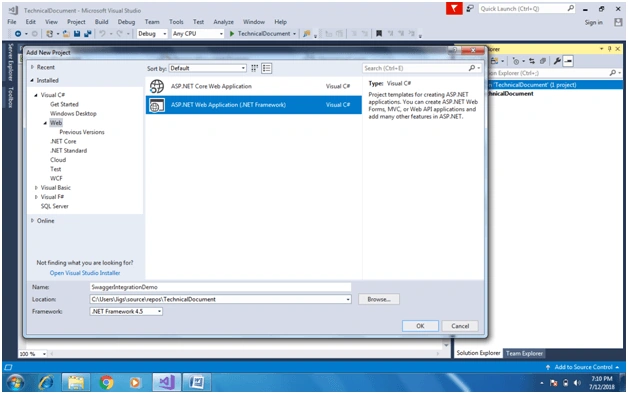
Step 1 - Create Web API application using Visual Studio
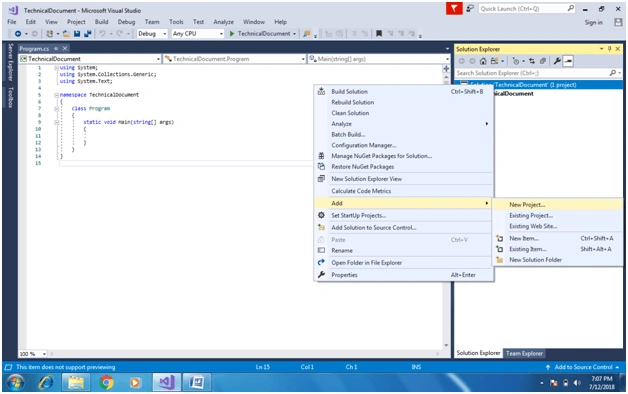
Create a new project or add a project to the existing solution. Here, I have added a Web API project to the existing solution.
Step 2 - Create Employee class
Add a new class with the following properties.
public class Employee
{
    public int EmployeeId { get; set; }

    public string FirstName { get; set; }

    public string LastName { get; set; }

    public string City { get; set; }

    public string ZipCoe { get; set; }

}
Step 3 - Add new Controller
Create an API controller using a scaffold template and select employee model. Once we are done with the controller, it will create all action methods like Get, Post, put and delete.
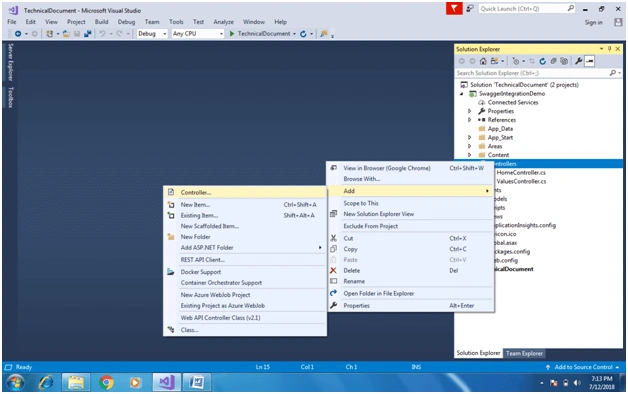
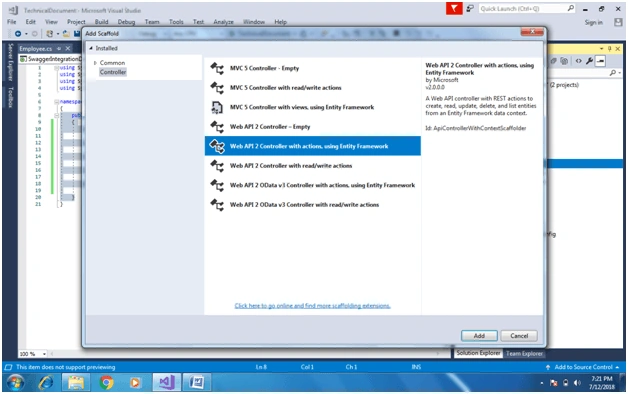
Add Controller with read and write access.
using System;
using System.Collections.Generic;
using System.Data;
using System.Data.Entity;
using System.Data.Entity.Infrastructure;
using System.Linq;
using System.Net;
using System.Net.Http;
using System.Web.Http;
using System.Web.Http.Description;
using SwaggerIntegrationDemo.Models;

namespace SwaggerIntegrationDemo.Controllers
{
    public class EmployeesController : ApiController
    {
        private SwaggerIntegrationDemoContext db = new SwaggerIntegrationDemoContext();


        // GET: api/Employees

        ////////////////////////////////////////////////////////////////////////////////////////////////////
        /// <summary>   Gets the employees. </summary>
        ///
        /// <remarks> List of all employees </remarks>
        ///
        /// <returns>   The employees. </returns>
        ////////////////////////////////////////////////////////////////////////////////////////////////////

        public IQueryable<Employee> GetEmployees()
        {
            return db.Employees;
        }

        // GET: api/Employees/5
        ////////////////////////////////////////////////////////////////////////////////////////////////////
        /// <summary>Get Employee by Id. </summary>
        ///
        /// <remarks> Employee Details for Requested employeId </remarks>
        ///
        /// <returns>Returns Employee object </returns>
        ////////////////////////////////////////////////////////////////////////////////////////////////////
        [ResponseType(typeof(Employee))]
        public IHttpActionResult GetEmployee(int id)
        {
            Employee employee = db.Employees.Find(id);
            if (employee == null)
            {
                return NotFound();
            }

            return Ok(employee);
        }

        // POST: api/Employees
        ////////////////////////////////////////////////////////////////////////////////////////////////////
        /// <summary>Create New Employee </summary>
        ///
        /// <remarks> Creates new employee using PostEmployee method </remarks>
        ///
        /// <returns></returns>
        ////////////////////////////////////////////////////////////////////////////////////////////////////
        [ResponseType(typeof(Employee))]
        public IHttpActionResult PostEmployee(Employee employee)
        {
            if (!ModelState.IsValid)
            {
                return BadRequest(ModelState);
            }

            db.Employees.Add(employee);
            db.SaveChanges();

            return CreatedAtRoute("DefaultApi", new { id = employee.EmployeeId }, employee);
        }

        // DELETE: api/Employees/5
        ////////////////////////////////////////////////////////////////////////////////////////////////////
        /// <summary>Delete Existing Employee By Id </summary>
        ///
        /// <remarks> Delete requested employee </remarks>
        ///
        /// <returns></returns>
        ////////////////////////////////////////////////////////////////////////////////////////////////////
        [ResponseType(typeof(Employee))]
        public IHttpActionResult DeleteEmployee(int id)
        {
            Employee employee = db.Employees.Find(id);
            if (employee == null)
            {
                return NotFound();
            }

            db.Employees.Remove(employee);
            db.SaveChanges();

            return Ok(employee);
        }

        protected override void Dispose(bool disposing)
        {
            if (disposing)
            {
                db.Dispose();
            }
            base.Dispose(disposing);
        }

        private bool EmployeeExists(int id)
        {
            return db.Employees.Count(e => e.EmployeeId == id) > 0;
        }
    }
}
Step 4 - Add Swashbuckle from NuGet packages
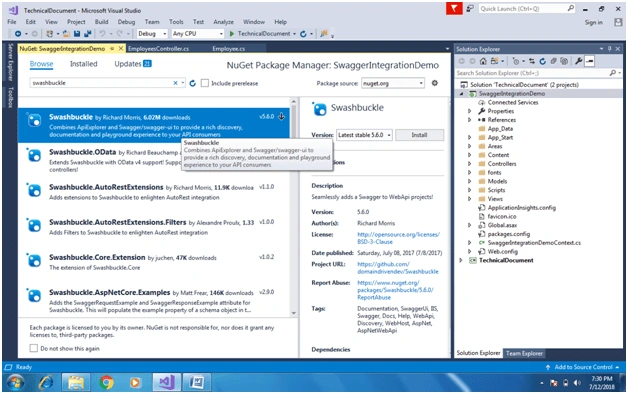
Go to solution and select "Manage NuGet Packages" and search for Swashbuckle to install it. It will integrate swagger to our application.
Step 5
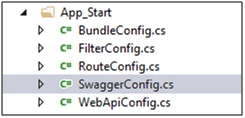
Once the above package is installed successfully, we will be able to see SwaggerConfig.cs file under App_Start folder, like in the below code snippet.
using System.Web.Http;
using WebActivatorEx;
using SwaggerIntegrationDemo;
using Swashbuckle.Application;

[assembly: PreApplicationStartMethod(typeof(SwaggerConfig), "Register")]

namespace SwaggerIntegrationDemo
{
    public class SwaggerConfig
    {
        public static void Register()
        {
            var thisAssembly = typeof(SwaggerConfig).Assembly;

            GlobalConfiguration.Configuration
                .EnableSwagger(c =>
                 {

                        c.SingleApiVersion("v1", "Documentation Using Swagger UI");

                       // c.IncludeXmlComments(string.Format(@"{0}\bin\SwaggerIntegrationDemo.xml", System.AppDomain.CurrentDomain.BaseDirectory));
                 })
                .EnableSwaggerUi(c =>
                 {
                        c.DocumentTitle("Employee Swagger UI");
                  });
        }
    }
}
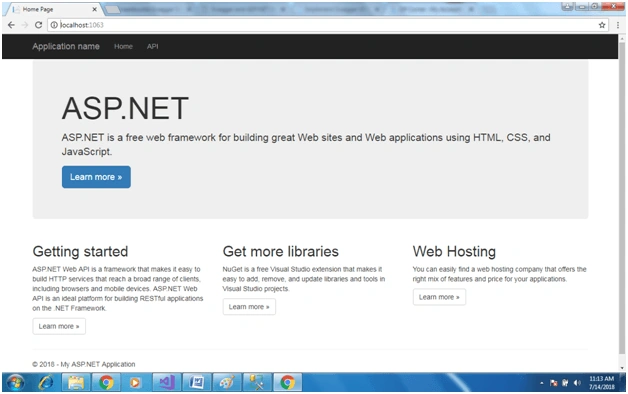
Step 6We are done with all required action. Just need to build a solution and it will open with default page of our application.
Step 7 - Run Swagger UI for our application
We need to suffix our URL with /swagger. It will create a swagger UI for us.
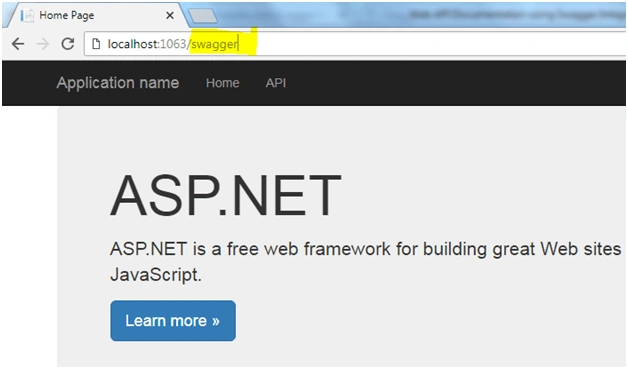
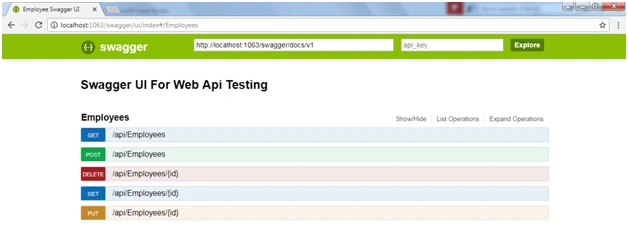
Now, our application is ready with swagger UI and we able to see all our action method in below snippet.
Step 7 - Test API methods using UI
Before moving to testing I want to explain few links which are available in the below screen
- Show/Hide
Once we click on this link, it shows all links and if it’s already open then it will hide all actions.
- List Operation
It will list out all API action methods
- Expand operation
It will expand all operations with try out buttons at the bottom.
This UI generates controller wise operation. Here I have only Employee controller so it’s showing under Employees. If we have more than one controller then it will create another link for that controller.
Here, I have five different API methods for employee controller so it’s created five operations for five methods. Using this UI we can test our API without any other tool.
- Get
Using this operation we can fetch all employees
- Post
Create new employee using post method
- Delete
Delete employee by employee id
- Put
Update employee details by employee Id
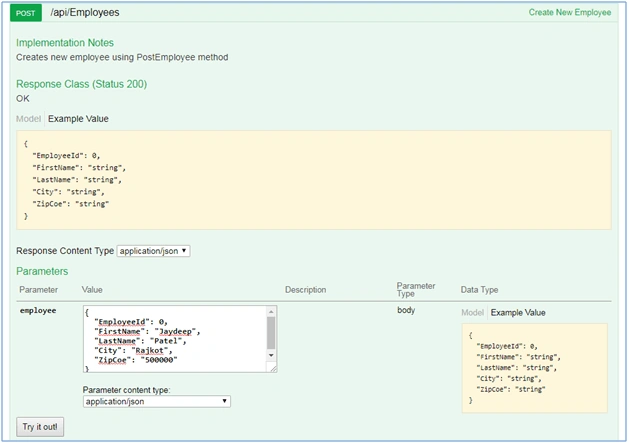
Let’s do testing for all API methods using Swagger UI. First, we will create a new employee and then we will retrieve the same employee. Look at the below two snippets,
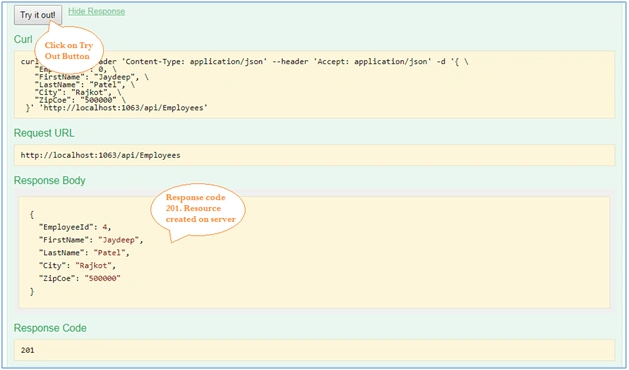
In first and second snippet I have created the new employee with first name Jaydeep and last name with Patel and city as Rajkot. We able to see at down status code 201 which mean it created a new record with employee id 4 on the server.
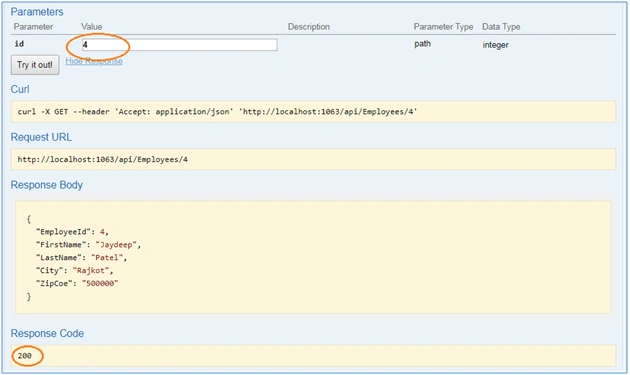
In the third snippet, I had tried to fetch the same record with Employee id as 4 and the same employee shown as json response body with response code 200.
Let’s test the Employees Get API method. Click on Try it out button and you will be able to see the list of all employees which we had created using Post method.
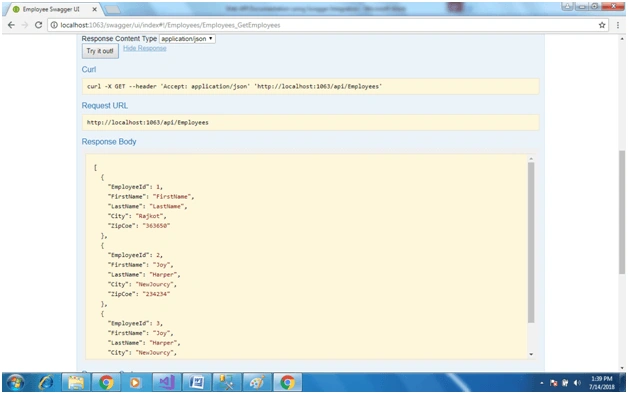
Like Post and Get employee, we can test all API methods using swagger UI.
If we want to enable documentation for the API method, then follow the below steps.
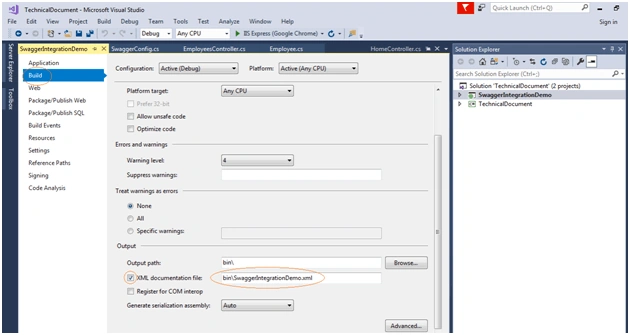
Step 1
Go to solution build property and check the checkbox for XML documentation file.
Step 2
Write XML styled comments top of your all method as below.
// GET: api/Employees
////////////////////////////////////////////////////////////////////////////////////////////////////
/// <summary>   Gets the employees. </summary>
///
/// <remarks> List of all employees </remarks>
///
/// <returns>   The employees. </returns>
////////////////////////////////////////////////////////////////////////////////////////////////////

public IQueryable<Employee> GetEmployees()
{
    return db.Employees;
}

// GET: api/Employees/5
////////////////////////////////////////////////////////////////////////////////////////////////////
/// <summary>Get Employee by Id. </summary>
///
/// <remarks> Employee Details for Requested employeId </remarks>
///
/// <returns>Returns Employee object </returns>
////////////////////////////////////////////////////////////////////////////////////////////////////
[ResponseType(typeof(Employee))]
public IHttpActionResult GetEmployee(int id)
{
    Employee employee = db.Employees.Find(id);
    if (employee == null)
    {
        return NotFound();
    }

    return Ok(employee);
}
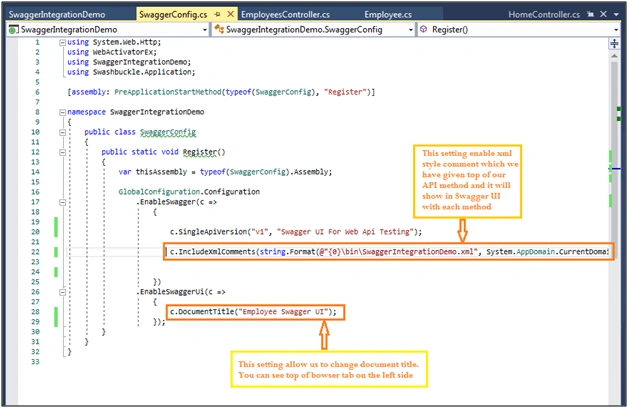
Step 3 - Enable XML styled document
Enable Documentation in SwaggerConfig.cs file and give XML file path using Includexmlcomments in swagger configuration file as per the below snippet.
Step 4
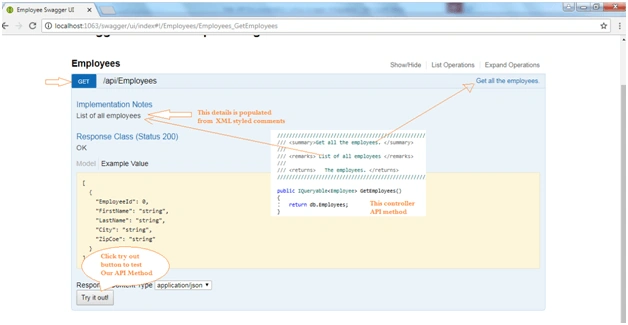
Look at the right side in swagger UI screen as below, you are able to comment which was provided in our employee controller API methods as XML styled comments.
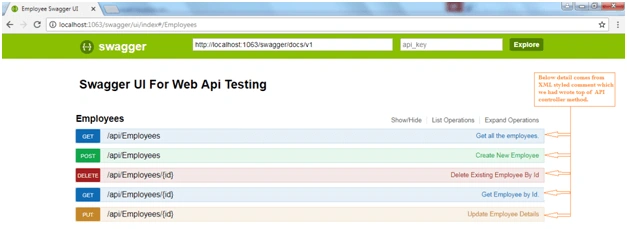
In the below screen, I have pointed out which comment displayed where in swagger UI. This comment really helps the end user to identify which API action method is doing what by the right side of that operation.
Look in our example we are able to see “Get all the employees” at the right side, it says that this method fetches all employee records. At bit farther down it displayed that this method returns “List of all employees”. Click on Expand operation and you can check all XML styled comments are there with the respective operation.
At last, I want to point out a few reasons why we should use swagger,
- It generates a UI for us to test API methods and it's easy to test bcause it will give an auto generated example of json to pass vaules for our method.
- it eliminates need of other tools like Postman, Soap UI, fidler etc.
I hope you enjoyed this article.
If you want to refer my articles and blogs, please visit this link My Articles and blogs
Thank you for reading.
sivaprakash sekarPosted Sep 19, 2019, 7:00 AM
How to add barrier token based Authentication.
Manoj PhajuPosted Jul 15, 2019, 11:11 PM
How to enable basic authentication in swagger
Sagar SinhaPosted Feb 20, 2019, 7:09 PM
Hi Jignesh, Is there any way by which we can monitor our ASP.Net web API's using swagger without using any third party tools? Swagger provides a tool called AlertSite which help in monitoring API's but I cannot use a third party tool. Is there anything which Nuget can help with?
Prashant BiradarPosted Nov 19, 2018, 6:58 AM
Hello Jignesh, can I integrate Swagger/Swashbuckle to Nancy API project.? I went through the various blogs but failed to find the appropriate solution.
L APosted Jul 26, 2018, 12:17 PM
Hello Jignesh Kumar, I also tried to include Swashbuckle in my WebAPI project but its giving error when i tried navigate to (localhost:{portnumber}/swagger). Because of following issues - https://github.com/domaindrivendev/Swashbuckle/issues/142; https://github.com/domaindrivendev/Swashbuckle/issues/916. Could you please explain how to overcome this error.
Biswabid RathPosted Jul 16, 2018, 10:34 PM
Nice article ... Thanks for sharing !!
Hadshana KamalanathanPosted Jul 16, 2018, 5:34 PM
Thank you for sharing