


Introduction
.NET MAUI, a cross-platform framework, empowers developers to build native mobile and desktop applications using C# and XAML. It enables the creation of apps that seamlessly operate on Android, iOS, macOS, and Windows, all from a unified codebase. This open-source platform is an advancement of Xamarin Forms, expanding its reach to desktop scenarios while enhancing UI controls for improved performance and extensibility.
In this article, we will see how to use SwipeView in the .NET MAUI project. SwipeView is a container control that wraps around an item of content and provides context menu items that are revealed by a swipe gesture.
Table of Content
- Project Setup
- Implementation
- Demo
- Full Code
- Download Code
Project Setup
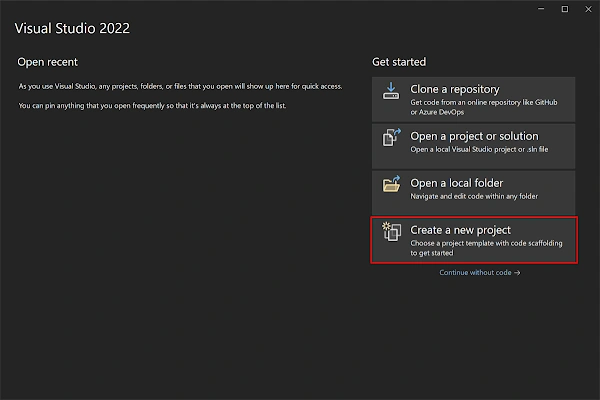
- Launch Visual Studio 2022, and in the start window, click Create a new project to create a new project.
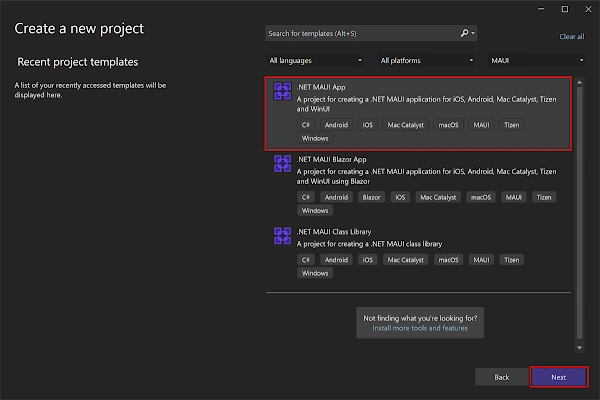
- In the Create a new project window, select MAUI in the All project types drop-down, select the .NET MAUI App template, and click the Next button:
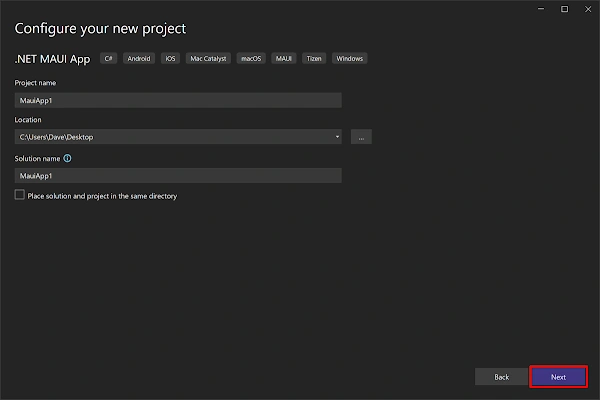
- In the configure your new project window, name your project, choose a suitable location for it, and click the Next button:
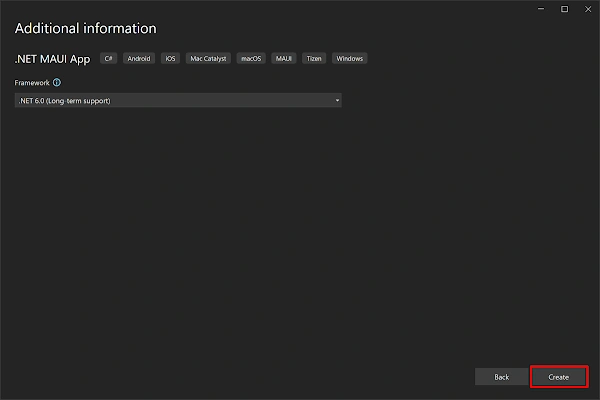
- In the Additional information window, click the Create button:
- Once the project is created, we can able to see the Android, iOS, Windows and other running options in the toolbar. Press the emulator or run button to build and run the app

Implementation of Swipe View in .NET MAUI
SwipeView defines the following attributes
- LeftItems: This property, of type SwipeItems, represents the swipe items accessible when swiping the control from the left side.
- RightItems: This property, of type SwipeItems, represents the swipe items accessible when swiping the control from the right side.
- TopItems: This property, of type SwipeItems, represents the swipe items accessible when swiping the control from top to bottom.
- BottomItems: This property, of type SwipeItems, represents the swipe items accessible when swiping the control from bottom to top.
- Threshold: This property, of type double, determines the number of device-independent units required to trigger a swipe gesture and fully reveal swipe items.
The SwipeView class additionally introduces three events
- SwipeStarted: This event is triggered when a swipe commences. It is accompanied by a SwipeStartedEventArgs object that includes a property named SwipeDirection of type SwipeDirection.
- SwipeChanging: Raised during the progression of a swipe, the SwipeChanging event provides a SwipeChangingEventArgs object. This object encompasses a SwipeDirection property of type SwipeDirection and an Offset property of type double.
- SwipeEnded: When a swipe concludes, the SwipeEnded event is raised. Its accompanying SwipeEndedEventArgs object contains a SwipeDirection property of type SwipeDirection and an IsOpen property of type bool.
Here's an example demonstrating how to create a SwipeView in XAML.
<SwipeView>
	<SwipeView.LeftItems>
		<SwipeItems>
			<SwipeItem Text="Favorite"
					   IconImageSource="heart.png"
					   BackgroundColor="LightGreen"
					   Invoked="OnFavoriteSwipeItemInvoked" />
		</SwipeItems>
	</SwipeView.LeftItems>
	<SwipeView.RightItems>
		<SwipeItems>
			<SwipeItem Text="Delete"
					   IconImageSource="delete.png"
					   BackgroundColor="LightPink"
					   Invoked="OnDeleteSwipeItemInvoked" />
		</SwipeItems>
	</SwipeView.RightItems>
	<!-- Content -->
	<Grid BackgroundColor="LightGray">
		<Label Text="Swipe Right or Left"
			   HorizontalOptions="Center"
			   VerticalOptions="Center" />
	</Grid>
</SwipeView>

In this example, we will use the listview to display the swipe view and the full example below.
<?xml version="1.0" encoding="utf-8" ?>
<ContentPage xmlns="http://schemas.microsoft.com/dotnet/2021/maui"
             xmlns:x="http://schemas.microsoft.com/winfx/2009/xaml"
             x:Class="MauiSwipeView.MainPage">

    <ListView x:Name="list">
        <ListView.ItemTemplate>
            <DataTemplate>
                <ViewCell>
                    <SwipeView>
                        <SwipeView.LeftItems>
                            <SwipeItems>
                                <SwipeItem Text="Favorite"
										   IconImageSource="heart.png"
										   BackgroundColor="LightGreen"
										   Invoked="OnFavoriteSwipeItemInvoked" />
                            </SwipeItems>
                        </SwipeView.LeftItems>
                        <SwipeView.RightItems>
                            <SwipeItems>
                                <SwipeItem Text="Delete"
										   IconImageSource="delete.png"
										   BackgroundColor="LightPink"
										   Invoked="OnDeleteSwipeItemInvoked" />
                            </SwipeItems>
                        </SwipeView.RightItems>
                        <!-- Content -->
                        <Grid BackgroundColor="LightGray">
                            <Label Text="Swipe Right or Left"
								   HorizontalOptions="Center"
								   VerticalOptions="Center" />
                        </Grid>
                    </SwipeView>
                </ViewCell>
            </DataTemplate>
        </ListView.ItemTemplate>
    </ListView>

</ContentPage>
Full Code
namespace MauiSwipeView
{
    public partial class MainPage : ContentPage
    {
        int count = 0;

        public MainPage()
        {
            InitializeComponent();
            List<int> ints = new List<int>();
            for (count = 0; count < 10; count++)
            {
                ints.Add(count);
            }
            list.ItemsSource = ints;
        }

        private void OnFavoriteSwipeItemInvoked(object sender, EventArgs e)
        {
            DisplayAlert("Swipe View", "Favourite Clicked", "OK");
        }

        private void OnDeleteSwipeItemInvoked(object sender, EventArgs e)
        {
            DisplayAlert("Swipe View", "Delete Clicked", "OK");
        }
    }

}
<?xml version="1.0" encoding="utf-8" ?>
<ContentPage xmlns="http://schemas.microsoft.com/dotnet/2021/maui"
             xmlns:x="http://schemas.microsoft.com/winfx/2009/xaml"
             x:Class="MauiSwipeView.MainPage">

    <ListView x:Name="list">
        <ListView.ItemTemplate>
            <DataTemplate>
                <ViewCell>
                    <SwipeView>
                        <SwipeView.LeftItems>
                            <SwipeItems>
                                <SwipeItem Text="Favorite"
                       IconImageSource="heart.png"
                       BackgroundColor="LightGreen"
                       Invoked="OnFavoriteSwipeItemInvoked" />
                            </SwipeItems>
                        </SwipeView.LeftItems>
                        <SwipeView.RightItems>
                            <SwipeItems>
                                <SwipeItem Text="Delete"
                       IconImageSource="delete.png"
                       BackgroundColor="LightPink"
                       Invoked="OnDeleteSwipeItemInvoked" />
                            </SwipeItems>
                        </SwipeView.RightItems>
                        <!-- Content -->
                        <Grid
          BackgroundColor="LightGray">
                            <Label Text="Swipe Right or Left"
               HorizontalOptions="Center"
               VerticalOptions="Center" />
                        </Grid>
                    </SwipeView>
                </ViewCell>
            </DataTemplate>
        </ListView.ItemTemplate>
    </ListView>

</ContentPage>
Demo
Download Code
Join the conversation! Your thoughts help the community grow.