

An idea to write an article came to me yesterday when one of my friends encountered a question in an interview. I felt that it would be a good brain teaser.
Question: Swap the value of s specific column value with another. For example, if we have a table t1 having column Gender then Male should be replaced with Female and vice versa.
Note: You should have a little knowledge of Cursors and the Switch Statement in SQL Server2005, 2008 and so on.
I have taken an idea and created a table keeping the structure as in the following:
- select * from customers
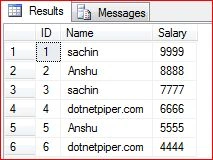
Here we will swap the values in the name column, like “Sachin” will be replaced by “dotnetpiper.com” and vice versa.
The output will be like the following:
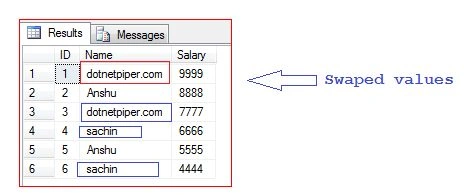
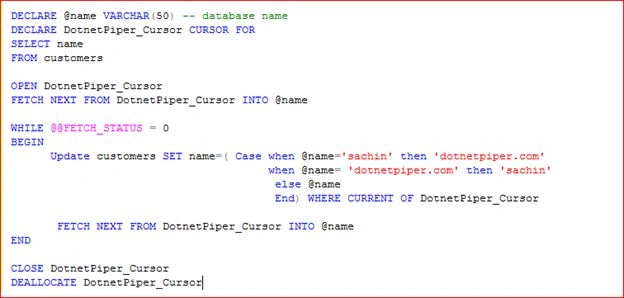
I have used a cursor to do it. The reason to choose a cursor is we will fetch each row individually and perform the desired action. Here is the actual SQL query implementation:
- DECLARE @name VARCHAR(50) -- database name
- DECLARE DotnetPiper_Cursor CURSOR FOR
- SELECT name
- FROM customers
- OPEN DotnetPiper_Cursor
- FETCH NEXT FROM DotnetPiper_Cursor INTO @name
- WHILE @@FETCH_STATUS = 0
- BEGIN
- Update customers SET name=( Case when @name='sachin' then 'dotnetpiper.com'
- when @name= 'dotnetpiper.com' then 'sachin'
- else @name
- End) WHERE CURRENT OF DotnetPiper_Cursor
- FETCH NEXT FROM DotnetPiper_Cursor INTO @name
- END
- CLOSE DotnetPiper_Cursor
- DEALLOCATE DotnetPiper_Cursor
- select * from customers
- update customers set name = (case name when 'sachin' then 'dotnetpiper'
- else 'sachin' end);
SQL Snippet to create table Customer table:
- USE [Employee]
- GO
- /****** Object: Table [dbo].[Customers] Script Date: 08/03/2015 07:18:12 ******/
- SET ANSI_NULLS ON
- GO
- SET QUOTED_IDENTIFIER ON
- GO
- SET ANSI_PADDING ON
- GO
- CREATE TABLE [dbo].[Customers](
- [ID] [int] NULL,
- [Name] [varchar](50) NULL,
- [Salary] [varchar](50) NULL
- ) ON [PRIMARY]
- GO
- SET ANSI_PADDING OFF
- GO
Santhakumar MunuswamyPosted Aug 12, 2015, 2:56 PM
Good Article. Thanks for sharing
Chervine BhiwooPosted Aug 12, 2015, 10:51 AM
Nice article
Gopi ChandPosted Aug 12, 2015, 7:25 AM
Nice article
Jose LopezPosted Aug 12, 2015, 6:47 AM
Cool, but we should review well when to use this approach instead of a simple Update query or 3 Update lines
Sibeesh VenuPosted Aug 12, 2015, 3:09 AM
Nice Share...
RakeshPosted Aug 11, 2015, 2:39 PM
Good one
sreenivasa kPosted Aug 11, 2015, 12:31 PM
excellent
Sachin KaliaPosted Aug 11, 2015, 10:05 AM
Cursor always makes query slow...becz of it reads eavh row one by one...
Sachin KaliaPosted Aug 11, 2015, 10:03 AM
Dear panklaj..yes we can achieve objective wid the saame ...this is one of the possible way...may be user like you dont know curso..so user will learn cursor implementation as well..m happy that u found the thing..which has key role to achieve this
Nilesh JadavPosted Aug 11, 2015, 9:53 AM
Good Article sir
Atul RawatPosted Aug 11, 2015, 9:34 AM
nice article bhaiya
Mohammed IbrahimPosted Aug 11, 2015, 9:18 AM
nice
Pankaj Kumar ChoudharyPosted Aug 11, 2015, 8:38 AM
Hello Sir! I have doubt that why you used cursor for this query. we can perform same task without cursor........ query is "UPDATE CUSTOMERS SET NAME=(CASE NAMEWHEN 'sachin' THEN 'dotnetpiper.com' WHEN 'dotnetpiper.com' THEN 'sachin' ELSE NULL END) WHERE NAME IN ('dotnetpiper.com' ,'sachin')" this query generate same result and it also very fast compare to cursor approach "what interviewer asked to use the cursor to solve this query or not ? "..................
Pankaj Kumar ChoudharyPosted Aug 11, 2015, 8:30 AM
Nice Article Sir...........
Karthikeyan KPosted Aug 11, 2015, 8:09 AM
Thanks for share...
Rajeesh MenothPosted Aug 11, 2015, 8:05 AM
Good One