

When we make an application like programming editor for language it provides syntax highlighting that makes the user comfortable to work with it as everybody likes colored text that can be easy to read and distinguish between normal variable names and language keywords.
In this I will show you how provide such syntax highlighting feature in RichTextBox control.
It's simple to make it.
Drag a RichTextBox control on the form.. Now we need when user types text it should be highlighted if its keyword of language. I will use Blue color here to highlight the keyword of language.
Now to make this feature available to user we need a collection of all keywords of language. So here in demonstration, I'm making syntax highlighting for C language so I need C language Keyword list...
I acquired all from here
Now think about how we should update the color of text obviously it would be nice if we update color of text to blue as we type in RichTextBox. So we will write code in RichTextBox's text changed event.
- private void richTextBox1_TextChanged(object sender, EventArgs e)
- {
- string tokens = "(auto|double|int|struct|break|else|long|switch|case|
- enum|register|typedef|char|extern|return|union|const|
- float|short|unsigned|continue|for|signed|void|default|
- goto|sizeof|volatile|do|if|static|while)";
- Regex rex = new Regex(tokens);
- MatchCollection mc = rex.Matches(richTextBox1.Text);
- int StartCursorPosition = richTextBox1.SelectionStart;
- foreach (Match m in mc)
- {
- int startIndex = m.Index;
- int StopIndex = m.Length;
- richTextBox1.Select(startIndex, StopIndex);
- richTextBox1.SelectionColor = Color.Blue;
- richTextBox1.SelectionStart = StartCursorPosition;
- richTextBox1.SelectionColor = Color.Black;
- }
- }
You can see here in first line I have written all the keywords of C language that we want to highlight. Then I match collection and color them one by one by selecting it and change its font color.
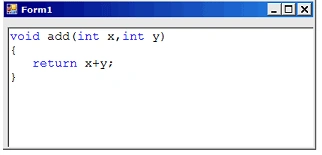
And here is my result
Bibhuti pdPosted Jun 25, 2015, 5:36 AM
Just needs some improvement . You don't need to check for whole text in Richtextbox on textChanged event. Just check in the area where Caret is.
Yadhavakrishnan dPosted Dec 10, 2014, 12:35 AM
When typing any code in the editor it's not highlighting, only we can paste an existing code, once you start typing the existing text were deleted.
sanabil ramzanPosted Mar 24, 2012, 7:30 AM
nice post
Larry RockPosted Aug 25, 2010, 11:54 PM
What if you have a public void called public then it highlights the public.
Imad MansourPosted Aug 18, 2010, 1:02 PM
This code works well with small files. But beyond a certain size, it becomes unusable. The entire RTB gets updated with every keypress - creating significant visual artifacts and delays. Do you have any suggestions for improving this? Thanks.
Ihor BatsPosted Aug 18, 2010, 3:54 AM
nice post, it's very ease, but what if the text will have 1000 words or more? Sorry for ma bad English.