

Every once in a while, I like to take a moment and learn something new about the latest SQL Server gizmos and gadgets. Today I came across system-versioned temporal tables and it piqued my interest, so I figured I’d investigate and share my findings with you.
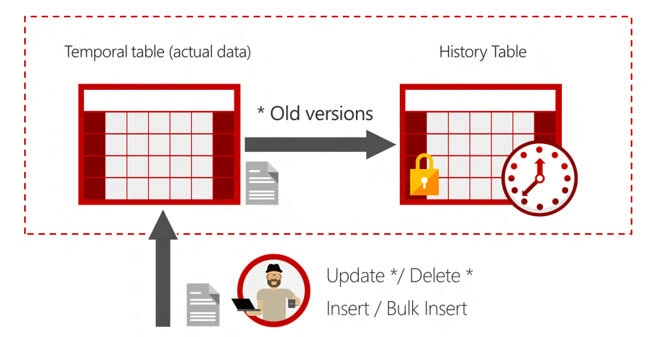
How many of you need to track data changes over time? I’ve needed this many times for things like auditing, investigating data changes, data fixes, and trend analysis of values over time. Having to do this in the past has been a very daunting task at times and sometimes nearly impossible. This is where system-versioned temporal tables will really help out. They have given us a new way to do just that with a new user table type. It keeps a full history of those data changes and gives us a way to query in order to do point in time analysis. What I really like about this is that you can’t INSERT or UPDATE data into the date time columns as they are automatically generated with the insert, which is great for auditing.
The syntax for Temporal Table Creation
Note we now have 2 required datetime2 fields that will be populated with our temporal history data for each row.
- CREATE TABLE dbo.[Department](
- [DepartmentID][smallint] NOT NULL PRIMARY KEY CLUSTERED, [Name] varchar(50) NOT NULL, [GroupName] varchar(50) NOT NULL, [BeginDate] datetime2(2) GENERATED ALWAYS AS ROW START, [EndDate] datetime2(2) GENERATED ALWAYS AS ROW END, PERIOD FOR SYSTEM_TIME([BeginDate], [EndDate])) WITH(SYSTEM_VERSIONING = ON(HISTORY_TABLE = dbo.DepartmentHistory)
- );
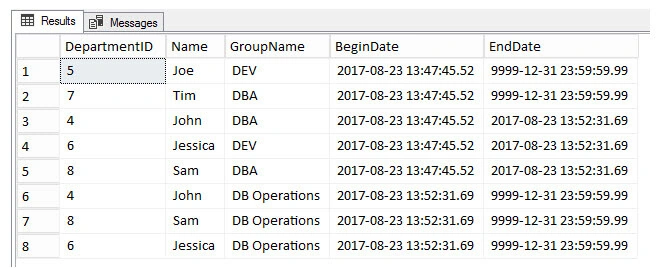
Let's insert some records using INSERTS and see how the data looks.
Hadshana KamalanathanPosted Jul 15, 2018, 8:46 PM
Thank you for sharing
Admirador damasPosted Mar 31, 2018, 3:09 AM
How about performance and space per table ?
Ramesh SinghPosted Mar 30, 2018, 8:56 AM
Really great gadget has been added in SQL 2017. Thank You
Satyaprakash SamantarayPosted Mar 29, 2018, 2:22 PM
That's really a nice article . Thanks for sharing