

This article has been excerpted from book "Graphics Programming with GDI+".
Along with the properties discussed in the preceding section, the StringFormat class provides some methods. The GetTabStops and SetTabStops methods can be used to get and set tab stops, respectively. Each of these methods takes two arguments: firstTabOffset and tabStops. The first parameter, firstTabOffset, is a float value that represents the number of spaces between the beginning of a line of text and the first tab stop. The second parameter, tabstops, is an array of float values that represents the number of spaces between tabs.
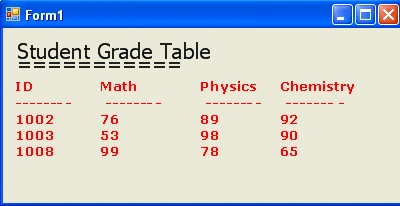
An application can use the SetTabStops method to generate tabular output on a graphics surface. For example, Listing 5.10 uses SetTabStops to generate a tabular data report. In this example we create a StringFormat object and set its tab stops using the SetTabStops method, and then we call the DrawString method.
In Listing 5.10 we create a table that lists the grades of a student in tabular format. The table has four columns: ID, Math, Physics, and Chemistry. These columns list the grades obtained by a student. As the listing shows we create a StringFormat object and set the tab stops using the SetTabStops method.
LISTING 5:10: Using tab stops to draw tabular data on a graphics surface
using System;
using System.Collections.Generic;
using System.ComponentModel;
using System.Data;
using System.Drawing;
using System.Linq;
using System.IO;
using System.Text;
using System.Windows.Forms;
namespace WindowsFormsApplication1
{
public partial class Form1 : Form
{
public Form1()
{
InitializeComponent();
}
private void Form1_Paint(object sender, PaintEventArgs e)
{
//Create a Graphics object
Graphics g = this.CreateGraphics();
g.Clear(this.BackColor);

John NelsonPosted Oct 2, 2012, 2:08 PM
Cool - great for GUI issues. My question is - How do you do the same thing for a "printed" report? I have tried everything I can code up to use tabstops in a printed, formatted string with 4 data columns and everything I have tried "squiggles" all four columns down the printed page. Using the "{0:10}" or "{0:-10}" format does nothing, as my columns are mixed numerical and alphabetical elements in the columns, so it just will not line up. Any solutions you can think of? JTN