

Introduction
Today, in this article let's play around with an interesting and very useful concept in Entity Framework.
Question: What is Table per Type Inheritance?
In simple terms "The parent entity is associated with many child entities where the child entities can inherit the data from the parent. Here the primary key of the parent entity is shared with the child entity that maintains 1-1 relationship".
Step 1: Create a new web application

Step 2: Entities in DB looks like this:

Step 3: Adding New Entity Data Model Framework

Step 4: Select the tables from DB

Step 5: Entity in Model Browser

Step 6: Delete association links between entities

Step 7: Select the base types


Step 8: New inheritance associations established

Step 9: Delete the child table or entities Id's that will inherit from the parent entity

Step 10: The complete code of WebForm1.aspx looks like this:
<%@ Page Language="C#" AutoEventWireup="true" CodeBehind="WebForm1.aspx.cs" Inherits="TPTInheritanceDeleteDataApp.WebForm1" %>
<!DOCTYPE html PUBLIC "-//W3C//DTD XHTML 1.0 Transitional//EN" "http://www.w3.org/TR/xhtml1/DTD/xhtml1-transitional.dtd">
<html xmlns="http://www.w3.org/1999/xhtml">
<head id="Head1" runat="server">
<title></title>
</head>
<body>
<form id="form1" runat="server">
<div>
<center>
<table>
<tr>
<td>
<asp:Label ID="Label1" runat="server" Text="Delete Data with TPT Inheritance via EDM Framework"
Font-Bold="true"></asp:Label>
</td>
</tr>
</table>
<br />
<br />
<table>
<tr>
<td>
<asp:Label ID="Label4" runat="server" Text="Please Enter Transport Code: " ForeColor="Brown"
Font-Bold="true" Font-Italic="true"></asp:Label>
</td>
<td>
<asp:TextBox ID="TextBox2" runat="server" Width="117px"></asp:TextBox>
</td>
</tr>
<tr>
<td colspan="2" align="center">
<asp:Button ID="Button1" runat="server" Text="Delete Data" OnClick="Button1_Click"
BackColor="Orange" Font-Bold="true" /><br />
<br />
</td>
</tr>
</table>
<br />
<br />
<table>
<tr>
<td colspan="3">
<asp:Label ID="Label5" runat="server" Font-Bold="true"></asp:Label>
</td>
</tr>
</table>
</center>
</div>
</form>
</body>
</html>
Step 11: The complete code of WebForm1.aspx.cs looks like this:
using System;
using System.Collections.Generic;
using System.Linq;
using System.Web;
using System.Web.UI;
using System.Web.UI.WebControls;namespace TPTInheritanceDeleteDataApp
{
public partial class WebForm1 : System.Web.UI.Page
{
protected void Page_Load(object sender, EventArgs e)
{
}
protected void Button1_Click(object sender, EventArgs e)
{
if (string.IsNullOrEmpty(TextBox2.Text))
{
Label5.Text = "Please Enter Some Values";
Label5.ForeColor = System.Drawing.Color.Red;
}
else
{
Train objTrain = objEntities.Transport.OfType<Train>().SingleOrDefault(r => r.TransportCode.Equals(TextBox2.Text));
objEntities.Transport.DeleteObject(objTrain);
objEntities.SaveChanges();
Label5.Text = "Data Deleted Successfully";
Label5.ForeColor = System.Drawing.Color.Green;
TextBox2.Text = string.Empty;
}
}
#region Instance Members CompanyEntities objEntities = new CompanyEntities();
#endregion
}
}
Step 12: The output of the application looks like this:
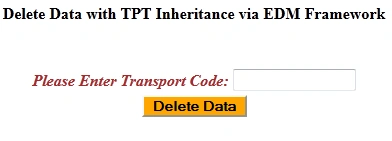
Step 13: The deleted data output of the application looks like this:

Step 14: The data deleted in the child entity output of the application looks like this:
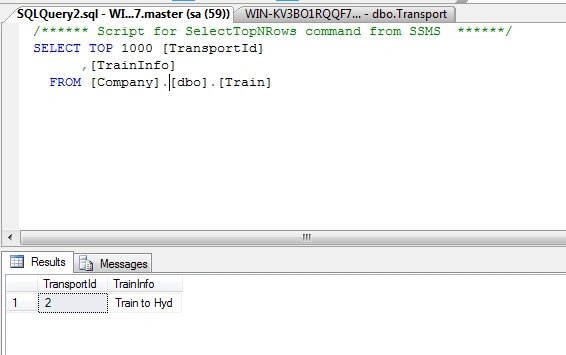
I hope this article was useful for you.
Join the conversation! Your thoughts help the community grow.