Introduction
This article shows how to do table splitting and select data operation using Code First Approach.
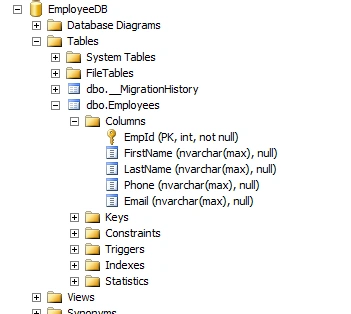
SQL Server table structure
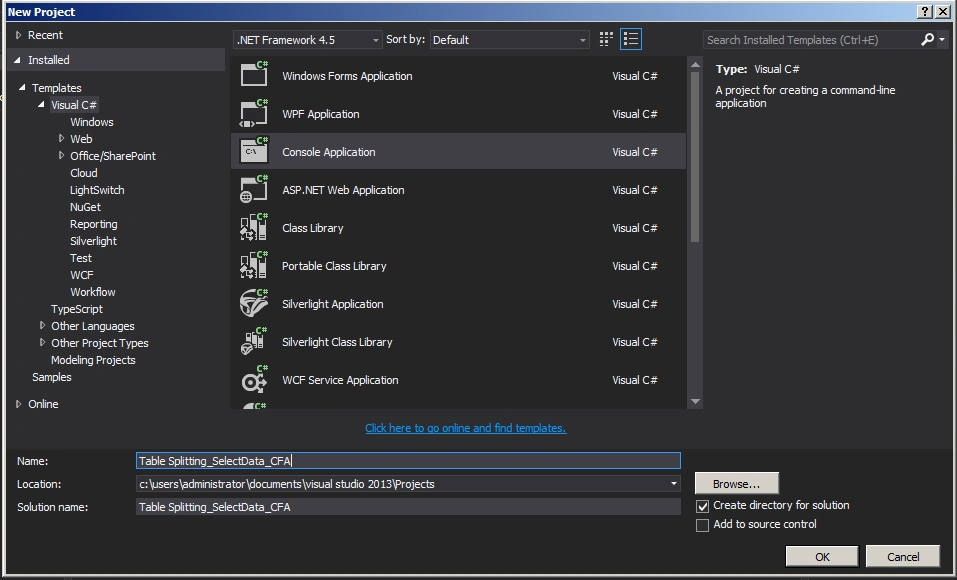
Create a console application as in the following:
Employee.cs
- using System;
- using System.Collections.Generic;
- using System.ComponentModel.DataAnnotations;
- using System.ComponentModel.DataAnnotations.Schema;
- using System.Linq;
- using System.Text;
- using System.Threading.Tasks;
-
- namespace Table_Splitting_SelectData_CFA
- {
- public class Employee
- {
- public Employee()
- {
- }
-
- [Key]
- [DatabaseGenerated(DatabaseGeneratedOption.Identity)]
- public int EmpId { get; set; }
- public string FirstName { get; set; }
- public string LastName { get; set; }
-
-
- public EmployeeDetails EmployeeDetails { get; set; }
- }
- }
Employeedetails.cs
- using System;
- using System.Collections.Generic;
- using System.Linq;
- using System.Text;
- using System.Threading.Tasks;
-
- namespace Table_Splitting_SelectData_CFA
- {
- public class EmployeeDetails
- {
- public EmployeeDetails()
- {
- }
-
- public int EmpId { get; set; }
- public string Phone { get; set; }
- public string Email { get; set; }
-
-
- public Employee Employee { get; set; }
- }
- }
Employeecontext.cs
- using System;
- using System.Collections.Generic;
- using System.Data.Entity;
- using System.Linq;
- using System.Text;
- using System.Threading.Tasks;
-
- namespace Table_Splitting_SelectData_CFA
- {
- public class EmployeeContext : DbContext
- {
- public EmployeeContext()
- : base("EmployeeConn")
- {
- Database.SetInitializer<EmployeeContext>(new CreateDatabaseIfNotExists<EmployeeContext>());
- }
-
- public DbSet<Employee> Employees { get; set; }
-
- protected override void OnModelCreating(DbModelBuilder modelBuilder)
- {
- modelBuilder.Entity<Employee>()
- .HasKey(pk => pk.EmpId)
- .ToTable("Employees");
-
- modelBuilder.Entity<EmployeeDetails>()
- .HasKey(pk => pk.EmpId)
- .ToTable("Employees");
-
- modelBuilder.Entity<Employee>()
- .HasRequired(p => p.EmployeeDetails)
- .WithRequiredPrincipal(c => c.Employee);
-
- base.OnModelCreating(modelBuilder);
- }
- }
- }
Web.config
- <connectionStrings>
- <add name="EmployeeConn"
- connectionString="Data Source=WIN-B4KJ8JI75VF;Initial Catalog=EmployeeDB;Integrated Security=true"
- providerName="System.Data.SqlClient"/>
- </connectionStrings>
Program.cs
- using System;
- using System.Collections.Generic;
- using System.Linq;
- using System.Text;
- using System.Threading.Tasks;
-
- namespace Table_Splitting_SelectData_CFA
- {
- class Program
- {
- static void Main(string[] args)
- {
- EmployeeContext empContext = new EmployeeContext();
- var query = from r in empContext.Employees select r;
-
- foreach (var r in query)
- {
- Console.WriteLine("FirstName: " + r.FirstName + " LastName: " + r.LastName + " Phone: " + r.EmployeeDetails.Phone + " Email: " + r.EmployeeDetails.Email);
- }
- Console.ReadKey();
- }
- }
- }
Summary
In this article we saw how to do table splitting and select data operations using Code First Approach. Happy coding!


Sonu ChaudharyPosted May 26, 2016, 10:44 AM
Good one...
Santhakumar MunuswamyPosted May 24, 2015, 12:47 PM
Thanks for nice one