

Introduction
This article shows how to do table splitting and update data operations using Code First Approach.
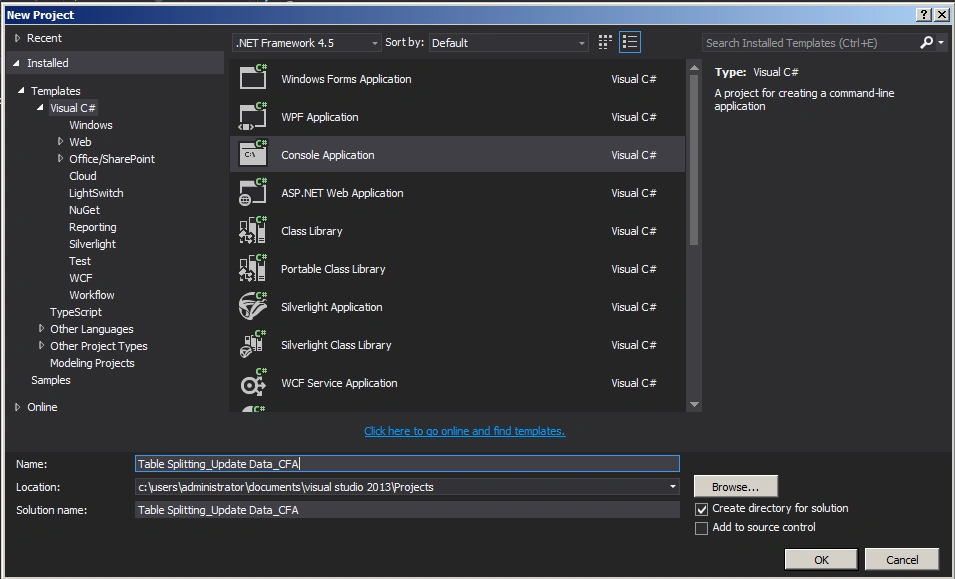
Create a Console application as in the following:
Employee.cs
- using System;
- using System.Collections.Generic;
- using System.ComponentModel.DataAnnotations;
- using System.ComponentModel.DataAnnotations.Schema;
- using System.Linq;
- using System.Text;
- using System.Threading.Tasks;
- namespace Table_Splitting_Update_Data_CFA
- {
- public class Employee
- {
- public Employee()
- {
- }
- [Key]
- [DatabaseGenerated(DatabaseGeneratedOption.Identity)]
- public int EmpId { get; set; }
- public string FirstName { get; set; }
- public string LastName { get; set; }
- //Navigation Properties
- public EmployeeDetails EmployeeDetails { get; set; }
- }
- }
Employeedetails.cs
- using System;
- using System.Collections.Generic;
- using System.Linq;
- using System.Text;
- using System.Threading.Tasks;
- namespace Table_Splitting_Update_Data_CFA
- {
- public class EmployeeDetails
- {
- public EmployeeDetails()
- {
- }
- public int EmpId { get; set; }
- public string Phone { get; set; }
- public string Email { get; set; }
- //Navigation Properties
- public Employee Employee { get; set; }
- }
- }
Employeecontext.cs
- using System;
- using System.Collections.Generic;
- using System.Data.Entity;
- using System.Linq;
- using System.Text;
- using System.Threading.Tasks;
- namespace Table_Splitting_Update_Data_CFA
- {
- public class EmployeeContext : DbContext
- {
- public EmployeeContext()
- : base("EmployeeConn")
- {
- Database.SetInitializer<EmployeeContext>(new CreateDatabaseIfNotExists<EmployeeContext>());
- }
- public DbSet<Employee> Employees { get; set; }
- protected override void OnModelCreating(DbModelBuilder modelBuilder)
- {
- modelBuilder.Entity<Employee>()
- .HasKey(pk => pk.EmpId)
- .ToTable("Employees");
- modelBuilder.Entity<EmployeeDetails>()
- .HasKey(pk => pk.EmpId)
- .ToTable("Employees");
- modelBuilder.Entity<Employee>()
- .HasRequired(p => p.EmployeeDetails)
- .WithRequiredPrincipal(c => c.Employee);
- base.OnModelCreating(modelBuilder);
- }
- }
- }
Web.config
- <connectionStrings>
- <add name="EmployeeConn"
- connectionString="Data Source=WIN-B4KJ8JI75VF;Initial Catalog=EmployeeDB;Integrated Security=true"
- providerName="System.Data.SqlClient"/>
- </connectionStrings>
Program.cs
- using System;
- using System.Collections.Generic;
- using System.Linq;
- using System.Text;
- using System.Threading.Tasks;
- namespace Table_Splitting_Update_Data_CFA
- {
- class Program
- {
- static void Main(string[] args)
- {
- EmployeeContext empContext = new EmployeeContext();
- int empId = 1;
- var emp = empContext.Employees.Include("EmployeeDetails").Where(a => a.EmpId.Equals(empId)).SingleOrDefault();
- emp.FirstName = "Jonny";
- emp.EmployeeDetails.Email = "[email protected]";
- empContext.SaveChanges();
- }
- }
- }
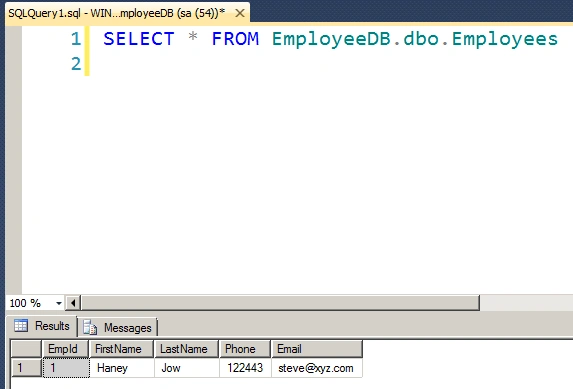
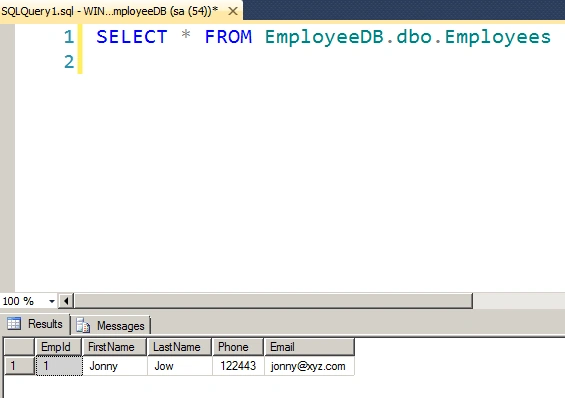
The output of this application is as in the following.
Before SQL update
After SQL update
Summary
In this article we saw how to do table splitting and update data operations using Code First Approach. Happy coding!
Sonu ChaudharyPosted May 26, 2016, 10:44 AM
Good one...
Bhuvanesh MohankumarPosted May 6, 2016, 3:59 PM
Good one...
Santhakumar MunuswamyPosted May 24, 2015, 12:53 PM
Thanks for nice one