
Introduction
A simple HTML table consists of the table element. A table is divided into rows and each row is divided into data cells.
The tr element defines a table row, the th element defines a table header, and the td element defines a table cell. A <td> tag can contain text, links, images,
lists, forms, other tables, etc.
For Example
- <table border="1">
- <tr>
- <td>row 1, cell 1</td>
- <td>row 1, cell 2</td>
- </tr>
- <tr>
- <td>row 2, cell 1</td>
- <td>row 2, cell 2</td>
- </tr>
- <tr>
- <td>row 3, cell 1</td>
- <td>row 3, cell 2</td>
- </tr>
- </table>
Attributes
Element-Specific Attributes
Attributes Introduced by
HTML5
| Attributes | Description |
| none |
Global Attributes
The following attributes are standard across all
HTML 5 tags.
|
HTML5
Global Attributes
|
||
| accesskey | draggable | style |
| class | hidden | tabindex |
| dir | spellcheck | |
| contenteditable | id | title |
| contextmenu | lang | |
Event Handler Content Attributes
Here are
the standard HTML 5 event handler content attributes.
| onabort | onerror* | onmousewheel |
| onblur* | onfocus* | onpause |
| oncanplay | onformchange | onplay |
| oncanplaythrough | onforminput | onplaying |
| onchange | oninput | onprogress |
| onclick | oninvalid | onratechange |
| oncontextmenu | onkeydown | onreadystatechange |
| ondblclick | onkeypress | onscroll |
| ondrag | onkeyup | onseeked |
| ondragend | onload* | onseeking |
| ondragenter | onloadeddata | onselect |
| ondragleave | onloadedmetadata | onshow |
| ondragover | onloadstart | onstalled |
| ondragstart | onmousedown | onsubmit |
| ondrop | onmousemove | onsuspend |
| ondurationchange | onmouseout | ontimeupdate |
| onemptied | onmouseover | onvolumechange |
| onended | onmouseup | onwaiting |
An HTML table may also include the below tag.
- HTML <caption> Tag
- HTML <thead> Tag
- HTML <tfoot> Tag
- HTML<tbody> Tag
- HTML <colgroup> Tag
- HTML <tr> Tag
- HTML <td> Tag
- HTML <th> Tag
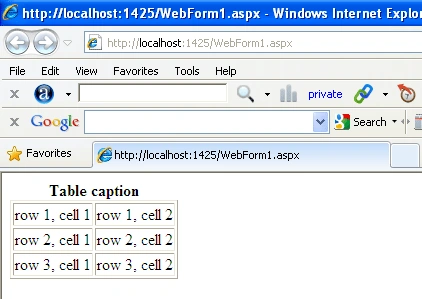
1. <caption> Tag
- The HTML <caption> tag is used for creating table captions.
- It is used in conjunction with the <table> tag and represents the title of the table.
- The <caption> tag must be inserted immediately after the <table> tag.
- A table should have no more than one caption.
- <table border="1">
- <caption>
- <strong>Table caption</strong>
- </caption>
- <tr>
- <td>row 1, cell 1</td>
- <td>row 1, cell 2</td>
- </tr>
- <tr>
- <td>row 2, cell 1</td>
- <td>row 2, cell 2</td>
- </tr>
- <tr>
- <td>row 3, cell 1</td>
- <td>row 3, cell 2</td>
- </tr>
- </table>
Internet Explorer
HTML <thead> Tag, HTML <tfoot> Tag and HTML<tbody> Tag
HTML <thead> Tag
The HTML
<tfoot> tag is used for
adding a header to a table. The
<thead> tag is used in conjunction with the <tbody> tag and the <tfoot> tag in
determining each part of the table (header, footer, body).HTML <tfoot> Tag
The HTML
<tfoot> tag is used for
adding a footer to a table. The
<tfoot> tag is used in conjunction with the <thead> tag and the <tbody> tag in
determining each part of the table (header, footer, body). HTML<tbody> Tag
The HTML <tbody> tag is used for grouping table
rows. The <tbody> tag is used in conjunction with the <thead> tag and the
<tfoot> tag in determining each part of the table (header, footer, body).
For Example
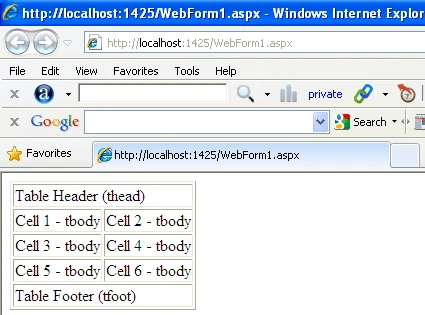
The below example defines the <thead>, <tfoot>
and <tbody> tag.
- <table border = "1">
- <thead>
- <TR>
- <td >Table Header (thead)</td>
- </tr>
- </thead>
- <tfoot>
- <TR>
- <td>Table Footer (tfoot)</td>
- </tr>
- </tfoot>
- <tbody>
- <tr>
- <td>Cell 1 - tbody</td>
- <td>Cell 2 - tbody</td>
- </tr>
- <tr>
- <td>Cell 3 - tbody</td>
- <td>Cell 4 - tbody</td>
- </tr>
- <tr>
- <td>Cell 5 - tbody</td>
- <td>Cell 6 - tbody</td>
- </tr>
- </tbody>
- </table>
Internet Explorer
HTML <colgroup> Tag
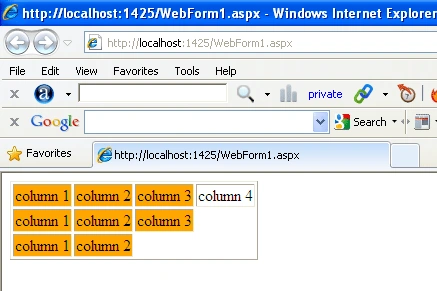
The HTML <colgroup> tag is used for specifying properties for a
group of columns within a table.
- <table border="1">
- <colgroup span="3" style="background-color:orange"></colgroup>
- <tr>
- <td>column 1</td>
- <td>column 2</td>
- <td>column 3</td>
- <td>column 4</td>
- </tr>
- <tr>
- <td>column 1</td>
- <td>column 2</td>
- <td>column 3</td>
- </tr>
- <tr>
- <td>column 1</td>
- <td>column 2</td>
- </tr>
- </table>
Internet Explorer
Join the conversation! Your thoughts help the community grow.